
Apple TV vs NVIDIA Shield Streaming Device for Seniors: Which?


Large Print Keyboard

Spill-Proof Travel Mug

Compression Socks
Apple TV vs NVIDIA Shield streaming device for seniors is a close comparison, but the two devices have different goals. Apple TV 4K focuses on a simple TV experience and strong accessibility tools. NVIDIA SHIELD TV Pro adds more advanced media, gaming, and home theater features.
For a senior who mainly wants easy streaming, the simpler interface and Siri Remote may matter most. For someone who wants more control, local media support, gaming, or advanced audio and video features, SHIELD TV Pro offers more flexibility.

Quick Comparison
Apple TV 4K is the simpler choice for many seniors. Its Siri Remote has dedicated buttons for common actions, and Apple includes accessibility features for vision, hearing, mobility, and learning.
SHIELD TV Pro is better suited to users who want more advanced features. It supports AI-enhanced upscaling, Dolby Vision, Dolby Atmos, USB storage, Plex Media Server, and GeForce NOW cloud gaming.
Simple streaming favors Apple TV 4K. Advanced home entertainment favors SHIELD TV Pro.
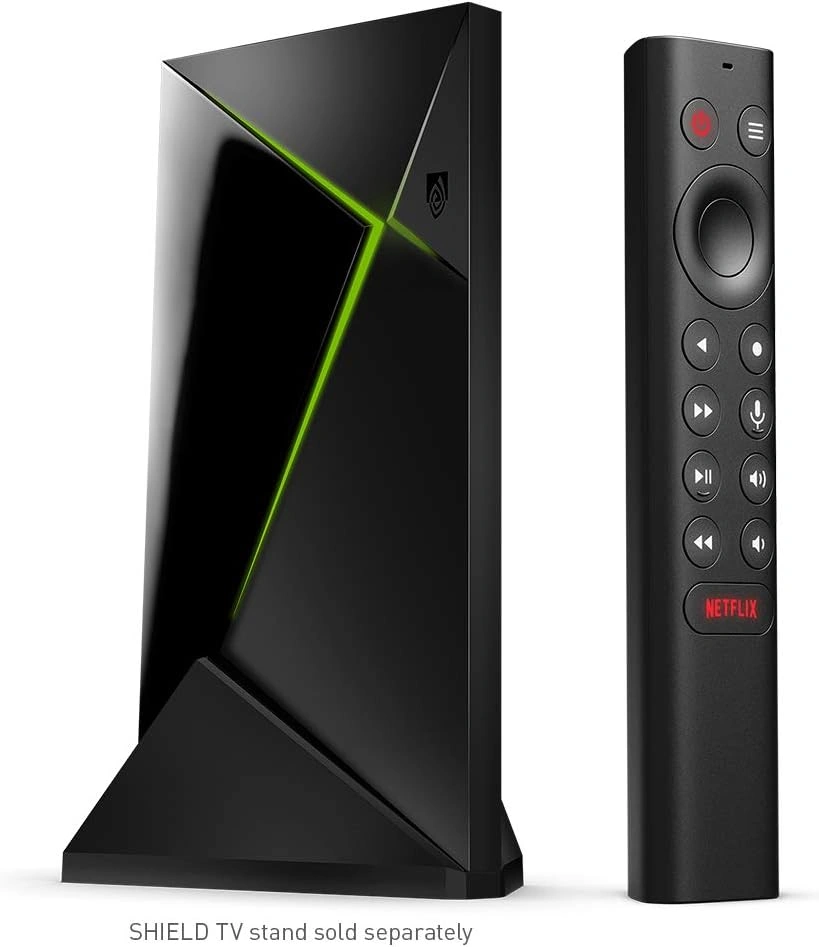
Apple TV vs NVIDIA Shield At a Glance
The table below focuses on features that can affect everyday use.
| Feature | Apple TV 4K | NVIDIA SHIELD TV Pro |
|---|---|---|
| Main system | tvOS | Android TV |
| Processor | A15 Bionic | Tegra X1+ |
| Storage | 64GB or 128GB | 16GB |
| 4K HDR | Yes | Yes |
| Dolby Vision | Yes | Yes |
| Dolby Atmos | Yes | Yes |
| Voice control | Siri | Google Assistant |
| Ethernet | 128GB model | Gigabit Ethernet |
| USB ports | No user USB port | 2 USB 3.0 |
| Gaming | Apple Arcade and apps | GeForce NOW and Android games |
| Remote | Siri Remote | SHIELD Remote |
| Current US price | $199–$249 | $199 |
Apple confirms the current Apple TV 4K uses the A15 Bionic chip and includes a Siri Remote. NVIDIA lists 3GB RAM, 16GB storage, two USB 3.0 ports, Gigabit Ethernet, and a Tegra X1+ processor for SHIELD TV Pro.
Apple TV 4K Review for Senior-Friendly Streaming
Apple TV 4K is designed around a straightforward TV experience. It can be a good fit for seniors who want to open streaming apps without dealing with many advanced settings.
Ease of Use
The Siri Remote has a touch-enabled clickpad, power, mute, volume, back, and play/pause controls. It also has a Siri button and a rechargeable battery.
Apple also provides accessibility features such as VoiceOver, Zoom, Hover Text, increased contrast, reduced motion, closed captions, audio descriptions, and Switch Control.
These options can be useful for users who need larger visual elements, spoken information, or other accessibility support.
Key Strengths
- Simple TV-focused experience
- Siri voice control
- Strong accessibility options
- A15 Bionic processor
- Dolby Vision and Dolby Atmos support
- Rechargeable remote
- Good fit for Apple device users
Potential Drawbacks
- The remote can take some practice because of its touch-enabled clickpad.
- HDMI and USB-C charging cables are sold separately.
- The higher-storage model costs more.
- It offers less physical connectivity than SHIELD TV Pro.
NVIDIA SHIELD TV Pro Review for Seniors
SHIELD TV Pro is a more advanced streaming box. It is especially interesting for users who want more than standard streaming apps.
Ease of Use
The SHIELD Remote has motion-activated backlit buttons. It also has voice control, an IR blaster, and a remote locator.
Backlit buttons can help when watching TV in a darker room. The remote locator can also be useful if the remote is often misplaced.
However, SHIELD TV Pro offers more settings and features than Apple TV 4K. That extra flexibility may mean a slightly steeper learning curve for someone who only wants basic streaming.
Key Strengths
- AI-enhanced 4K upscaling
- Dolby Vision and HDR10
- Dolby Atmos and DTS-X support
- Gigabit Ethernet
- Two USB 3.0 ports
- Expandable storage
- Google Assistant
- GeForce NOW cloud gaming
- Plex Media Server support on the Pro model
Potential Drawbacks
- More advanced settings can make setup less simple.
- The included storage is only 16GB, although USB storage can expand it.
- Some advanced features may be unnecessary for basic streaming.
- The device is more focused on power users than simple TV use.
Which Is Easier for Seniors to Use?
For simple everyday streaming, Apple TV 4K has a clear advantage in simplicity. Its accessibility tools are also more extensive and directly documented by Apple.
SHIELD TV Pro has a useful remote. Its backlit buttons and remote finder are practical touches.
The choice depends on the user’s needs.
| Senior Need | Apple TV 4K | SHIELD TV Pro |
|---|---|---|
| Simple streaming | Strong fit | Good fit |
| Voice control | Siri | Google Assistant |
| Large accessibility support | Extensive built-in options | More limited comparison |
| Backlit remote buttons | No | Yes |
| Lost remote support | Not a highlighted feature | Yes |
| Advanced settings | Fewer | More |
A senior who wants fewer settings may prefer Apple TV 4K. A more experienced user may appreciate SHIELD’s extra controls.
Performance Comparison
Both devices support 4K HDR and premium home theater formats. The bigger difference is how they handle advanced media features.
Apple TV 4K uses Apple’s A15 Bionic chip.
SHIELD TV Pro uses the Tegra X1+ with a 256-core GPU and 3GB of RAM. NVIDIA also supports AI-enhanced upscaling up to 4K at 60 frames per second.
| Performance Area | Apple TV 4K | SHIELD TV Pro |
|---|---|---|
| 4K HDR | Yes | Yes |
| Dolby Vision | Yes | Yes |
| Dolby Atmos | Yes | Yes |
| AI upscaling | Not the main feature | Yes |
| Local media flexibility | Good | Strong |
| Gaming features | Apple gaming ecosystem | GeForce NOW and Android gaming |
SHIELD TV Pro has the stronger feature set for users who care about local media and advanced home theater functions.
Comfort, Accessibility, and Senior-Friendly Design
A streaming box does not require much physical effort. The remote is therefore the main part of the experience.
Apple’s accessibility features cover vision, hearing, mobility, and learning needs.
SHIELD’s remote has backlit buttons and a built-in remote locator.
For a senior with vision-related needs, Apple TV’s built-in accessibility settings deserve particular attention. For someone who frequently loses the remote, SHIELD’s locator can be useful.
Features Comparison
The two devices take different approaches to advanced features.
| Feature | Apple TV 4K | SHIELD TV Pro |
|---|---|---|
| Voice assistant | Siri | Google Assistant |
| Accessibility | Extensive | Available, but different |
| USB expansion | No | Two USB 3.0 ports |
| Ethernet | Available on 128GB model | Gigabit Ethernet |
| AI upscaling | — | Yes |
| Cloud gaming | Apple gaming apps | GeForce NOW |
| Plex Media Server | — | Yes |
NVIDIA specifically lists USB expansion, Plex Media Server, and GeForce NOW among SHIELD TV Pro’s capabilities.
Price, Maintenance, and Long-Term Value
Apple currently lists the 64GB Wi-Fi Apple TV 4K at $199 and the 128GB Wi-Fi + Ethernet version at $249 in the US.
NVIDIA currently lists SHIELD TV Pro at $199.
| Cost Factor | Apple TV 4K | SHIELD TV Pro |
|---|---|---|
| Current listed price | $199–$249 | $199 |
| Storage | 64GB or 128GB | 16GB |
| Storage expansion | Not via USB | USB storage |
| Ethernet | 128GB model | Built in |
| Remote battery | Rechargeable | 2 AAA batteries |
| Subscription needs | Depends on services used | Depends on services used |
Price alone does not tell the full story. SHIELD gives you more physical expansion. Apple TV offers more internal storage in its current configurations.
Who Should Choose Apple TV 4K?
- Choose Apple TV 4K if simple streaming matters most.
- Choose it if accessibility features are important.
- Choose it if the user already uses Apple devices.
- Choose it if a clean, TV-focused interface is preferred.
- Choose it if Siri voice control is useful.
- Choose it if gaming and advanced local-media features are not priorities.
Who Should Choose NVIDIA SHIELD TV Pro?
- Choose SHIELD TV Pro if advanced media features matter.
- Choose it if AI upscaling is useful.
- Choose it for USB storage expansion.
- Choose it if Ethernet is important.
- Choose it if GeForce NOW gaming is wanted.
- Choose it if Plex Media Server is part of the home setup.
- Choose it if the backlit remote and remote finder are useful.
Apple TV vs NVIDIA Shield — Final Verdict
Best for simple senior-friendly streaming: Apple TV 4K
Best for advanced media features: NVIDIA SHIELD TV Pro
Best for built-in accessibility tools: Apple TV 4K
Best for expandable storage: NVIDIA SHIELD TV Pro
Best for a more advanced home theater setup: NVIDIA SHIELD TV Pro
Best for Apple users: Apple TV 4K
There is no need to choose the more powerful device if those extra features will not be used. For a senior who mainly wants Netflix, YouTube, Apple TV, and other streaming apps, Apple TV 4K keeps the experience focused.
SHIELD TV Pro makes more sense when the household wants extra storage, advanced media playback, AI upscaling, gaming, or Plex features.
Scoring Summary
The scores below are editorial comparisons based on the features discussed above, not laboratory test results.
| Category | Apple TV 4K | SHIELD TV Pro |
|---|---|---|
| Ease of Use | 9/10 | 8/10 |
| Senior-Friendly Design | 9/10 | 8/10 |
| Performance | 9/10 | 9/10 |
| Advanced Features | 8/10 | 10/10 |
| Maintenance | 9/10 | 8/10 |
| Value | 8/10 | 9/10 |
How We Evaluate These Streaming Devices
We focus on practical factors that matter during daily TV use.
That includes ease of setup, remote controls, accessibility, streaming performance, picture and sound support, maintenance, connectivity, and long-term value.
We do not treat manufacturer marketing claims as personal testing. Product features are based on current manufacturer information.
Senior-Specific Buying Considerations
Controls
Look at the remote before buying. A remote that feels confusing can make an otherwise good streaming device frustrating.
Accessibility
Apple TV 4K includes tools such as VoiceOver, Zoom, Hover Text, increased contrast, closed captions, and Switch Control.
Setup
Think about the TV, Wi-Fi, HDMI connection, and home network before choosing.
Storage
Basic streaming does not require much storage. Local media users may benefit more from SHIELD TV Pro’s USB expansion.
Voice Control
Siri and Google Assistant work differently. Choose the ecosystem that feels familiar to the household.
Common Buying Mistakes
- Choosing based only on the processor.
- Paying for features the user will never use.
- Ignoring the remote design.
- Forgetting about Wi-Fi or Ethernet needs.
- Overlooking accessibility settings.
- Choosing advanced media features when simple streaming is the real goal.
Safety
Both devices connect to mains power and a TV. Keep power cables away from walking paths.
Make sure HDMI and power cables are connected securely. Place the streaming device where it has adequate ventilation.
Do not place the device where it can be easily knocked from a shelf.
Frequently Asked Questions
Is Apple TV easier for seniors than NVIDIA SHIELD?
For basic streaming, Apple TV 4K is generally the simpler option. Its accessibility tools also provide more documented options for vision, hearing, mobility, and learning needs.
Does NVIDIA SHIELD TV Pro support 4K?
Yes. SHIELD TV Pro supports 4K HDR playback and Dolby Vision. NVIDIA also provides AI-enhanced upscaling to 4K at up to 60 FPS.
Does Apple TV 4K have Dolby Atmos?
Yes. Apple TV 4K supports Dolby Atmos.
Which has more storage?
The current Apple TV 4K comes with 64GB or 128GB options. SHIELD TV Pro has 16GB of internal storage but supports expansion through USB storage.
Which is better for gaming?
SHIELD TV Pro is the more gaming-focused option. NVIDIA supports GeForce NOW cloud gaming and Android gaming through Google Play.
Conclusion
Apple TV 4K and NVIDIA SHIELD TV Pro are both capable 4K streaming devices, but they target different users. Apple TV 4K is a strong fit for seniors who value simple streaming, Apple integration, and accessibility features.
SHIELD TV Pro is better suited to users who want advanced media playback, USB expansion, AI upscaling, gaming, or Plex features. The right choice depends less on raw specifications and more on how the senior plans to use the TV.