
Roku vs NVIDIA Shield Streaming Device for Seniors: Which?


Hands-Free Neck Magnifier

Bedside Commode Chair

Fall Detection Smart Watch
Roku vs NVIDIA Shield streaming device for seniors is a useful comparison when simple TV use matters as much as picture quality. Roku focuses on an easy streaming experience, while NVIDIA SHIELD TV offers more advanced features and stronger media performance.
For this comparison, Roku Streaming Stick 4K and the standard NVIDIA SHIELD TV are used as representative models. Roku offers 4K, Dolby Vision, HDR10+, voice control, and a simple setup. SHIELD TV adds AI upscaling, Dolby Vision, Dolby Atmos, Google Assistant, and GeForce NOW cloud gaming.
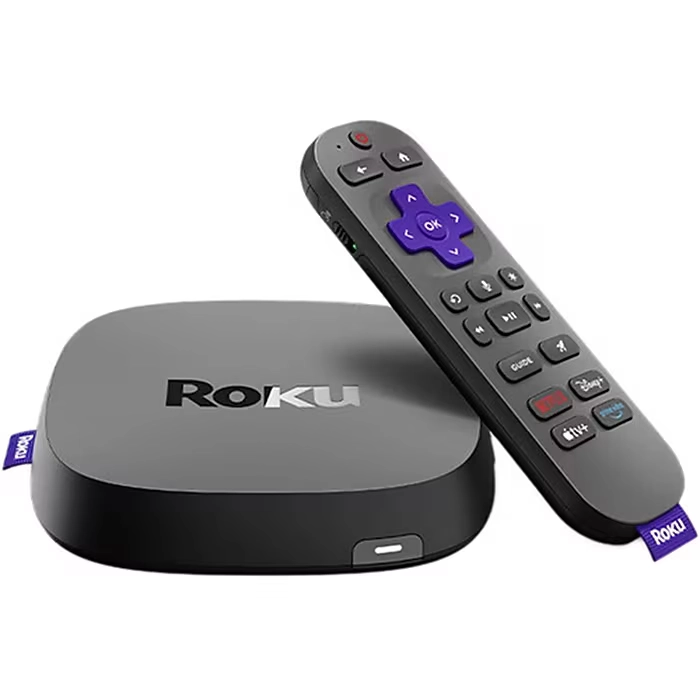
Quick Comparison
Roku is generally the simpler choice for seniors who mainly want to watch streaming services with fewer advanced settings.
NVIDIA SHIELD TV makes more sense for someone who wants stronger media features, AI upscaling, gaming, Google Assistant, or more advanced home entertainment options.
The biggest difference is simplicity versus flexibility. Roku keeps the experience straightforward. SHIELD TV gives you more tools, but those tools can add complexity.
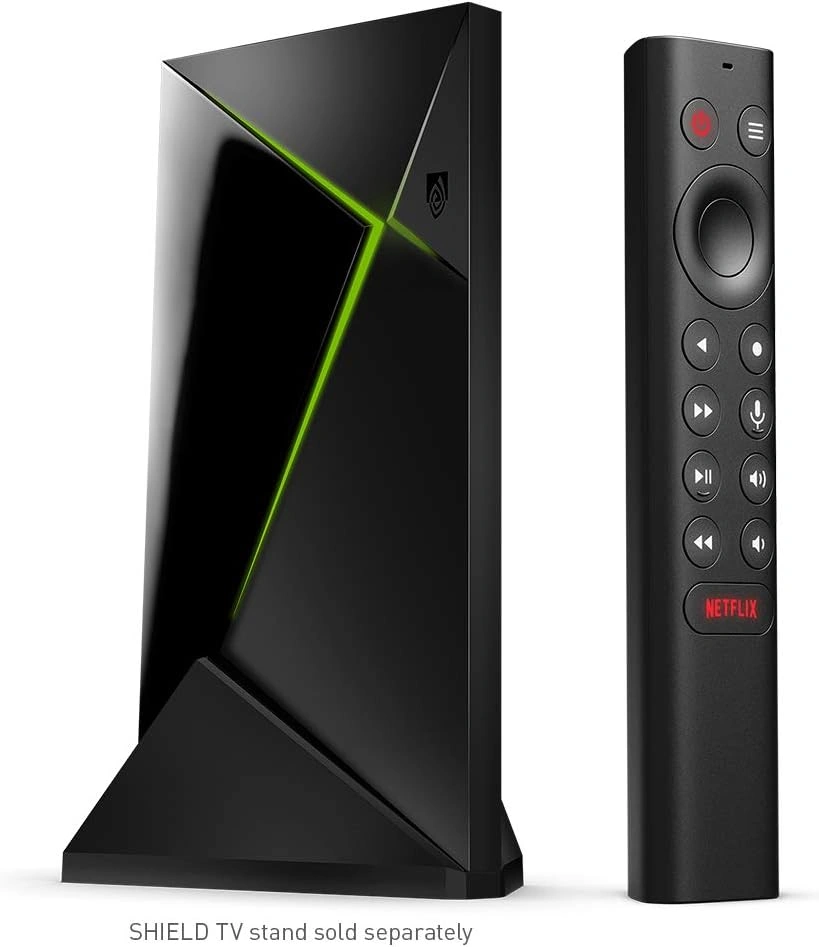
Roku vs NVIDIA Shield At a Glance
The two devices can both provide high-quality streaming, but they target somewhat different users.
| Feature | Roku Streaming Stick 4K | NVIDIA SHIELD TV |
|---|---|---|
| 4K streaming | Yes | Yes |
| Dolby Vision | Yes | Yes |
| Voice control | Roku Voice | Google Assistant |
| AI upscaling | No | Yes |
| Cloud gaming | No | GeForce NOW |
| Setup | Simple | More involved |
| Typical current price | $79.99 | $149.99 |
| Best fit | Simple streaming | Advanced streaming |
Roku Streaming Stick 4K currently lists at $79.99 on Roku’s site. NVIDIA lists SHIELD TV at $149.99. Prices can change.
Roku Review for Senior-Friendly Streaming
Roku Streaming Stick 4K is designed around simple streaming. It plugs into the TV’s HDMI port, connects to Wi-Fi, and uses a voice remote with TV power and volume controls.
Ease of Use
Roku has a clear advantage for users who want a simple TV interface.
The remote includes a directional pad and voice button. Compatible Roku voice remotes can search for content and control the device by voice.
Setup is also straightforward:
- Connect Roku to the TV.
- Connect the power.
- Select the correct HDMI input.
- Connect to Wi-Fi.
- Sign in and add streaming apps.
Roku describes its setup as plug in, connect, and start streaming.
Key Strengths
- Simple interface
- Voice search and control
- 4K streaming
- Dolby Vision and HDR10+
- Compact design
- TV power and volume controls on the voice remote
- Works with Alexa, Google Home, Apple AirPlay, and HomeKit on supported setups
Potential Drawbacks
- Less suitable for advanced gaming
- Fewer advanced media-server features
- Less powerful feature set than SHIELD TV
- Some voice features depend on the compatible remote and region
NVIDIA Shield Review for Senior Streaming
NVIDIA SHIELD TV is more of an advanced entertainment device. It supports 4K HDR, Dolby Vision, Dolby Atmos, AI-enhanced upscaling, Google Assistant, and GeForce NOW cloud gaming.
Ease of Use
The SHIELD remote has a directional control, select button, home button, back button, volume control, and voice search through Google Assistant. The remote is paired with SHIELD TV out of the box.
Voice search can help users find movies, shows, and apps without typing. Google Assistant can also control some smart-home functions.
The trade-off is that SHIELD offers many more settings and capabilities. That can be useful for an experienced user but may be unnecessary for someone who only wants Netflix, YouTube, or other basic streaming services.
Key Strengths
- 4K HDR playback
- Dolby Vision
- Dolby Atmos
- AI-enhanced upscaling
- Google Assistant
- GeForce NOW cloud gaming
- Google Cast support
- Access to apps through Google Play
- Strong support for advanced media use
Potential Drawbacks
- Higher price
- More advanced features can increase setup complexity
- Gaming features may be unnecessary for basic TV viewers
- Some advanced functions require additional services or compatible equipment
Which Is Easier for Seniors to Use?
For basic streaming, Roku has the simpler approach.
Its setup is short, its remote is familiar, and voice search can reduce the need for typing. Roku also offers a mobile app that can act as another remote.
SHIELD TV is still usable, but it offers more options. A senior who enjoys technology may appreciate this. Someone who wants fewer menus and fewer decisions may prefer Roku.
If the main goal is “turn on the TV and watch,” simplicity matters more than having every advanced feature.
Performance Comparison
Both devices support 4K video and Dolby Vision, so both can provide a strong picture when paired with compatible TVs and content.
SHIELD TV has a notable advantage in processing features. NVIDIA includes AI-enhanced upscaling that can improve compatible HD video toward 4K. It also supports Dolby Atmos and a broad range of video and audio formats.
Roku Streaming Stick 4K focuses more on mainstream streaming. It supports 4K, Dolby Vision, HDR10+, and long-range Wi-Fi.
For ordinary streaming, both offer plenty of performance. SHIELD’s extra power becomes more useful for advanced media users.
Comfort, Accessibility, and Senior-Friendly Design
A streaming device does not require much physical effort, so the main senior-friendly factors are the remote, controls, setup, and screen experience.
Roku’s voice remote can control TV power and volume, reducing the need to manage multiple remotes.
SHIELD also supports voice search through Google Assistant. Its remote has dedicated navigation controls and volume control.
For someone who has difficulty typing with a remote, voice search may be useful on either platform. Availability and language support can vary by region.
Features Comparison
The feature gap becomes clearer when looking beyond normal streaming.
| Feature | Roku | NVIDIA SHIELD |
|---|---|---|
| Voice search | Yes | Yes |
| 4K HDR | Yes | Yes |
| Dolby Vision | Yes | Yes |
| AI upscaling | No | Yes |
| Google Cast | No | Yes |
| Cloud gaming | No | Yes |
| Advanced media use | Limited | Strong |
Roku also offers a growing home-screen experience with streaming shortcuts and content discovery features. Roku announced a redesigned home screen in 2026, including easier access to areas such as Live TV, Sports, Search, and saved content.
SHIELD provides access to Google Play apps and Google Cast.
Price, Maintenance, and Long-Term Value
Roku Streaming Stick 4K currently costs $79.99 on Roku’s official site, while NVIDIA lists SHIELD TV at $149.99.
That makes Roku the lower-cost option in this representative comparison.
| Cost Factor | Roku | NVIDIA SHIELD |
|---|---|---|
| Initial price | Lower | Higher |
| Basic streaming | Excellent fit | More than needed for some users |
| Advanced features | Fewer | More |
| Extra gaming features | No | Yes |
| Long-term value | Strong for simple streaming | Strong for advanced users |
The better value depends on what the user will actually use. Paying more for features that never get used does not necessarily provide better value.
Who Should Choose Roku?
Choose Roku if:
- Simple streaming is the main goal.
- The user prefers straightforward controls.
- Voice search would be useful.
- A lower starting price matters.
- The user mainly watches movies, shows, news, or live TV.
- Advanced gaming features are not important.
- A compact device is preferred.
Who Should Choose NVIDIA Shield?
Choose NVIDIA SHIELD TV if:
- The user enjoys advanced technology.
- AI upscaling is important.
- Dolby Vision and Dolby Atmos are priorities.
- Google Assistant and Google Cast are useful.
- Cloud gaming is wanted.
- The household uses more advanced media features.
- The higher price is acceptable.
Roku vs NVIDIA Shield — Final Verdict
Roku and NVIDIA SHIELD TV are both capable streaming devices, but they suit different types of users.
For a senior who mainly wants easy streaming, Roku’s simpler setup and straightforward controls may be the better fit. For a senior who enjoys technology and wants advanced video, audio, gaming, and smart-home features, SHIELD TV offers a much broader feature set.
Best for simple streaming: Roku
Best for advanced media features: NVIDIA SHIELD TV
Best for AI upscaling: NVIDIA SHIELD TV
Best for lower upfront cost: Roku
Best for cloud gaming: NVIDIA SHIELD TV
Scoring Summary
Numeric scores can create false precision because “senior-friendly” depends on the person’s needs. A simple evidence-based summary is more useful here.
| Category | Roku | NVIDIA SHIELD |
|---|---|---|
| Ease of use | Strong | Strong |
| Advanced features | Basic | Extensive |
| Picture features | Strong | Extensive |
| Voice control | Yes | Yes |
| Simple setup | Strong | Moderate |
| Value for basic streaming | Strong | Moderate |
How We Evaluate Products
This comparison focuses on practical factors that matter during everyday senior use.
We look at:
- Ease of setup
- Remote controls
- Voice features
- Accessibility
- Streaming performance
- Picture and audio features
- Maintenance
- Price and value
- Long-term usefulness
This is a specification-based comparison. It does not claim hands-on testing of either device.
Senior-Specific Buying Considerations
Controls
Look for a remote with controls that are easy to identify and remember. Voice search may help reduce typing.
Setup
Check whether the user can connect the device to the TV and Wi-Fi without help.
Streaming Services
Make sure the apps and services the user watches are available on the chosen platform.
Voice Features
Check language and regional support before relying on voice control.
TV Compatibility
For 4K and HDR features, the TV and content must also support the required formats.
Internet Connection
A stable internet connection matters more than many advanced device features. Weak Wi-Fi can affect streaming quality on either platform.
Common Buying Mistakes
- Paying for advanced features that will never be used
- Ignoring the remote’s button layout
- Forgetting to check TV compatibility
- Assuming every streaming service works the same way
- Choosing based only on maximum video quality
- Overlooking the importance of a stable Wi-Fi connection
Safety
These devices have few special physical safety concerns during normal use. The main considerations are electrical connections, cable placement, and keeping power cables away from areas where they could create a trip hazard.
Follow the manufacturer’s setup instructions and use the supplied or compatible power equipment.
Frequently Asked Questions
Is Roku easier for seniors than NVIDIA SHIELD TV?
For basic streaming, Roku may be easier because its experience is more focused on straightforward streaming. SHIELD offers more advanced options.
Does NVIDIA SHIELD have better picture features?
SHIELD has strong picture-processing features, including AI-enhanced upscaling. Roku Streaming Stick 4K also supports 4K, Dolby Vision, and HDR10+.
Can both devices use voice control?
Yes. Roku supports voice search and control with compatible voice remotes. SHIELD supports voice search through Google Assistant.
Is NVIDIA SHIELD worth the higher price for seniors?
It can be if the user wants advanced features such as AI upscaling, Dolby Atmos, Google Assistant, or cloud gaming. For basic streaming, those features may not be necessary.
Does Roku support 4K?
Yes. Roku Streaming Stick 4K supports 4K playback and compatible HDR formats, including Dolby Vision and HDR10+.
Which should a caregiver choose?
For someone who mainly needs simple streaming, Roku may reduce unnecessary complexity. If the person already uses Google’s ecosystem or wants advanced entertainment features, SHIELD may be a better match.
Conclusion
Roku and NVIDIA SHIELD TV both provide strong streaming, but the best fit depends on how much technology the user wants. Roku keeps the experience simple and costs less in this comparison.
NVIDIA SHIELD TV costs more but adds AI upscaling, advanced audio and video support, Google Assistant, and cloud gaming. For seniors, the most important question is not which device has more features, but which features the person will actually use.
