
Ring vs Wyze Security Camera for Seniors: Which?


Voice Assistant Smart Speaker

Cane with LED Light

Digital Thermometer
Ring vs Wyze security camera for seniors is a useful comparison if you want home monitoring without making the system hard to manage. Both brands offer indoor and outdoor cameras, phone alerts, live viewing, and smart detection features.
The bigger difference is how each camera system handles subscriptions, recordings, alerts, and everyday use. Ring has a strong focus on its wider security ecosystem, while Wyze offers flexible cameras and a lower-cost entry into smart monitoring.
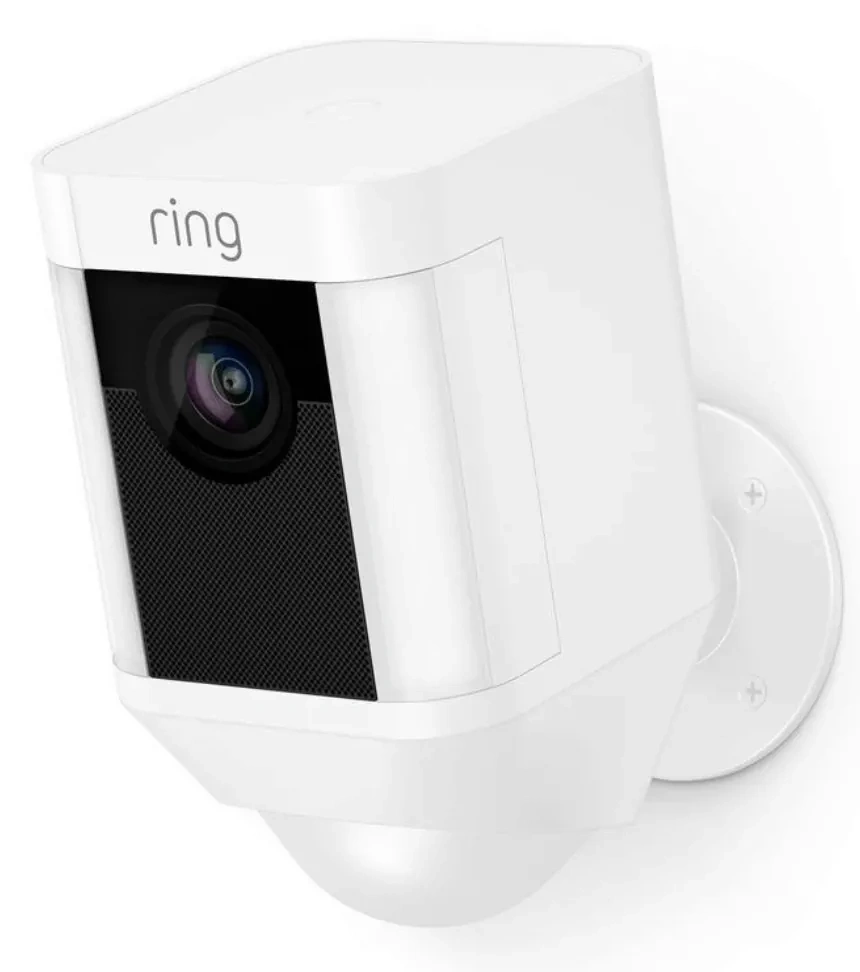
Quick Comparison
For seniors who want a simple security system with strong integration across cameras and other security devices, Ring may be easier to build around. Ring also offers longer video history with its paid plans, including up to 180 days on current Ring Protect plans.
Wyze may suit seniors who want lower ongoing costs and more flexibility. Wyze cameras can be used without a paid subscription, while Cam Plus adds cloud recording and smart detection features.
The better choice depends less on the brand name and more on how much recording, automation, and security support the household needs.
Ring vs Wyze At a Glance
Both brands offer useful smart-camera features, but their subscription systems and security ecosystems are different.
| Feature | Ring | Wyze |
|---|---|---|
| Live viewing | Yes | Yes |
| Smart alerts | Available | Available |
| Cloud recording | Requires eligible plan | Optional plan |
| Local recording | Model-dependent | Supported on compatible cameras with microSD |
| Multi-camera plans | Available | Available |
| Person detection | Available with eligible plan | Available with Cam Plus |
| Setup | App-based | App-based |
| Best fit | Connected security system | Flexible, lower-cost setup |
Ring Security Cameras for Senior-Friendly Use
Ring offers a broad range of indoor and outdoor security cameras. Its current camera lineup includes plug-in indoor models, and Ring Protect plans add recording and advanced alert features.
Ease of Use
Ring cameras are managed through the Ring app. This can make everyday tasks easier when the system is already configured.
A senior can use the app to check a live camera, receive notifications, and review recorded events when the appropriate plan is active. Ring also supports smart alerts that can identify people, packages, and vehicles on eligible plans.
Key Strengths
- Strong security-focused ecosystem
- Clear smartphone alerts
- Multiple camera options
- Useful smart detection features
- Plans can cover one camera or multiple devices
- Long video history with eligible plans
Potential Drawbacks
- Important recording features may require a subscription
- More advanced features can increase monthly costs
- The wider Ring ecosystem may feel like more than needed for simple camera monitoring
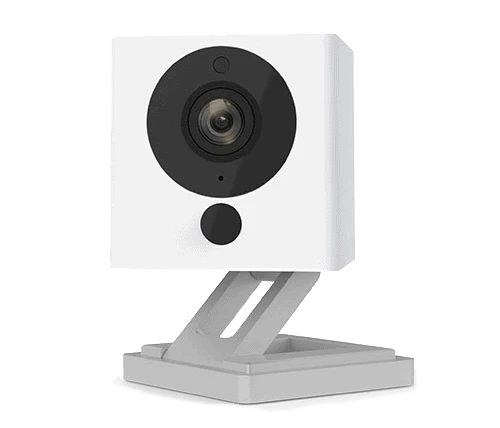
Wyze Security Cameras for Senior-Friendly Use
Wyze takes a more flexible approach. Its cameras can be used without a paid subscription, while paid plans add cloud recording and advanced AI detection.
Ease of Use
Wyze cameras are controlled through the Wyze app. Basic users can view live video and receive motion and sound alerts without paying for Cam Plus. Compatible cameras can also support 24/7 local recording with a microSD card.
For a senior who mainly wants to check a room, doorway, or other area from a phone, this can be a practical setup.
Key Strengths
- Cameras can be used without a subscription
- Cam Plus adds smart detection
- Local microSD recording is available on compatible cameras
- Multi-camera plans are available
- Web viewing is supported
- Generally flexible for DIY setups
Potential Drawbacks
- Advanced features can require a paid plan
- Managing several cameras and subscription options may take some learning
- The system can become more complex when many advanced features are enabled
Which Is Easier for Seniors to Use?
Both brands can be easy after setup, but the experience depends on the camera model and how many features are enabled.
Ring may be easier for a senior who wants a dedicated security ecosystem with cameras and other Ring devices managed through one system. Wyze may be easier for someone who wants a basic camera without immediately paying for cloud services.
| Senior Need | Ring | Wyze |
|---|---|---|
| Simple live viewing | Good | Good |
| Basic alerts | Good | Good |
| Multiple cameras | Good | Good |
| Avoiding subscriptions | Limited for recording | Stronger |
| Advanced smart alerts | Strong | Strong |
| DIY flexibility | Good | Strong |
A caregiver can also help with initial setup and account management. Once configured, both systems can provide remote access through their apps.
Performance Comparison
For security cameras, the most useful performance factors are video quality, alerts, night viewing, recording, and app access.
Ring offers smart alerts and recorded-event features through its current Protect plans. Its plans can provide up to 180 days of video history, depending on the plan and market.
Wyze offers motion and sound alerts as basic features. Cam Plus adds person, vehicle, package, and pet detection, along with cloud event recording.
| Performance Area | Ring | Wyze |
|---|---|---|
| Live video | Yes | Yes |
| Person detection | Available | Available with Cam Plus |
| Package detection | Available on eligible plans | Available with Cam Plus |
| Cloud event history | Up to 180 days on eligible plans | 14 days with Cam Plus |
| Local recording | Model-dependent | microSD on compatible cameras |
| Web access | Available | Available |
Wyze currently lists 14 days of event history with Cam Plus, while higher Wyze plans can extend cloud history further.
Comfort, Accessibility, and Senior-Friendly Design
A security camera does not require much physical effort once installed. The bigger accessibility issue is the app.
For seniors, look for:
- Clear notification wording
- Easy-to-find live-view controls
- Simple camera names
- Easy sharing with family members
- Reliable Wi-Fi
- A convenient installation location
- Minimal need to physically reset the camera
Ring can make sense when a household wants a larger connected security system. Wyze can make sense when a senior or caregiver wants to start with one camera and expand later.
Features Comparison
The two ecosystems have several overlapping features, but subscriptions make a major difference.
| Feature | Ring | Wyze |
|---|---|---|
| Free basic camera use | Yes | Yes |
| Cloud event recording | Paid plan | Cam Plus or higher |
| AI detection | Eligible plans | Cam Plus or higher |
| Multi-camera plan | Ring Multi | Cam Unlimited |
| Web viewing | Available | Available |
| Local microSD recording | Model-dependent | Compatible cameras |
Wyze says its free camera experience includes live streaming, motion detection, and other basic functions. Cam Plus adds cloud video recording and AI detection.
Price, Maintenance, and Long-Term Value
The camera’s purchase price is only part of the long-term cost. Subscription fees can matter more if you want recorded video and advanced alerts.
Ring currently lists Ring Solo at $4.99 per month and Ring Multi at $9.99 per month in the U.S. Ring Pro is $19.99 per month and adds additional intelligent and monitoring features. Availability can vary by market.
Wyze currently lists Cam Plus at $2.99 per month per camera, while Cam Unlimited covers multiple cameras for $9.99 per month. Cam Unlimited Pro is listed at $19.99 per month.
| Cost Factor | Ring | Wyze |
|---|---|---|
| Basic camera use | No plan required | No plan required |
| Entry paid plan | Ring Solo | Cam Plus |
| Multi-camera plan | Ring Multi | Cam Unlimited |
| Local storage option | Model-dependent | microSD on compatible cameras |
| Long-term concern | Subscription for recordings | Subscription for advanced features |
For a single camera, Wyze can be attractive if keeping recurring costs low is important. For a larger security setup, compare the total subscription cost rather than the price of one camera.
Who Should Choose Ring?
- Choose Ring if you want a security-focused camera ecosystem.
- Choose Ring if recorded video history is important.
- Choose Ring if you may add other Ring security devices later.
- Choose Ring if caregiver or family access to a broader security system matters.
- Choose Ring if smart security alerts are a priority.
Who Should Choose Wyze?
- Choose Wyze if you want to start without a subscription.
- Choose Wyze if low ongoing camera costs matter.
- Choose Wyze if local microSD recording is useful.
- Choose Wyze if you want flexible DIY camera options.
- Choose Wyze if you plan to use several cameras and want a multi-camera subscription.
Ring vs Wyze Security Camera for Seniors — Final Verdict
Ring and Wyze can both work well for seniors, but they suit somewhat different priorities.
Best for a connected security ecosystem: Ring
Best for avoiding a subscription at first: Wyze
Best for long cloud video history: Ring, with an eligible Protect plan
Best for flexible local recording: Wyze, on compatible cameras with microSD
Best for multi-camera subscription value: Depends on the number of cameras and required features
The biggest decision is whether the household wants a more security-focused ecosystem or a flexible camera system with a lower-cost starting point.
Scoring Summary
The scores below are a practical comparison based on the features and ownership factors discussed above. They are not laboratory test scores.
| Category | Ring | Wyze |
|---|---|---|
| Ease of Use | 9/10 | 9/10 |
| Senior-Friendly Design | 9/10 | 9/10 |
| Performance | 9/10 | 9/10 |
| Maintenance | 9/10 | 9/10 |
| Value | 8/10 | 9/10 |
The small differences matter less than the user’s preferred setup. A senior who values a broader security system may have different needs from someone who simply wants an affordable camera.
How We Evaluate Products
We focus on practical factors that matter when a senior uses a security camera at home.
These include:
- Ease of setup
- App simplicity
- Alert clarity
- Video and recording features
- Accessibility
- Maintenance
- Subscription costs
- Local storage options
- Long-term practicality
- Caregiver usefulness
We do not treat manufacturer marketing claims as independent testing.
Senior-Specific Buying Considerations
Setup
Choose a camera that can be installed in a useful location without creating a complicated setup process.
Controls
Check whether the app makes live viewing and notifications easy to understand.
Maintenance
Think about Wi-Fi reliability, software updates, cleaning, and any storage devices that need attention.
Storage
Decide whether cloud recording or local microSD storage makes more sense for the household.
Caregiver Access
If a family member helps manage the camera, check how account sharing and remote access work before installation.
Common Buying Mistakes
Avoid these common mistakes when comparing Ring and Wyze:
- Looking only at the camera’s purchase price
- Forgetting monthly or annual subscription costs
- Buying more cameras than the household needs
- Ignoring Wi-Fi coverage
- Choosing advanced features that will never be used
- Forgetting to consider who will manage the app
Safety
Place cameras where they can monitor useful areas without creating trip hazards from power cables.
If using an outdoor camera, follow the manufacturer’s installation instructions and check that the selected model is designed for the intended location.
For seniors who may have difficulty managing technology, a caregiver or family member can help with account setup, passwords, updates, and notification settings.
Frequently Asked Questions
Does Ring require a subscription?
No. Ring cameras can provide live viewing and real-time notifications without a Ring Protect plan, but recording and several advanced features require a compatible plan.
Does Wyze require a subscription?
No. Wyze says its cameras can be used without a paid subscription. Paid plans add cloud recording and advanced AI features.
Which is better for a senior who wants simple monitoring?
Either can work. Wyze may be appealing for basic monitoring without a subscription, while Ring may suit someone who wants a broader security ecosystem.
Can Wyze cameras record locally?
Yes, compatible Wyze cameras can use a microSD card for local recording.
Does Ring offer long video history?
Yes. Current Ring Protect plans can provide up to 180 days of video history, depending on the plan and eligible device.
Conclusion
Ring and Wyze both offer useful security cameras for seniors, but their strengths are different. Ring is a strong fit for households that want a connected security ecosystem and longer cloud video history with a suitable plan.
Wyze is a practical option for seniors and caregivers who want flexible cameras, local recording on compatible models, and the ability to use the cameras without a paid subscription. The best choice is the one that matches the household’s desired features, technical comfort, and long-term costs.
