
Arlo vs Google Nest Video Doorbell for Seniors: Which?


Non-Slip Bathroom Mat

Kindle E-Reader
Medical Alert System
Arlo vs Google Nest video doorbell for seniors is a useful comparison if you want a doorbell camera that is simple to check, gives clear alerts, and does not create extra work. The two brands take different approaches to smart doorbells.
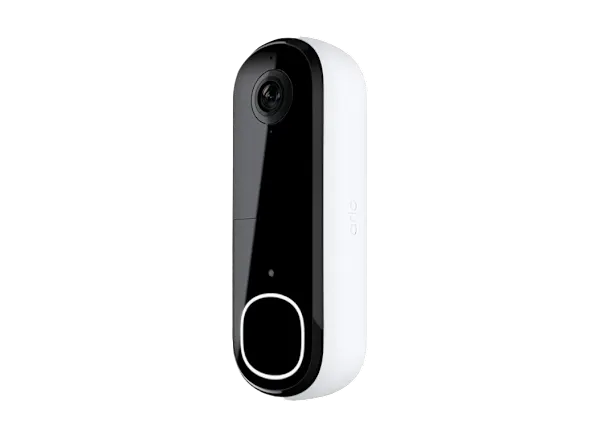
For a current comparison, this guide looks at the Arlo Video Doorbell 2nd Gen and Google Nest Doorbell (wired, 3rd gen). Arlo offers both wired and wireless installation, while the Nest model here is wired.
Quick Comparison
For seniors who want flexible installation, Arlo has a clear advantage because its 2nd Gen Video Doorbell can be installed wirelessly or with wires.
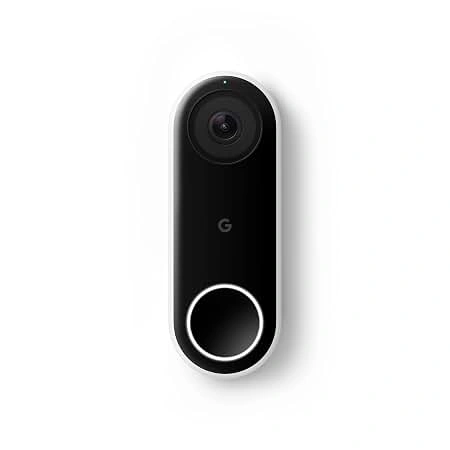
Google Nest is more appealing for someone already using Google Home devices. Its current wired 3rd Gen model offers 2K HDR video, a 166° field of view, built-in person, package, animal, and vehicle alerts, and access to Google Home features.
The better choice depends less on age and more on the home setup, phone ecosystem, installation needs, and desired smart features.
Arlo vs Google Nest At a Glance
The biggest difference is simple: Arlo gives more installation flexibility, while Nest is tightly connected to the Google Home system.
| Feature | Arlo Video Doorbell 2nd Gen | Google Nest Doorbell 3rd Gen |
|---|---|---|
| Video | Up to 2K or HD, depending on model | Up to 2K HDR |
| Installation | Wired or wireless | Wired |
| Field of view | 180° | 166° diagonal |
| Night vision | Yes | Yes, with HDR |
| Two-way audio | Yes | Yes |
| Person alerts | Available | Built in |
| Package alerts | Available with plan | Built in |
| App | Arlo Secure | Google Home |
| Video history | Depends on Arlo plan | 6 hours included; longer history with Google Home Premium |
| Best fit | Flexible installation | Google Home users |
Arlo’s 2nd Gen doorbell supports 2K or HD video, a 180° field of view, night vision, two-way audio, and wired or wireless installation. Google’s current wired 3rd Gen model offers 2K HDR video, a 166° diagonal field of view, night vision, and built-in intelligent alerts.
Arlo Video Doorbell Is Flexible for Seniors
The Arlo Video Doorbell 2nd Gen is a practical option for homes where installation flexibility matters. It can operate with or without wires, which may make it easier to fit into different door setups.
Ease of Use
Arlo’s main advantage here is flexibility rather than a complicated feature list. The Arlo Secure app handles live viewing, notifications, and other doorbell controls.
For a senior who may not want to deal with new wiring, the wireless option can be useful. However, battery-powered devices still need attention when the battery needs charging.
Key Strengths
- Wired or wireless installation
- Up to 2K video on the 2K model
- 180° field of view
- Night vision
- Two-way audio
- Package detection is available with an Arlo subscription
- Person, vehicle, animal, and other smart detection options are available with compatible Arlo plans
Potential Drawbacks
- Some advanced detection features require an Arlo subscription.
- Wireless installation means battery maintenance.
- The available features can vary by Arlo model and subscription plan.
Google Nest Doorbell Offers Strong Smart Features
The Google Nest Doorbell (wired, 3rd gen) takes a more connected approach. It works through the Google Home app and is designed to work with Google’s wider smart-home system.
Ease of Use
The Google Home app can make sense for seniors who already use Google devices. The doorbell feed can be viewed from the Home app, and compatible Google devices can also provide access to the feed.
The main issue is installation. The wired Nest Doorbell requires a suitable 16–24VAC, 10–40VA transformer and chime, so an existing setup may need changes.
Key Strengths
- 2K HDR video
- 166° diagonal field of view
- Person, package, animal, and vehicle alerts
- Six hours of event video previews included
- Up to 60 days of event history with the appropriate Google Home Premium plan
- Up to 10 days of 24/7 history with Google Home Premium Advanced
- Google Home ecosystem integration
Potential Drawbacks
- The 3rd Gen wired model requires a wired power setup.
- Longer video history requires a subscription.
- Some advanced Gemini features require Google Home Premium.
- It requires the Google Home app rather than the older Nest app.
Which Is Easier for Seniors to Use?
Ease of use depends heavily on the existing home setup.
| Senior Need | Arlo | Google Nest |
|---|---|---|
| Flexible installation | Strong option | More demanding |
| Existing Google Home setup | Good | Strong option |
| Wireless installation | Yes | No for this model |
| App-based viewing | Yes | Yes |
| Smart alerts | Yes | Yes |
| Battery management | Needed for wireless use | Not needed |
| Simple wired operation | Yes | Yes |
For a senior who wants to avoid new wiring, Arlo may be easier to install. For someone already comfortable with Google Home, Nest may feel more natural to operate.
Neither choice should be treated as universally easier. The home setup matters.
Performance Comparison
Video quality is strong on both, but the published specifications are not identical.
Arlo’s 2nd Gen Video Doorbell is available in 2K or HD versions and has a 180° field of view.
The Nest Doorbell (wired, 3rd gen) uses a 2K sensor, records up to 2K at 30 FPS with HDR, and has a 166° diagonal field of view.
| Performance Area | Arlo | Google Nest |
|---|---|---|
| Resolution | Up to 2K | Up to 2K HDR |
| Field of view | 180° | 166° diagonal |
| Night vision | Yes | Yes |
| Two-way audio | Yes | Yes |
| Smart alerts | Yes | Yes |
| Continuous history | Depends on setup/plan | Available on wired 3rd Gen with Advanced plan |
Google’s wired 3rd Gen Nest Doorbell supports 24/7 video history with Google Home Premium Advanced, while the battery Nest model does not support continuous video history.
Comfort, Accessibility, and Senior-Friendly Design
A doorbell camera does not require much physical effort during normal use. Most interaction happens through a phone or smart-home device.
For seniors with limited dexterity, the most useful feature may be not having to physically operate the doorbell camera itself. Checking alerts and viewing the camera through an app can reduce the need to go to the door simply to see who is there.
Arlo’s wireless installation can also reduce installation work in homes where running doorbell wiring is difficult.
Nest can be convenient when the household already uses Google Home devices. Its live feed can be accessed through compatible Google devices, which may reduce the need to handle a phone every time.
Features Comparison
The two systems offer similar core security functions, but their subscription ecosystems differ.
| Feature | Arlo | Google Nest |
|---|---|---|
| Person detection | Yes | Yes |
| Package detection | Subscription feature | Built-in intelligent alert |
| Vehicle detection | Available with compatible plan | Built-in intelligent alert |
| Animal detection | Available with compatible plan | Built-in intelligent alert |
| Activity zones | Available with compatible plan | Available |
| Video history | Arlo Secure plans | Google Home Premium plans |
| Familiar faces | Plan and region dependent | Google Home Premium feature |
| 24/7 history | Model/plan dependent | Available on wired 3rd Gen with Advanced |
Arlo says its Smart Detection can identify people, packages, vehicles, animals, and fire, with advanced detection depending on the Arlo Secure plan.
Google provides built-in intelligent alerts for people, packages, animals, and vehicles on the wired 3rd Gen model.
Price, Maintenance, and Long-Term Value
Prices can change, so the hardware price should be checked before purchase.
Google currently lists the Nest Doorbell (wired, 3rd gen) at $179.99 on its US store. Google Home Premium Standard is listed at $10 per month or $100 per year, while Advanced is $20 per month or $200 per year.
The bigger long-term question is subscription cost.
Arlo’s advanced Smart Detection and package detection require compatible Arlo Secure plans.
Google’s longer video history and several advanced features require Google Home Premium. The wired 3rd Gen includes six hours of event video previews without the paid history plans.
So, compare the total cost of hardware plus the features you actually need, rather than looking only at the doorbell’s purchase price.
Who Should Choose Arlo?
Choose Arlo if:
- You want wired or wireless installation.
- You do not want to depend on a wired doorbell setup.
- A wide 180° field of view is useful to you.
- You want Arlo’s broader security ecosystem.
- You are comfortable managing an Arlo subscription for advanced detection features.
- You want more installation flexibility.
Who Should Choose Google Nest?
Choose Google Nest if:
- Your home already uses Google Home.
- You prefer Google’s app and smart-home ecosystem.
- You want 2K HDR video.
- You want built-in person, package, animal, and vehicle alerts.
- You want the option of 24/7 video history on the wired model.
- You value Google’s newer Gemini-based smart features and are willing to use Google Home Premium for them.
Arlo vs Google Nest — Final Verdict
Best for flexible installation: Arlo
Best for Google Home households: Google Nest
Best for wired 24/7 video history: Google Nest Doorbell (wired, 3rd gen)
Best for a wide field of view: Arlo, based on the published 180° specification versus Nest’s 166° diagonal field of view.
Best for advanced Google smart-home features: Google Nest
The choice is therefore less about finding one universal winner and more about matching the doorbell to the home. Arlo makes more sense when installation flexibility is important. Nest makes more sense when Google Home integration and Google’s newer smart features are the priority.
Scoring Summary
The scores below are a practical comparison of the documented features, not laboratory test results.
| Category | Arlo | Google Nest |
|---|---|---|
| Ease of Use | 9/10 | 9/10 |
| Senior-Friendly Design | 9/10 | 9/10 |
| Video Performance | 9/10 | 9/10 |
| Installation Flexibility | 10/10 | 7/10 |
| Smart Features | 9/10 | 10/10 |
| Long-Term Value | 8/10 | 8/10 |
These scores should be treated as a simplified editorial summary. The actual fit can change depending on the user’s home wiring, phone, smart-home ecosystem, and subscription needs.
How We Evaluate Products
This comparison focuses on practical factors that matter when a senior or caregiver is choosing a video doorbell.
We consider:
- Ease of setup
- App usability
- Video quality
- Alert features
- Installation requirements
- Physical effort
- Maintenance
- Smart-home compatibility
- Subscription requirements
- Long-term practicality
The comparison uses current manufacturer information and support documentation. It does not claim hands-on testing or laboratory testing.
Senior-Specific Buying Considerations
Setup
Check whether the home already has compatible doorbell wiring. A wired Nest installation may require a suitable transformer and chime.
Controls
Consider which app the senior already knows. Familiar software can matter more than having extra features.
Maintenance
Wireless Arlo installation can introduce battery charging as an additional task. A wired setup avoids regular battery charging.
Alerts
Too many notifications can become annoying. Look for useful person, package, and vehicle alerts rather than enabling every possible notification.
Privacy
Smart doorbells record activity around the entrance to a home. Check the manufacturer’s privacy controls and local rules before enabling features such as familiar-face detection. Google specifically notes that familiar-face use may require consent depending on local law.
Common Buying Mistakes
- Choosing based only on camera resolution
- Forgetting to check existing doorbell wiring
- Ignoring subscription requirements
- Choosing advanced features that will not be used
- Overlooking battery maintenance with wireless installation
- Assuming every smart alert is included without checking the plan
Safety
Installation is the main physical safety concern. If a wired doorbell requires changes to electrical components, someone who is not comfortable working with the existing doorbell system should consider professional installation.
Also keep the camera positioned so it provides a useful view without creating unnecessary privacy issues for neighbors or visitors.
Frequently Asked Questions
Is Arlo or Google Nest easier to install?
Arlo has an advantage when wireless installation is useful because its 2nd Gen Video Doorbell supports wired or wireless installation. Nest’s current 3rd Gen wired model requires a suitable wired power setup.
Does Arlo have package detection?
Yes. Arlo offers package detection, but its package detection feature requires an eligible Arlo subscription.
Does Google Nest detect packages?
Yes. The Nest Doorbell (wired, 3rd gen) has built-in intelligent alerts for people, packages, animals, and vehicles.
Does Google Nest offer 24/7 video history?
Yes, but for the current wired 3rd Gen model, 24/7 continuous video history requires Google Home Premium Advanced. Google says the plan can provide up to 10 days of 24/7 history.
Which is better for someone already using Google Home?
Google Nest is the more natural fit because the Nest Doorbell is managed through the Google Home app and works with compatible Google devices.
Does a senior need a subscription for either doorbell?
Not necessarily for basic operation, but important advanced features and longer video history can require subscriptions. Arlo requires a plan for Smart Detection features such as package detection, while Google Home Premium unlocks longer history and several advanced features.
Conclusion
Arlo vs Google Nest video doorbell for seniors comes down to two different strengths. Arlo is a strong fit when installation flexibility and a wide field of view matter. Google Nest is a strong fit for households already using Google Home and wanting deeper smart-home features.
For an older adult, the most important question is not simply which doorbell has more features. Check the installation, app, alert system, subscription needs, and maintenance first. A doorbell that fits the home’s setup and is easy to check every day is usually more practical than one with features that will rarely be used.
