
Ring vs Google Nest Video Doorbell for Seniors: Which?


Easy Grip Knife Set

Bathtub Grab Bar

Reacher Grabber Tool
If you are comparing Ring vs Google Nest video doorbell for seniors, the main choice comes down to the app, smart alerts, power options, and how much setup you want to handle. Both can let a senior see visitors, talk through the doorbell, and receive phone alerts.
Ring offers a broad range of battery and wired doorbells. Google Nest focuses on the Google Home experience, with smart alerts and close links to other Google devices. The right choice depends more on the senior’s setup and daily needs than on the brand name alone.
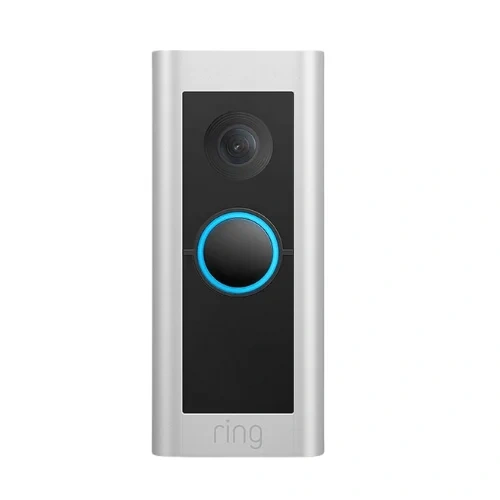
Quick Comparison
For many seniors, Ring is the simpler choice if flexible installation and a wide range of doorbell options matter most. Its current battery models can be installed without relying on existing doorbell wiring.
Google Nest may be a better fit for seniors already using Google Home, Nest speakers, or Google displays. Its intelligent alerts and Google Home integration can make visitor notifications easier to manage.
The biggest difference is the ecosystem. Ring is built around the Ring app and Ring Protect plans, while Nest works through the Google Home app and Google services.
Ring vs Google Nest At a Glance
The two brands take a slightly different approach. Here are the features that matter most for everyday senior use.
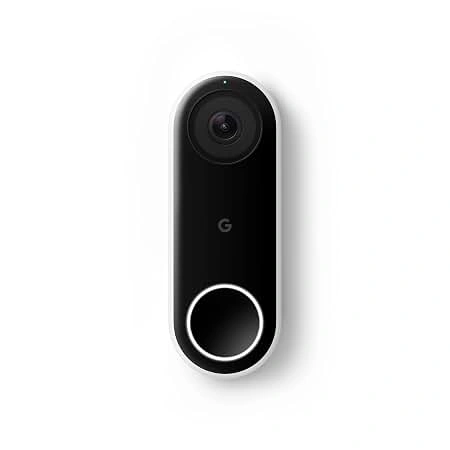
| Feature | Ring | Google Nest |
|---|---|---|
| Battery option | Yes | Yes |
| Wired option | Yes | Yes |
| App | Ring app | Google Home app |
| Two-way talk | Yes | Yes |
| Smart alerts | Person, package and vehicle alerts with plan | Person, animal, vehicle and package alerts |
| Video history | Up to 180 days with Ring Protect | 3 hours included; longer history with Google Home Premium |
| Voice ecosystem | Alexa and Ring | Google Home and compatible assistants |
| Subscription | Optional for basic use; paid plans add features | Optional plans add longer history and advanced features |
Ring’s current Battery Doorbell 2K uses a built-in rechargeable battery and offers 2K video, head-to-toe coverage, motion alerts and two-way talk. Google Nest Doorbell (Battery) uses the Google Home app and offers HDR video, night vision, two-way talk and built-in intelligent alerts.
Ring Doorbell Review for Senior Use
Ring has several current doorbell choices, including battery and wired models. That gives families more flexibility when replacing an older doorbell system.
Ease of Use
The Ring app is the main control point. A senior can use it to view the live camera, receive alerts and communicate with visitors.
The current Battery Doorbell 2K also has a built-in rechargeable battery. Ring says it can be trickle-charged through existing wiring or paired with compatible solar charging accessories.
That can be useful when a home does not have a suitable wired doorbell setup.
Key Strengths
- Wide choice of battery and wired models
- Simple live-view and two-way-talk functions
- Battery installation can reduce wiring work
- Current models offer head-to-toe video
- Ring Protect can add longer video history and smart alerts
- Multiple phones and tablets can manage Ring devices
Potential Drawbacks
- Some useful recording and smart-alert features require a subscription
- Battery models need charging
- The number of models can make choosing confusing
- Advanced Ring features can add ongoing costs
Ring says its doorbells work without a subscription, but video recording and several advanced features require a Ring Protect plan.
Google Nest Doorbell Review for Senior Use
Google Nest takes a more connected-home approach. The current Nest Doorbell (Battery) works through the Google Home app rather than the older Nest app.
Ease of Use
For someone already comfortable with Google Home, the Nest Doorbell can fit naturally into an existing setup.
The Nest Doorbell (Battery) can also send notifications to compatible Google speakers and displays when someone presses the doorbell.
That can be handy for a senior who does not always have a phone nearby.
Key Strengths
- Google Home app integration
- Built-in intelligent alerts
- Battery or wired installation options
- Two-way talk with noise cancellation
- Can work with compatible Google speakers and displays
- Familiar Google ecosystem for existing users
Potential Drawbacks
- Battery life changes with activity, temperature and settings
- Longer video history requires a paid Google plan
- Google Home setup may be less familiar to people outside the Google ecosystem
- Wired models can require transformer compatibility checks
Google lists typical Nest Doorbell battery life at about one month in a busy setting, about 2.5 months with typical activity, and about six months in a quiet setting.
Which Is Easier for Seniors to Use?
Ease of use depends heavily on the phone and smart-home system the senior already uses.
Ring may feel simpler for someone who mainly wants a doorbell app with clear visitor alerts and live video. Its battery models also give families more installation flexibility.
Nest may feel easier for someone already using Google Home. A compatible Google speaker or display can provide another way to hear doorbell notifications.
The easiest system is often the one that matches the senior’s existing phone and smart-home setup.
For seniors who dislike frequent charging, a wired installation may also be worth considering. Battery life varies with activity, temperature and settings, so it should not be treated as a fixed number.
Performance Comparison
Video quality varies by specific model, so comparing the brands as a whole can be misleading.
Ring’s current Battery Doorbell 2K records at 1920 × 1920 and provides a wide field of view with head-to-toe coverage.
The current Nest Doorbell (Battery) uses a 1.3-megapixel sensor, 960 × 1280 HD video, HDR and a 145-degree diagonal field of view.
| Performance Area | Ring | Google Nest |
|---|---|---|
| Live video | Available | Available |
| Night vision | Yes | Yes |
| Two-way talk | Yes | Yes |
| Smart detection | People, packages and vehicles with compatible plan | People, animals, vehicles and packages |
| Video history | Up to 180 days with compatible plan | 3 hours included; longer with subscription |
For shoppers comparing a specific Ring model with a specific Nest model, check the exact generation before deciding. Brand-level comparisons can hide major differences between models.
Comfort, Accessibility, and Senior-Friendly Design
For seniors, the camera itself is only part of the experience. The alerts and control method matter too.
A senior who has trouble checking a phone regularly may benefit from a setup that also uses a smart speaker or display. Nest can send doorbell notifications to compatible Google speakers and displays.
Ring can also be useful for families who want several people to access the same system. Ring says its devices can be managed from multiple phones and tablets.
Neither system removes the need for a stable Wi-Fi connection and a compatible phone.
Features Comparison
The most useful differences are not small technical specifications. They are the features that change how the doorbell works day to day.
| Feature | Ring | Google Nest |
|---|---|---|
| App | Ring | Google Home |
| Battery models | Yes | Yes |
| Smart alerts | Available, with plan for advanced alerts | Built-in intelligent alerts |
| Voice ecosystem | Alexa | Google Home |
| Video history | Up to 180 days with plan | Up to 60 days with current premium options |
| 24/7 recording | Available on eligible Ring cameras with plan/add-on | Available on eligible wired Nest models with subscription |
Google’s current information lists up to 60 days of event history with its Advanced plan, while certain wired Nest models can also support 24/7 video history. The battery Nest Doorbell cannot continuously record 24/7 video history.
Price, Maintenance, and Long-Term Value
Purchase prices change, so it is better to compare the ongoing ownership model than rely on a temporary sale price.
Ring currently lists Ring Protect Solo at $4.99 per month or $49.99 per year in the U.S. for one device. Higher plans cover more devices and add features.
Google also offers paid Google Home plans that increase video history and add advanced features.
| Cost Factor | Ring | Google Nest |
|---|---|---|
| Basic doorbell use | No subscription required | Basic features available |
| Longer video history | Ring Protect | Google Home Premium |
| Battery maintenance | Recharge as needed | Recharge as needed |
| Wired installation | Model dependent | Model dependent |
| Ecosystem cost | Ring/Alexa accessories optional | Google Home accessories optional |
For long-term value, consider both the doorbell price and the subscription cost over several years.
Who Should Choose Ring?
- Choose Ring if flexible battery installation matters.
- Choose Ring if you want many doorbell models to choose from.
- Choose Ring if family members will manage the system from several phones.
- Choose Ring if you already use Alexa or other Ring devices.
- Choose Ring if long video history is important and you are comfortable with a subscription.
Who Should Choose Google Nest?
- Choose Nest if the senior already uses Google Home.
- Choose Nest if Google speakers or displays are part of the home.
- Choose Nest if intelligent alerts are important.
- Choose Nest if you prefer managing the doorbell through the Google Home app.
- Choose Nest if Google Home’s subscription features fit your needs.
Ring vs Google Nest Video Doorbell — Final Verdict
There is no single choice that fits every senior.
Ring makes more sense for seniors who value installation flexibility, a broad product range, and a straightforward security-focused ecosystem. Its current battery models can be useful where traditional doorbell wiring is inconvenient.
Google Nest makes more sense for seniors already invested in Google Home. The ability to send doorbell notifications to compatible Google speakers and displays can be useful in a connected home.
The most important question is not simply which brand has more features. It is which system the senior and caregiver will find easiest to manage every day.
Scoring Summary
Scores can create false precision when comparing different product models, so the practical differences are more useful than a numerical ranking.
| Category | Ring | Google Nest |
|---|---|---|
| Installation flexibility | Strong | Strong |
| App ecosystem | Ring-focused | Google Home-focused |
| Smart-home integration | Alexa/Ring | Google Home |
| Battery options | Strong | Strong |
| Subscription flexibility | Strong | Strong |
| Family access | Strong | Strong |
These are comparison categories rather than laboratory scores. Exact performance depends on the individual doorbell model and home setup.
How We Evaluate Products
This comparison focuses on factors that matter during everyday senior use.
We look at:
- Ease of setup
- App simplicity
- Alert usefulness
- Installation options
- Battery maintenance
- Smart-home compatibility
- Video and audio features
- Subscription requirements
- Long-term ownership
The comparison does not claim hands-on testing. Product specifications and current service information were checked against manufacturer sources.
Senior-Specific Buying Considerations
Before choosing either doorbell, check these points.
Setup
Confirm that the senior or caregiver can complete the app setup and Wi-Fi connection.
Controls
Look at how easy it is to answer alerts, open live video, and start two-way communication.
Charging
For battery models, decide who will remove and recharge the doorbell. Frequent activity can shorten the time between charges.
Smart Home
If the home already uses Alexa or Google Home, staying within that ecosystem may reduce confusion.
Maintenance
Check how the battery is removed and charged. A caregiver may be useful if the senior finds this task difficult.
Common Buying Mistakes
- Choosing a brand without checking the exact model
- Ignoring subscription costs
- Forgetting about battery charging
- Assuming all Ring or Nest models have the same video quality
- Buying a wired model without checking transformer compatibility
- Choosing advanced features that the senior may never use
Safety
Installation is the main practical safety concern.
A wired doorbell may require work with an existing low-voltage doorbell system, and compatibility should be checked before installation. Google notes that some wired Nest installations may require transformer changes.
If the installation involves electrical work beyond normal doorbell replacement, professional installation may be the safer option.
Conclusion
Ring and Google Nest both offer useful video doorbells for older adults, but they suit different home setups. Ring stands out for its broad range of battery and wired choices, while Nest fits especially well into homes that already use Google Home.
For the senior, the best practical choice is the system that is easy to answer, easy to maintain, and easy for a trusted family member or caregiver to manage when needed.
