
August vs Kwikset Smart Lock for Seniors: Which Wins?

Bed Rail for Seniors

Folding Walking Stick with Seat

Automatic Pill Dispenser
August vs Kwikset smart lock for seniors comes down to how the lock is used each day. August focuses on app control, auto-unlock, and keeping the existing outside lock. Kwikset Halo adds a built-in keypad for code entry.
Both can give seniors more ways to enter and lock a home. The better fit depends on whether simple phone control or direct keypad access matters more.
Quick Comparison
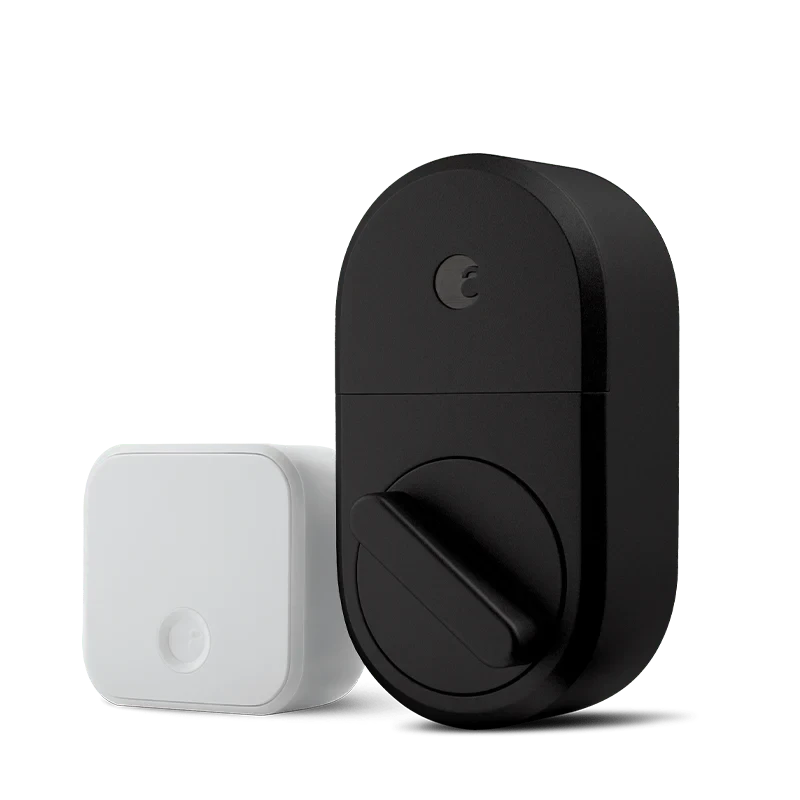
For seniors who want a simple smart lock with hands-free features, August has some useful advantages. Its Wi-Fi model supports auto-lock, auto-unlock, remote access, and existing-key use.
Kwikset Halo may suit seniors who prefer entering a code at the door. Its keypad supports custom codes, one-touch locking, app control, and traditional key access.
The main difference is simple: August is more focused on phone-based and automatic access, while Kwikset Halo puts keypad entry right on the door.
August vs Kwikset At a Glance
Here is the basic difference between the two current smart-lock options.
| Feature | August Wi-Fi Smart Lock | Kwikset Halo Keypad |
|---|---|---|
| App control | Yes | Yes |
| Built-in Wi-Fi | Yes | Yes |
| Keypad | Optional | Built in |
| Auto-unlock | Yes | Not listed as a Halo feature |
| Auto-lock | Yes | Yes |
| Existing key | Yes | Yes |
| Guest access | Yes | Yes |
| Access codes | With keypad | Up to 250 |
| Door status | DoorSense | App and lock status features |
| Warranty | 1 year | Check current model terms |
August lists built-in Wi-Fi, DoorSense, auto-lock, auto-unlock, and existing-key use for its Wi-Fi Smart Lock. Kwikset lists custom codes, one-touch locking, app control, event history, and traditional key access for Halo.
August Wi-Fi Smart Lock Review
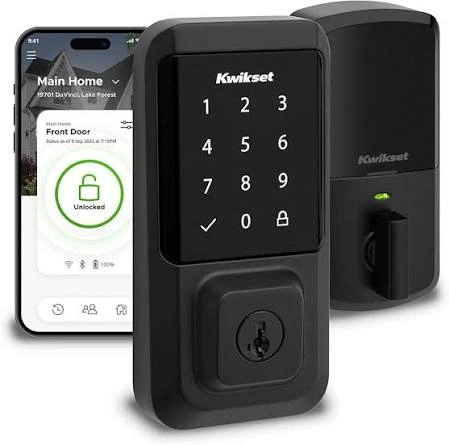
August is a good match for seniors who want smart features without replacing the outside part of their existing deadbolt.
Ease of Use
August attaches to the inside of a compatible single-cylinder deadbolt. This means the existing key can still work. The August app can lock and unlock the door from a phone.
The auto-unlock feature can also reduce the need to use a phone or key when arriving home. That may help seniors who have trouble handling small keys or carrying several things at once.
A useful August feature is that the outside lock can stay familiar.
Key Strengths
- Built-in Wi-Fi
- Auto-lock and auto-unlock
- Existing key still works
- Remote lock and unlock
- Guest access through the app
- DoorSense door-status monitoring
- Works with Alexa, Google Assistant, and Siri/HomeKit on supported setups
Potential Drawbacks
- A keypad is an added accessory.
- Phone-based control may not suit someone who prefers a physical code.
- Compatibility with the existing deadbolt must be checked.
- Smart features depend on the required phone, app, and network setup.
Kwikset Halo Keypad Review
Kwikset Halo takes a different approach. Its keypad is built into the lock, so users can enter a code without using a phone.
Ease of Use
The Halo keypad has a one-touch locking button. Users can also unlock it with an access code or traditional key. The Kwikset app provides another way to control the lock.
This can be useful for a senior who does not want to depend on a smartphone every time they enter the house.
Key Strengths
- Built-in keypad
- Up to 250 custom user codes
- Scheduled access codes
- Remote app control
- Lock activity notifications
- Event history
- One-touch locking
- Traditional key access
- Low-battery alerts
- Keypad can be temporarily disabled
Potential Drawbacks
- The keypad adds another interface to learn.
- Code management can take some setup.
- App features require a compatible phone and internet connection.
- Kwikset says its app-connected products work only in the United States and Canada.
Which Is Easier for Seniors to Use?
Ease of use depends on how the person prefers to enter the home.
For someone comfortable with a smartphone, August can be very simple. Auto-unlock can reduce the need to find a key or operate a keypad. Its app also gives remote control and activity information.
For someone who prefers a physical method, Kwikset Halo has an advantage. The built-in keypad lets the user enter a code directly.
| Senior Need | August | Kwikset Halo |
|---|---|---|
| Phone-free entry | With optional keypad or key | Keypad or key |
| Hands-free arrival | Auto-unlock | Not listed |
| Simple code entry | Optional keypad | Built in |
| Remote access | Yes | Yes |
| Existing key | Yes | Yes |
So there is no need to assume every senior wants the same setup. A phone user may prefer August. A code user may prefer Halo.
Performance Comparison
For smart locks, useful performance is about access, response, control, and reliability.
August provides auto-lock and auto-unlock. Its DoorSense sensor can also report whether the door is securely closed and locked.
Kwikset Halo focuses more on keypad access and access-code management. It supports up to 250 custom user codes and lets owners schedule those codes through the app.
| Performance Area | August | Kwikset Halo |
|---|---|---|
| Auto-unlock | Yes | Not listed |
| Auto-lock | Yes | Yes |
| Remote control | Yes | Yes |
| Access codes | Optional keypad | Up to 250 |
| Door status | DoorSense | App features |
| Activity history | Yes | Yes |
The difference is more about how the smart features are used than basic locking ability.
Comfort, Accessibility, and Senior-Friendly Design
August keeps the smart mechanism on the inside of the door. The existing outside lock remains in place. That can make the change less disruptive for someone already comfortable with the current door hardware.
Kwikset Halo puts the keypad on the outside. This gives users a clear physical entry method, but it also means remembering and entering a code.
For seniors with limited dexterity, a phone, auto-unlock feature, or simple access code may be easier than handling a small key. The right choice depends on the person’s comfort with each method.
Features Comparison
The biggest feature difference is the access method.
| Feature | August | Kwikset Halo |
|---|---|---|
| Built-in Wi-Fi | Yes | Yes |
| Auto-unlock | Yes | Not listed |
| DoorSense | Yes | No equivalent listed |
| Built-in keypad | No | Yes |
| Custom codes | With keypad | Yes |
| Guest access | Yes | Yes |
| App control | Yes | Yes |
August’s Wi-Fi model does not need a separate Wi-Fi bridge. Kwikset Halo also provides Wi-Fi access through the Kwikset app.
Price, Maintenance, and Long-Term Value
August lists the Wi-Fi Smart Lock at $199.99 on its current product page. A keypad can be added separately or purchased as part of a bundle. August lists a one-year warranty for its smart locks.
Kwikset pricing can vary by model and retailer, so the current package should be checked before buying.
For long-term value, also consider the access method. August may cost more if a keypad is needed. Kwikset Halo already includes keypad entry.
Neither choice should be judged only by the initial price. The better value depends on which features will actually be used.
Who Should Choose August?
- Choose August if auto-unlock is important.
- Choose August if you want to keep the existing outside key.
- Choose August if phone control is preferred.
- Choose August if DoorSense is useful.
- Choose August if remote access and guest access matter.
- Choose August if you want a compact inside retrofit design.
Who Should Choose Kwikset?
- Choose Kwikset Halo if a built-in keypad is important.
- Choose Halo if several people need their own access codes.
- Choose Halo if scheduled codes are useful.
- Choose Halo if one-touch keypad locking is convenient.
- Choose Halo if you want both code and traditional-key access.
- Choose Halo if detailed lock event history is useful.
August vs Kwikset — Final Verdict
August and Kwikset Halo take different approaches to senior-friendly smart entry.
Best for automatic access: August
Best for built-in keypad entry: Kwikset Halo
Best for keeping the existing outside lock: August
Best for many custom access codes: Kwikset Halo
Best for phone-based smart features: August
The better option depends on whether the senior prefers automatic phone-based access or a physical keypad.
Scoring Summary
Scores are not a measure of product quality. They are a simple way to show how the documented features fit common senior needs.
| Category | August | Kwikset Halo |
|---|---|---|
| Ease of Use | 9/10 | 9/10 |
| Senior-Friendly Design | 9/10 | 9/10 |
| Smart Features | 9/10 | 9/10 |
| Access Flexibility | 9/10 | 10/10 |
| Maintenance | 9/10 | 9/10 |
| Value | 8/10 | 9/10 |
These scores are based on the features discussed above, not hands-on testing.
How We Evaluate Products
This comparison focuses on practical factors that can matter to older adults.
We look at:
- Ease of use
- Access options
- Setup
- Physical effort
- Controls
- Smart features
- Maintenance
- Safety
- Long-term value
- Access for caregivers
No claim of laboratory testing or personal hands-on testing is made.
Senior-Specific Buying Considerations
Physical Effort
Think about how much key turning, phone use, or keypad use is required.
Controls
Check whether the senior prefers a smartphone, physical key, or keypad.
Maintenance
Consider battery changes and keeping the lock connected to the required app or network.
Setup
Check deadbolt compatibility before buying. August specifically requires a compatible single-cylinder deadbolt.
Safety
Keep a traditional key or another backup entry method available. Both August and Halo support traditional key access.
Common Buying Mistakes
- Buying without checking deadbolt compatibility
- Choosing features the user will never use
- Forgetting about keypad or accessory costs
- Assuming every senior prefers smartphone control
- Ignoring backup entry methods
- Focusing only on the lock’s price
Safety
Smart locks are powered devices, so battery condition matters. Check low-battery alerts and replace batteries as recommended by the manufacturer.
Kwikset Halo provides audible and visual low-battery warnings. August’s Wi-Fi Smart Lock includes two CR123 batteries.
A smart lock should also be installed correctly. If the door or deadbolt does not operate smoothly, fix the mechanical problem before relying on the smart features.
Conclusion
August is a strong fit for seniors who value automatic unlocking, phone control, and keeping the existing outside lock. Its DoorSense and auto-lock features can also make everyday access more convenient.
Kwikset Halo is a practical choice for seniors who prefer keypad entry. Its large set of access-code features can also help families and caregivers manage access without handing out physical keys.
The key question is simple: Does the senior prefer automatic smartphone access, or a physical code on the door? That answer makes the August vs Kwikset decision much easier.
