
10 Best Smart Door Locks for Seniors: Secure and Easy-to-Use Options


Non-Slip Slippers

Smart Doorbell Camera

Rollator Walker with Seat
Smart door locks can make daily entry easier without requiring a physical key. Many models let users unlock a door with a keypad, fingerprint, smartphone, or voice command. Some also keep a keyhole for backup, which can help older adults and caregivers feel more comfortable.
For seniors, the best lock should offer simple controls, clear instructions, and reliable access. We prioritize locks with easy-to-read keypads, dependable backup entry, strong battery warnings, and optional remote access for trusted family members or caregivers. Buyers should also check door compatibility, installation needs, app quality, and whether the lock works during a power or internet outage.
We evaluated smart door locks for ease of use, security, installation, and helpful features to identify the models that work best for seniors.
Best Smart Door Locks for Seniors
We selected the best smart door locks for seniors based on ease of use, reliable access, security features, and setup. Our list includes options with keypads, smartphone controls, voice commands, and backup keys.
Philips Wi-Fi Smart Deadbolt

We recommend this lock for seniors who want several simple entry options, remote access, and an app without adding a separate hub.
Pros
- Fingerprint, keypad, app, key, and voice unlocking
- Easy screwdriver-only installation
- Remote access and activity alerts
Cons
- Batteries are not included
- Works only with 2.4GHz Wi-Fi
- No door sensor detects whether the door remains open
We found the fingerprint reader and backlit keypad useful for reducing the need to carry keys. Family members can use separate codes, while one-time or scheduled codes help with caregivers, guests, and service visits.
The built-in Wi-Fi lets us lock or unlock the door from the app without installing an extra hub. We could also connect it to Alexa or Google Assistant, though voice control requires a stable network and the correct account setup.
Installation took about 20 minutes with basic DIY skills and a screwdriver. We would check the door thickness and latch alignment before buying, since a poor fit can affect operation. The auto-lock timer adds convenience, but we would still confirm the door closed properly because this model lacks a door-position sensor.
The lock uses AA alkaline batteries, which we would keep on hand. Its 2.4GHz Wi-Fi limit may also require checking the home router, but the combination of fingerprint access, codes, and a physical key gives seniors useful backup choices.
LOCKSTAR Smart Door Lock
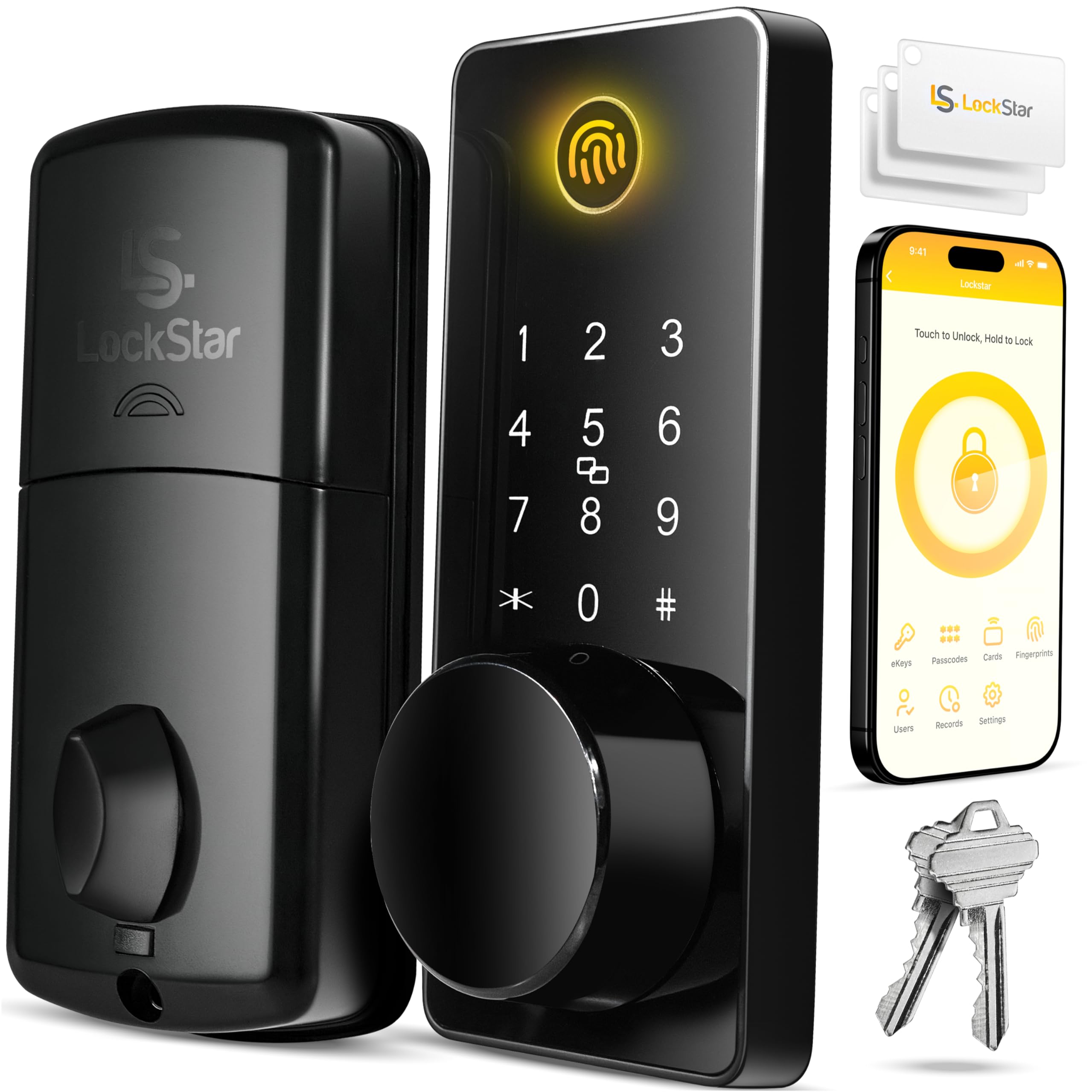
We recommend this lock for seniors who want several simple entry options, remote access, and auto-locking without giving up a traditional key.
Pros
- Fingerprint, code, fob, app, and key access
- Includes the Wi-Fi gateway and installation tools
- Stores entry activity and sends phone alerts
Cons
- Requires batteries, which are not included
- App features may take time to learn
- Fingerprint access may not work perfectly every time
We found the multiple entry methods useful for different situations. A senior can use a fingerprint or keypad code, while family members can use the app or a physical key. The fobs also offer a simple option for anyone who does not want to use a smartphone.
Installation was straightforward with the included screwdriver, drill bit, and instructions. We would still check the door measurements first, since fit can vary between doors. The auto-lock feature adds convenience, especially when someone forgets to lock the door after entering.
The app and included Wi-Fi gateway allow remote control and activity tracking. We liked being able to see when the lock was used and receive alerts. However, setup and app controls may feel less familiar to seniors who rarely use smart devices, so family assistance could help at first.
eufy FamiLock S3 Max
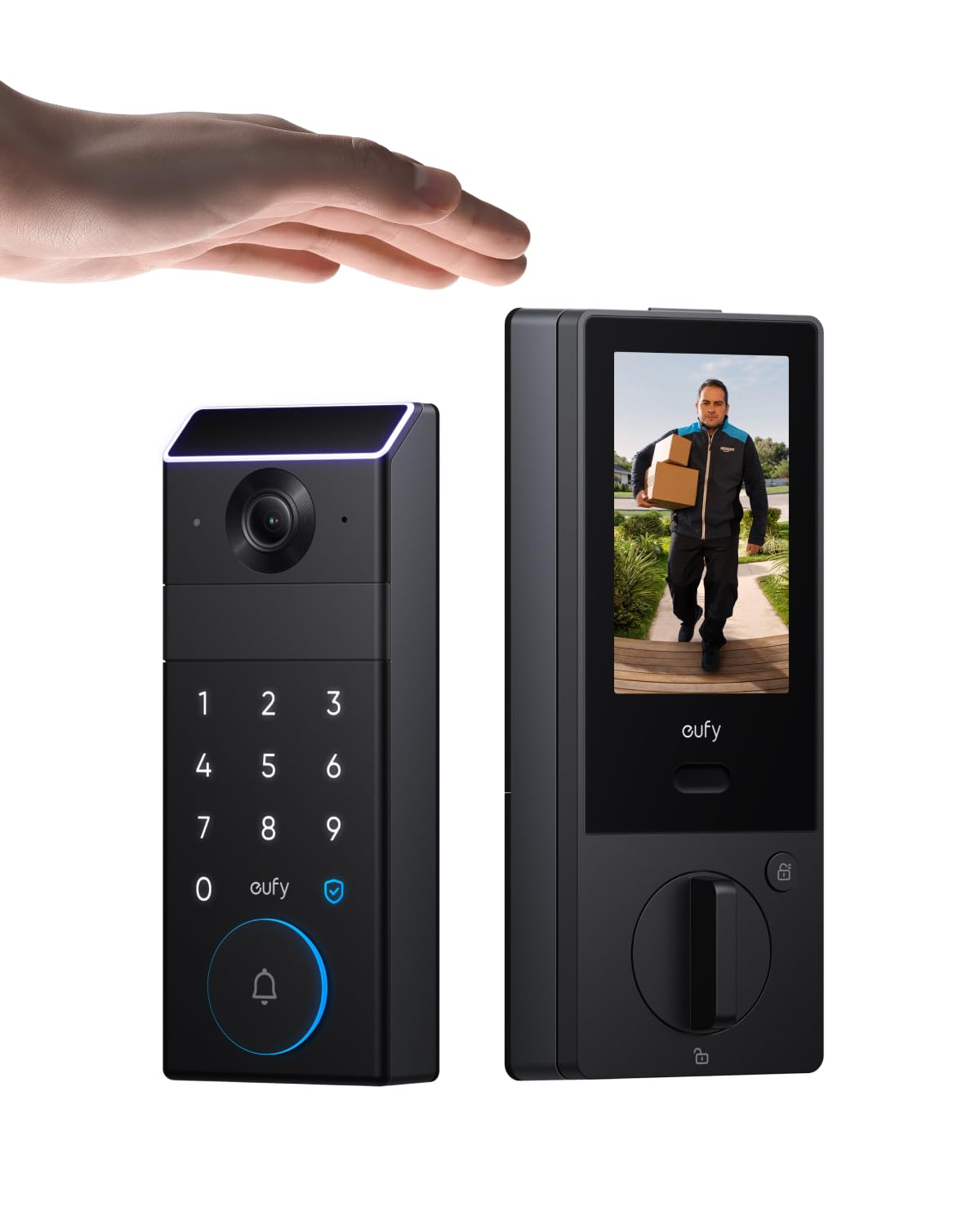
We recommend this lock for seniors who want palm access, video monitoring, and a simple indoor screen in one device.
Pros
- Palm recognition works quickly once we learn the correct hand position.
- The rear screen lets us check the door without using a phone.
- Backup batteries and physical keys provide extra access options.
Cons
- App setup may require a 2.4 GHz Wi-Fi network.
- The large feature set can take time to learn.
- Some users report concerns about long-term reliability.
The palm reader makes daily entry simple. We only need to hold our hand near the sensor, and the lock usually responds quickly. Physical keys and passcodes remain available if the reader does not work.
We also like the indoor screen. It shows the front-door view and lock status without requiring a smartphone, which can help seniors who prefer simple controls. The camera provides a wide view and records motion for added awareness.
Installation felt manageable with the included hardware, though the lock is more involved than a basic smart deadbolt. We would check the door fit and Wi-Fi signal before buying.
The rechargeable battery can last several months, and four AAA batteries provide backup power. The eufy app supports remote features, while smart-home support works with platforms such as Alexa, Apple Home, Google Home, and SmartThings.
samtechT Fingerprint Smart Lock

We recommend this lock for seniors who want several simple ways to enter without carrying a key.
Pros
- Fingerprint, keypad, fob, app, and key access
- Auto-lock helps prevent missed lockups
- DIY installation suits many standard doors
Cons
- Remote access needs a separate gateway
- App setup may take some patience
- Fingerprint access may not work every time
We found the many entry options useful for different needs. A senior can use a fingerprint or fob, while family members can use a code or the physical key. The backlit keypad also helps with nighttime use.
Installation was manageable with a screwdriver when the existing door matched the stated size range. We still recommend checking the door measurements before ordering, since one customer reported a compatibility issue.
The auto-lock feature added convenience during daily use. We could also create temporary codes for visitors and review access activity through the app. However, users who want to unlock the door remotely or connect it to Alexa or Google should plan to buy the optional gateway.
Yamiry Smart Fingerprint Door Lock

We recommend this lock for seniors who want several simple ways to enter without carrying a key.
Pros
- Fingerprint, keypad, app, fob, and key access
- Straightforward do-it-yourself installation
- Temporary codes and unlock records in the app
Cons
- Remote control requires a separate Wi-Fi gateway
- App setup may take time for some users
- Battery care remains necessary
We found the fingerprint reader quick and useful for daily entry. The keypad also gives us a clear backup when a finger does not register, while the included fobs and mechanical keys offer familiar options for family members.
Installation uses a screwdriver and fits many standard wooden doors without extra drilling. The reversible handle helps with different door swings, but we still recommend checking the existing door measurements before ordering.
The Bluetooth app lets us create permanent or temporary codes and review unlock activity. Remote access and Alexa controls need the separately sold Wi-Fi gateway, so buyers should include that extra cost if they want those features.
eufy Security C220 Smart Lock
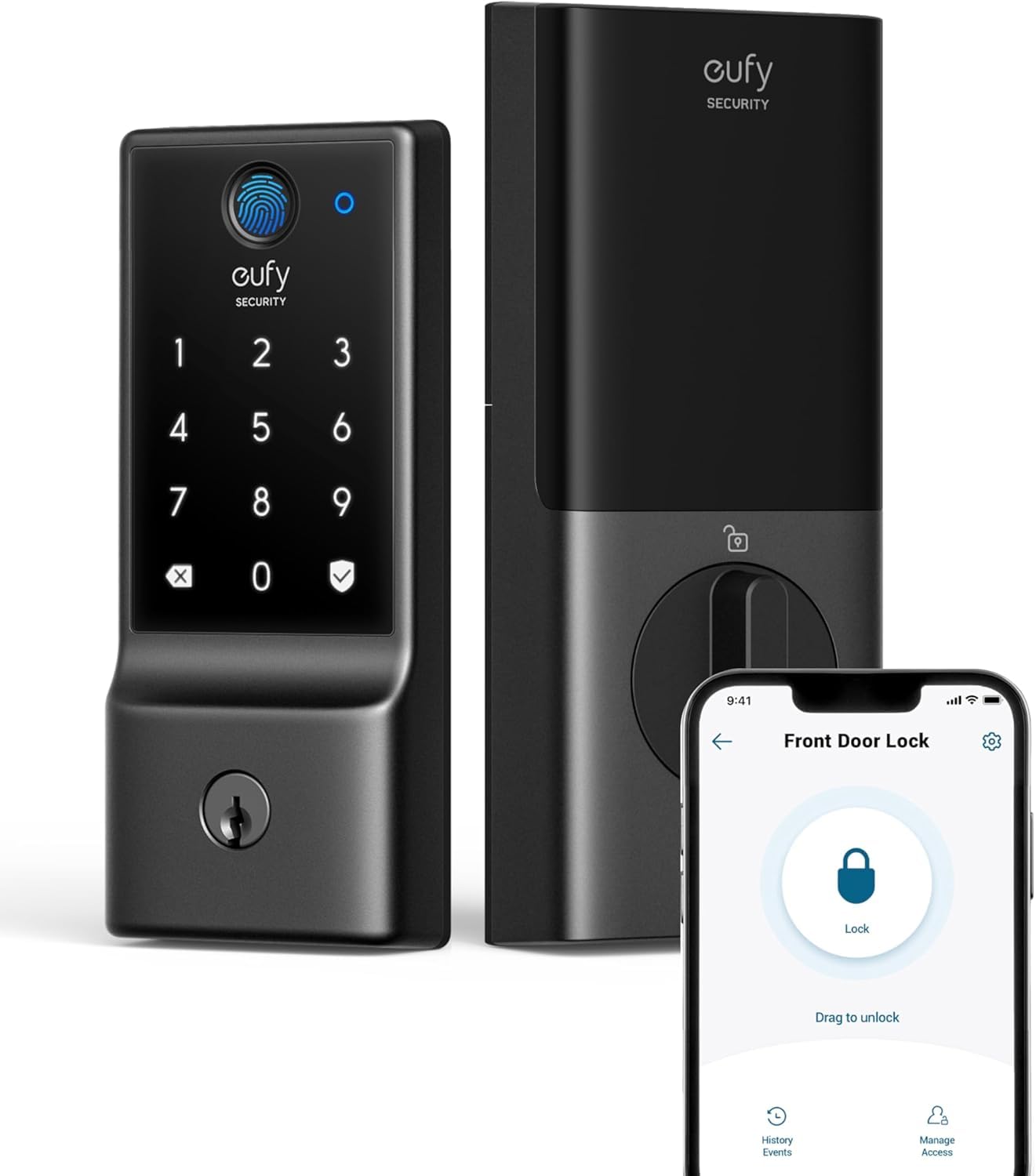
We recommend the eufy Security C220 for seniors who want easy keyless entry, remote control, and several backup options.
Pros
- Fingerprint, keypad, app, voice, and key access
- Built-in Wi-Fi works without a separate bridge
- Simple installation on many standard deadbolts
Cons
- Fingerprint scanning may need repeated attempts
- The lock uses eight AA batteries
- It does not include an exterior door handle
We found the fingerprint reader convenient for daily use, especially when carrying groceries or other items. The keypad and physical keys also provide useful backups if the reader does not recognize a finger.
Installation was straightforward on a compatible deadbolt and did not require drilling. The eufy Security app lets us lock or unlock the door remotely, manage access, view activity, and receive alerts about unusual entry attempts.
Battery life can reach about eight months, though frequent use may reduce it. The lock also offers Alexa and Google Assistant support, plus integration with other eufy devices. Its IP53 rating adds protection from limited dust and water exposure, but we would still keep it sheltered from heavy rain.
Yamiry Fingerprint Smart Lock

We recommend this lock for seniors who want several simple entry options and an easy installation, but buyers should confirm compatibility and plan for battery changes.
Pros
- Fingerprint, keypad, key fob, app, and physical key access
- Straightforward setup with a screwdriver
- Bright keypad and solid aluminum build
Cons
- Battery is not included
- Bluetooth connection may be unreliable for some users
- Some doors may need extra fitting around the strike plate
We found the fingerprint reader quick to use after setup, and the keypad gave us a clear backup when our hands were full. Physical keys and key fobs also make this a practical choice for seniors who prefer not to depend on a phone.
Installation felt simple overall, though the fit was not perfect on every door. Some users reported needing to adjust the strike plate, so we would check the door measurements before ordering.
The lock supports auto-locking, which helps if someone forgets to secure the door. However, the app uses Bluetooth unless we add the separate Wi-Fi gateway, and several reviews mention connection problems. The four AA batteries are also sold separately, so we would keep replacements nearby.
Philips Wi-Fi Fingerprint Smart Lock
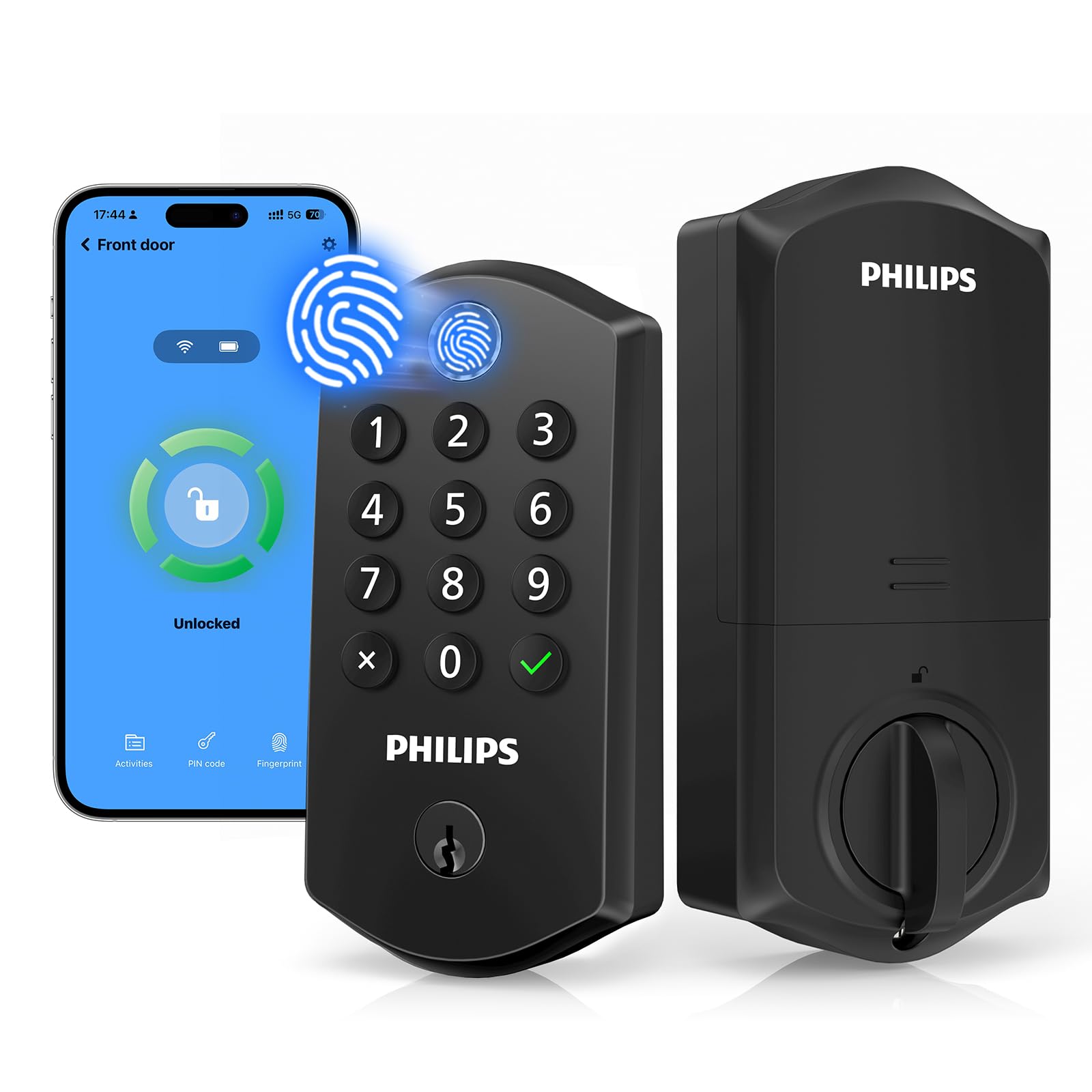
We recommend this lock for seniors who want several simple ways to enter, plus remote access through a phone.
Pros
- Fingerprint entry reduces the need to remember codes.
- Auto-lock and one-touch locking add daily convenience.
- Supports family, guest, and caregiver access codes.
Cons
- The app may lose its connection or feel difficult to use.
- Battery life may be short for some users.
- Installation requires eight AA alkaline batteries.
The fingerprint reader sits at the top, so we could unlock the door with one natural motion. The keypad also worked well for backup access, while the physical keys provided a dependable option when we did not want to use electronics.
We liked the flexible access settings. We could create separate codes for family members, caregivers, or guests and remove them later. The auto-lock timer also helped prevent us from leaving the door unlocked.
The lock installed easily on a standard door, though we needed to supply the batteries. Remote control and voice features add convenience, but reported app and connection problems may frustrate some users. We would choose this model for its fingerprint access and backup options, not for app performance alone.
Philips 4200 Series WiFi Smart Lock
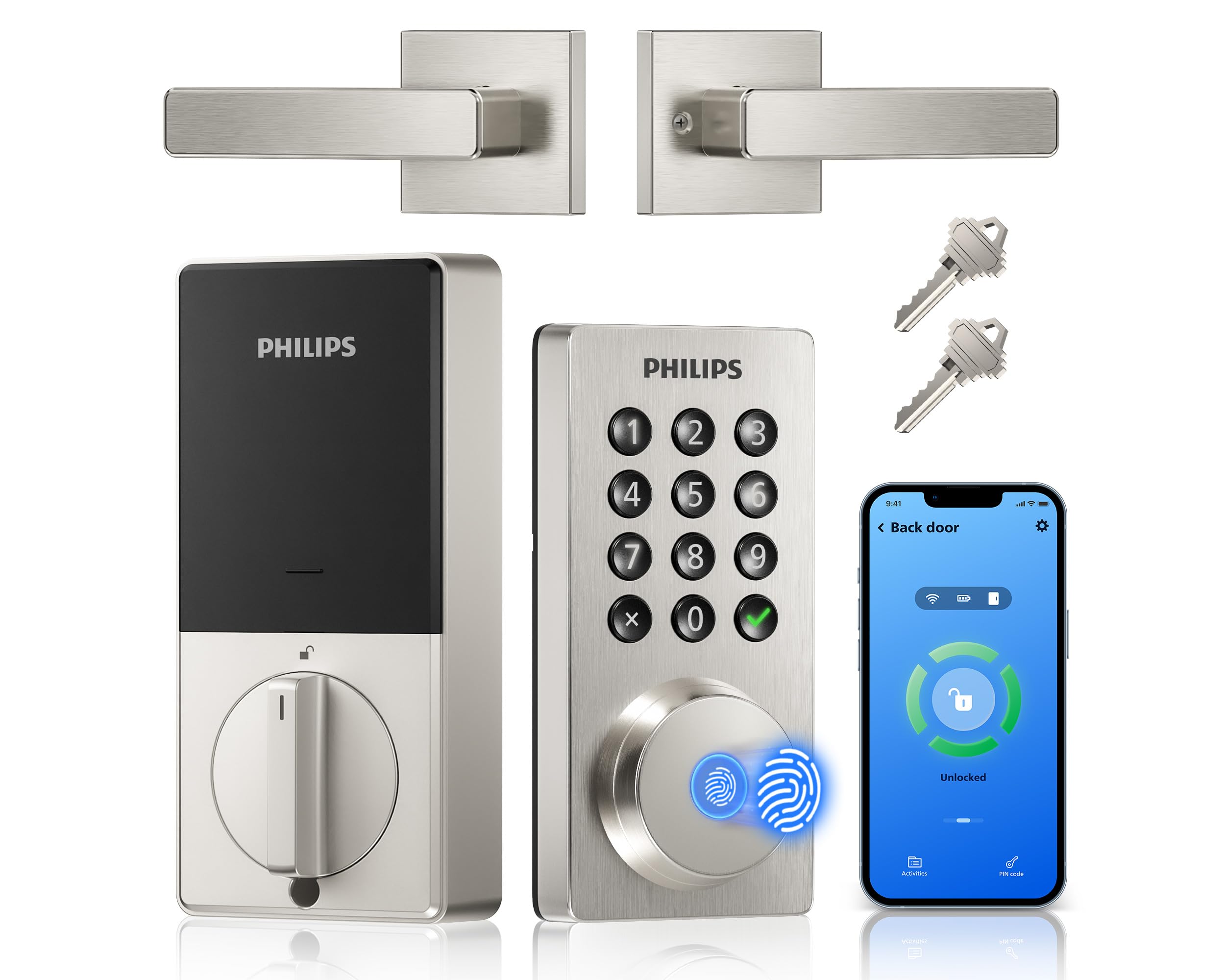
We recommend this lock for seniors who want several simple ways to enter, plus remote control through a phone app.
Pros
- Fingerprint, keypad, key, and app access
- Built-in WiFi with no separate hub
- Auto-lock and access history
Cons
- Requires eight AA batteries
- Battery life may drop with lower-quality batteries
- Door fit should be checked before installation
We found the fingerprint reader and backlit keypad useful for quick entry. Seniors can avoid carrying keys, while family members or caregivers can receive their own codes. The app also lets us check the lock status and unlock the door remotely when needed.
Installation was manageable with a screwdriver, and the included handle created a complete front-door setup. We would measure the door first because the lock fits doors from 1-3/8 to 1-3/4 inches thick.
The auto-lock feature helps prevent forgotten locks, and Alexa and Google Assistant support adds another control option. However, customer feedback shows that battery life can be short with basic batteries, so we would use premium alkaline batteries and monitor the low-battery warning.
Sifely Fingerprint Smart Door Lock

We recommend this lock for seniors who want several simple ways to enter without carrying a key.
Pros
- Fast fingerprint access
- Keypad, app, fob, and key entry
- Easy DIY installation for many standard doors
Cons
- Remote access requires the optional Wi-Fi Gateway
- Some doors may need extra drilling
- The lock may not support rekeying
We found the fingerprint reader quick and convenient during daily use. The backlit keypad also helped when entering after dark, while the anti-peeping feature allowed us to hide the code with extra numbers.
Multiple entry methods make this lock useful for families. Seniors can use a fingerprint or code, while caregivers can receive their own access method. The physical keys and key cards provide backup if the electronic features are unavailable.
Installation was straightforward on a compatible wood door, but door fit matters. Some users needed to enlarge the hole or make other adjustments, especially with less common door designs. We recommend checking the measurements before ordering.
The Sifely app handles users, access records, and Bluetooth unlocking. We needed the optional Wi-Fi Gateway for remote control and Alexa or Google Assistant support, so those features add to the total cost.
Buying Guide
We should choose a smart lock that matches the senior’s comfort, mobility, and daily routine. The best option should offer simple controls, reliable access, and a backup method if the battery or internet fails.
| Feature | What to look for |
|---|---|
| Easy operation | A large keypad, clear buttons, or an accessible app |
| Access methods | Keypad codes, physical keys, phone access, or fingerprint entry |
| Battery life | Long battery life and clear low-battery alerts |
| Backup entry | A keyway, external battery connection, or emergency power option |
| Installation | A design that fits the existing door and does not require major changes |
| Safety features | Auto-lock settings, tamper alerts, and temporary codes |
| Connectivity | Bluetooth for nearby use; Wi-Fi for remote access and alerts |
| Support | Clear instructions, dependable customer service, and a useful warranty |
We should favor models with large, easy-to-read numbers and settings that reduce daily steps. Voice control can help some users, but we should treat it as an extra feature rather than the only way to unlock the door.
Before buying, we should check door thickness, lock type, and available space around the handle. We should also confirm whether the lock needs a separate hub, paid service, or compatible smart-home system. A trusted family member or caregiver may need their own access code, so user management should be simple and secure.
Editor’s Choice
We choose the Schlage Encode Smart WiFi Deadbolt as our top pick for seniors. It connects directly to Wi-Fi, so we do not need a separate hub. The keypad lets users unlock the door with a code, while the smartphone app offers remote control and access alerts.
Its large, backlit numbers are easy to see at night. We can also create unique codes for family members, caregivers, or service workers and remove them when access ends.
| Feature | Why it helps seniors |
|---|---|
| Keypad entry | Reduces the need to handle small keys |
| Built-in Wi-Fi | Enables remote control without extra equipment |
| Large backlit buttons | Improves visibility in low light |
| Access codes | Allows controlled entry for trusted people |
| Physical key backup | Provides another way to unlock the door |
We recommend checking the door’s deadbolt size and backset before buying. Installation usually requires a screwdriver, but some doors may need adjustments. Users should also keep the physical key in a safe, easy-to-reach place in case the batteries run out.
Conclusion
We should choose a smart door lock based on the senior’s needs, comfort with technology, and door setup. Simple controls, clear alerts, and reliable access options often matter more than extra features.
Key features to consider include:
- Keypad entry for easy access without a phone
- Physical key backup for emergencies
- Voice prompts or app alerts for added guidance
- Long battery life to reduce maintenance
- Remote access for trusted family members or caregivers
- Easy installation that fits the existing door
We should also check whether the lock works with the home’s current door, Wi-Fi network, and smart home system. A family member or caregiver can help manage codes, update batteries, and review alerts when needed.
The best choice gives seniors dependable access while keeping daily use simple. We can improve safety and convenience by selecting a lock with clear controls, strong security, and backup entry methods.
FAQs
Are smart locks safe for seniors?
We can improve home access with features such as auto-locking, activity alerts, and temporary codes. We should choose a model with strong encryption, regular software updates, and a manual key option.
Which type of smart lock is easiest to use?
We usually recommend a keypad or fingerprint lock because it reduces the need to use a phone. Large numbers, clear voice prompts, and backlit controls can also make daily use easier.
Do smart locks work during a power or internet outage?
Most battery-powered locks still allow entry with a keypad, fingerprint, or physical key during an internet outage. We should check the product details because remote access and app alerts may stop working without Wi-Fi.
Can family members help manage the lock?
Yes. Many locks let us create separate codes for family, caregivers, or service workers. We can often set schedules, remove access, and review activity through the app.
How often should we replace the batteries?
We should check battery warnings and replace the batteries promptly. Many models provide low-battery alerts, but keeping a spare set nearby adds extra protection.
Will a smart lock fit an existing door?
Many products replace only the inside thumb-turn and work with common deadbolts. We should measure the lock and check the manufacturer’s compatibility guide before buying.
