
Logitech vs AnkerWork Webcam for Seniors: Which?


Long Handle Shoe Horn

Glucose Monitor Kit

Bed Exit Alarm Sensor
Logitech vs AnkerWork webcam for seniors is a useful comparison for anyone who wants clearer video calls without a hard setup. For a fair current comparison, this article looks at the Logitech Brio 505 and AnkerWork C310.
Both webcams offer autofocus, privacy protection, and features that can help with video calls. The main difference is simple: the Brio 505 focuses on easy Full HD use, while the C310 adds 4K video and more AI-based features.
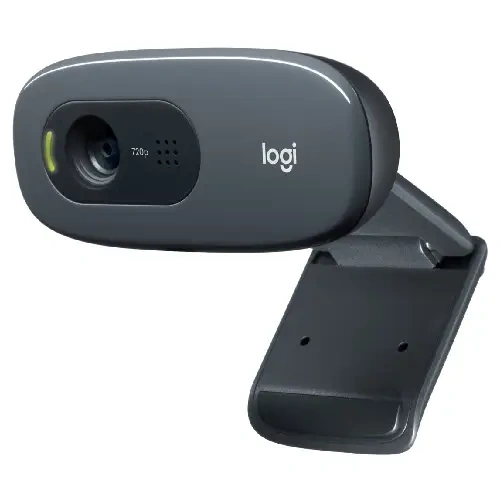
Quick Comparison
The Logitech Brio 505 is the simpler choice for seniors who mainly want easy video calls. It offers 1080p video, auto light correction, auto framing, and a built-in privacy shutter.
The AnkerWork C310 offers higher image resolution and AI autofocus, AI framing, and AI noise cancellation. It may suit users who want more advanced camera features and do not mind using extra software for some functions.
Logitech vs AnkerWork At a Glance
Here is the basic difference between the two webcams.
| Feature | Logitech Brio 505 | AnkerWork C310 |
|---|---|---|
| Video | 1080p at 30fps | Up to 4K |
| Autofocus | Yes | AI autofocus |
| Auto framing | RightSight | AI framing |
| Light support | RightLight 4 with HDR | 1080p HDR, f/2.0 |
| Microphones | Dual beamforming mics | Dual AI noise-canceling mics |
| Privacy | Built-in shutter | Built-in cover |
| Connection | USB-C | USB 3.0 |
| Main advantage | Simple video calls | Higher-resolution video |
The Brio 505 supports 1080p/30fps, 4x digital zoom, three field-of-view options, and a built-in privacy shutter. The C310 has a 12MP 4K camera and supports 1080p at up to 60fps through USB 3.0.
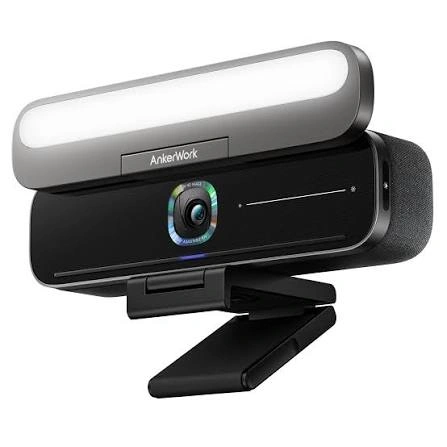
Logitech Brio 505 Review for Seniors
The Brio 505 is built around simple video meetings. Logitech lists it as a plug-and-play webcam with 1080p video, autofocus, automatic light correction, auto framing, and dual noise-reducing microphones.
Ease of Use
The Brio 505 is a strong fit for users who want a straightforward setup.
It connects through USB-C and works with Windows, macOS, and ChromeOS. Logitech also lists compatibility with popular video calling platforms, including Zoom, Microsoft Teams, and Google Meet.
The privacy shutter is also simple. A physical control can cover the lens when the camera is not needed.
Key Strengths
- Full HD 1080p video
- Autofocus
- Automatic light correction
- Auto framing
- Dual noise-reducing microphones
- Built-in privacy shutter
- Adjustable 65°, 78°, and 90° field of view
- 121 g weight including mount and cable
- Three-year limited hardware warranty
Potential Drawbacks
- It does not provide 4K video.
- Advanced settings may require Logitech software.
- USB-C connectivity may require an adapter on some older computers.
AnkerWork C310 Review for Seniors
The AnkerWork C310 takes a more feature-heavy approach. It has a 12MP 4K camera and adds AI autofocus, AI framing, and dual-microphone AI noise cancellation.
Ease of Use
The C310 is designed to work with USB 3.0 and includes a built-in privacy cover.
AnkerWork also provides software for its webcams. This can give users access to extra features, but it adds another layer of setup for someone who wants only basic video calls.
An AnkerWork customer review says the C310 was easy to set up, while another says some advertised features require downloading the software. Those are individual customer comments, not independent testing results.
Key Strengths
- 12MP 4K video
- AI autofocus
- AI framing
- AI noise cancellation
- 1080p at up to 60fps
- HDR support
- Built-in privacy cover
- USB 3.0 connection
- f/2.0 aperture and 1/2.5-inch sensor
Potential Drawbacks
- The extra features can make the setup more complex.
- 4K may be unnecessary for simple video calls.
- USB 3.0 is more demanding than a basic plug-and-play setup.
- Some advanced functions may require software.
Which Is Easier for Seniors to Use?
Ease of use depends on what the user wants from a webcam.
For a senior who mainly joins family calls, Zoom meetings, or Google Meet calls, the Brio 505 has a relatively simple feature set. It is designed as a plug-and-play webcam and offers automatic light correction and framing.
The C310 may be better for a user who wants more control and higher video quality. Its AI features can handle some camera adjustments automatically, but there are more features to understand.
If simple setup matters more than maximum image quality, the Brio 505 may be the easier fit.
Neither webcam requires batteries, so there is no charging routine to remember.
Performance Comparison
Both webcams can handle everyday video calls, but they focus on different levels of image quality.
The Brio 505 records at Full HD 1080p and includes RightLight 4 with HDR. Logitech says this helps the camera adjust to different lighting conditions.
The C310 goes further with a 12MP 4K camera. It also supports 1080p at 60fps and uses a 1/2.5-inch sensor with an f/2.0 aperture.
| Performance Area | Logitech Brio 505 | AnkerWork C310 |
|---|---|---|
| Resolution | 1080p | Up to 4K |
| Autofocus | Yes | AI autofocus |
| Framing | Auto framing | AI framing |
| Low-light support | RightLight 4 + HDR | HDR + f/2.0 |
| High-frame-rate video | 720p/60fps | 1080p/60fps |
For normal family calls, 1080p is already enough for many users. The C310’s 4K capability becomes more useful when image detail is a priority.
Comfort, Accessibility, and Senior-Friendly Design
A webcam does not require much physical effort after installation. The main senior-friendly factors are setup, controls, privacy, and how much software is needed.
The Brio 505 weighs 121 g with its mount and cable. Its detachable mounting clip can fit laptops, monitors, and displays.
The C310 also has a built-in privacy cover. Its AI features can reduce the need for manual camera adjustments during calls.
For someone who prefers fewer settings, Logitech’s simpler Full HD approach may be easier to understand. For someone comfortable with computer software, the C310’s extra features may be useful.
Features Comparison
The biggest feature gap is video resolution and the amount of automatic processing.
| Feature | Logitech Brio 505 | AnkerWork C310 |
|---|---|---|
| Auto light correction | RightLight 4 | HDR |
| Auto framing | RightSight | AI framing |
| Focus | Autofocus | AI autofocus |
| Microphones | Dual beamforming | Dual AI noise cancellation |
| Privacy | Shutter | Cover |
| Video maximum | 1080p/30fps | 4K |
| Software | Logi Tune | AnkerWork software |
The Brio 505 also has a Show Mode that lets the camera tilt down to show physical objects during a call. This could be useful for showing documents or other items to family members.
Price, Maintenance, and Long-Term Value
Webcam prices can change by country, retailer, and promotion, so a temporary price should not be treated as a permanent cost.
At the time of checking, AnkerWork’s UK store listed the C310 at £104.99. The current listing also shows a 30-day money-back guarantee and warranty support through AnkerWork.
The Logitech Brio 505 comes with a three-year limited hardware warranty according to Logitech’s product page.
| Cost Factor | Logitech Brio 505 | AnkerWork C310 |
|---|---|---|
| Main ownership cost | Webcam | Webcam |
| Battery replacement | Not required | Not required |
| Routine cleaning | Lens and body | Lens and body |
| Software | Logi Tune available | AnkerWork software |
| Warranty | 3-year limited hardware warranty | Warranty support available |
For long-term value, the key question is not just price. It is whether the user will actually use the extra C310 features.
Who Should Choose Logitech Brio 505?
Choose the Brio 505 if:
- You want simple Full HD video calls.
- Easy setup is important.
- You want automatic light correction.
- You prefer a physical privacy shutter.
- You mainly use Zoom, Teams, or Google Meet.
- You do not need 4K video.
- You want a longer stated hardware warranty.
Who Should Choose AnkerWork C310?
Choose the C310 if:
- You want higher-resolution video.
- 4K recording is useful to you.
- You want AI autofocus and AI framing.
- You want 1080p at up to 60fps.
- You are comfortable using webcam software.
- You want more advanced image and audio features.
Logitech vs AnkerWork Webcam — Final Verdict
For seniors who want a simple webcam for everyday calls, the Logitech Brio 505 offers a straightforward feature set with 1080p video, automatic light correction, auto framing, and a physical privacy shutter.
The AnkerWork C310 is the more feature-heavy option. Its 4K camera, AI autofocus, AI framing, and AI noise cancellation make it more suitable for users who want advanced video features.
Best for simple video calls: Logitech Brio 505
Best for higher-resolution video: AnkerWork C310
Best for advanced camera features: AnkerWork C310
Best for straightforward setup: Logitech Brio 505
These are category-based conclusions from the published specifications, not hands-on test results.
Scoring Summary
The scores below are editorial estimates based on the documented features above. They are not laboratory measurements.
| Category | Logitech Brio 505 | AnkerWork C310 |
|---|---|---|
| Ease of Use | 9/10 | 8/10 |
| Senior-Friendly Design | 9/10 | 8/10 |
| Performance | 8/10 | 9/10 |
| Maintenance | 9/10 | 8/10 |
| Feature Set | 8/10 | 9/10 |
| Value | 8/10 | 8/10 |
The scoring reflects the comparison criteria used in this article. It should not replace checking the user’s computer, software, and actual needs.
How We Evaluate Products
For SeniorsProTalk, the comparison focuses on practical factors that can affect everyday use.
We consider:
- Ease of setup
- Ease of operation
- Accessibility
- Comfort
- Privacy
- Video and audio performance
- Maintenance
- Useful features
- Compatibility
- Warranty
- Long-term value
No hands-on testing is claimed in this comparison. Product specifications and manufacturer information are used as the main evidence.
Senior-Specific Buying Considerations
A few simple checks can prevent problems after purchase.
Setup
Check whether the computer has the required USB port. Older computers may need an adapter.
Controls
Think about how many features the user actually needs. More features can be helpful, but they can also add complexity.
Privacy
Both webcams provide a physical way to cover the camera. This is useful when the webcam is not being used.
Software
Check whether the user is comfortable installing webcam software. Some advanced camera features may depend on it.
Display Quality
A 4K webcam does not automatically mean a 4K video call. The video-calling app, computer, internet connection, and display can affect the final result.
Common Buying Mistakes
Avoid these common mistakes when choosing between the two.
- Paying for 4K when 1080p is enough.
- Ignoring the computer’s USB ports.
- Assuming every video-call service uses the webcam’s maximum resolution.
- Choosing extra features that the user will never use.
- Forgetting to check software requirements.
- Ignoring the importance of a physical privacy cover.
Safety
Webcams have relatively few physical safety concerns, but privacy is important.
Use the physical shutter or cover when the camera is not needed. Keep the lens clean with a suitable soft cloth, and avoid using liquids directly on the camera.
Also check that the webcam is securely mounted before a video call. A loose mount can cause the camera to move or fall.
Conclusion
Logitech and AnkerWork take different approaches to webcams for seniors. The Brio 505 keeps the focus on Full HD video, automatic lighting, framing, and simple video calls. The C310 offers more advanced features, including 4K video and AI-based camera functions.
For a senior who values simplicity, the Brio 505 may be the easier choice. For someone who wants higher resolution and more advanced camera features, the C310 offers a broader feature set. The right choice depends mainly on how the webcam will be used and how much technology the user wants to manage.