
Best Desktop for Seniors: 5 Easy-To-Use Picks


Weighted Blanket
Medication Reminder Alarm

Bathtub Grab Bar
Finding the best desktop for seniors is less about raw computer power and more about comfort and ease of use. A clear display, simple setup, reliable performance, and a comfortable keyboard can make a big difference.
For most older adults, an all-in-one desktop is a smart choice because it keeps the computer, display, speakers, and camera in one unit. We compared current models from Apple, HP, Dell, Lenovo, and Acer to find options for different needs and budgets.
Best Overall: Apple iMac 24-Inch M4
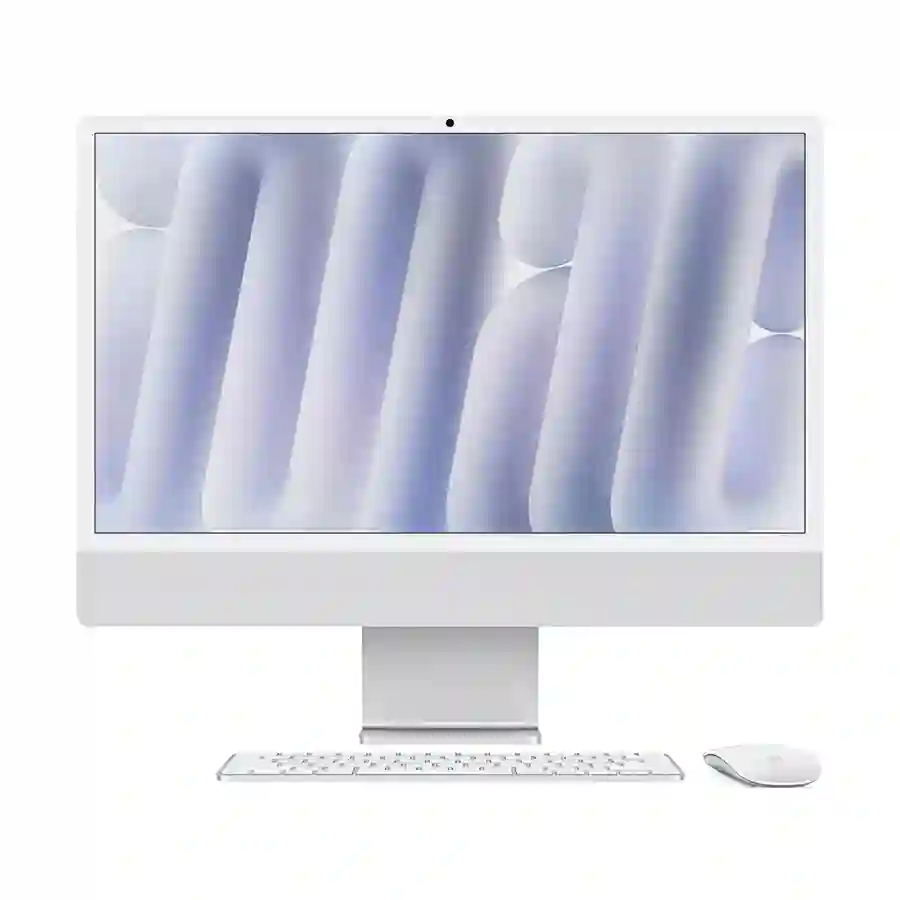
The iMac is our best overall pick for seniors who want a clean setup, a sharp screen, and strong long-term performance. Its 24-inch 4.5K Retina display is especially appealing for reading photos, websites, and documents.
The main drawback is price. It also uses macOS rather than Windows, so seniors who already know Windows may need some adjustment.
The current iMac uses Apple’s M4 chip and comes with 16GB unified memory and 256GB SSD storage in the entry configuration. Higher configurations offer more memory and storage.
| Specification | Details | Why It Matters |
|---|---|---|
| Display | 24-inch 4.5K Retina | Very sharp text and images |
| Memory | 16GB standard | Good for everyday multitasking |
| Storage | 256GB SSD standard | Fast startup and app loading |
| Camera | 12MP Center Stage | Useful for video calls |
Pros And Cons
The iMac has several features that make it comfortable for everyday home use, but it is not the cheapest option.
| Feature | Pro | Con |
|---|---|---|
| Display | Very sharp 4.5K screen | May be more than basic users need |
| Performance | Fast M4 chip | Higher cost |
| Setup | Clean all-in-one design | Less upgrade flexibility |
| Camera | 12MP camera | Mac-specific software |
| Storage | Fast SSD | 256GB may feel limited for large photo libraries |
Who Should Consider This Product
The iMac suits seniors who want a premium desktop for browsing, email, photos, video calls, streaming, and everyday productivity.
It is less suitable for someone who wants the lowest possible price or strongly prefers Windows.
Best For: Seniors wanting a premium, simple all-in-one Mac
Not Ideal For: Budget buyers or longtime Windows users who do not want to switch
Best Value: HP All-in-One 24-cr0203d
The HP All-in-One 24-cr0203d offers a more affordable Windows experience with a 23.8-inch touchscreen. Its Full HD IPS display has anti-glare treatment and 300-nit brightness, while the system includes 8GB memory and a 512GB SSD.
That combination makes it a practical choice for email, web browsing, video calls, documents, and streaming. The touchscreen can also be useful for seniors who find tapping on large on-screen controls easier than using a mouse.
| Specification | Details | Why It Matters |
|---|---|---|
| Display | 23.8-inch FHD IPS touch | Easy viewing and touch control |
| Memory | 8GB | Suitable for basic daily tasks |
| Storage | 512GB SSD | Plenty of room for everyday files |
| Camera | 720p HD | Suitable for video calls |
Pros And Cons
Its biggest advantage is the balance between a familiar Windows interface and a straightforward all-in-one design.
| Feature | Pro | Con |
|---|---|---|
| Touchscreen | Easy direct control | Not everyone needs touch |
| Display | Anti-glare IPS panel | Full HD is less sharp than iMac |
| Storage | 512GB SSD | 8GB RAM is modest |
| Connectivity | USB, HDMI, Ethernet | Fewer premium features |
| Setup | Includes keyboard and mouse | Wired accessories |
Who Should Consider This Product
This HP is a good fit for seniors who want Windows without paying for high-end hardware.
Someone doing heavy photo editing or demanding creative work should consider a more powerful configuration.
Best For: Seniors who want an affordable Windows all-in-one
Not Ideal For: Heavy creative workloads
Best Windows Performance: HP OmniStudio 24
The HP OmniStudio 24 is a strong choice for seniors who want more performance without moving to a large tower PC. One current configuration has an Intel Core 7 240H processor, 16GB DDR5 memory, 1TB SSD storage, and a 23.8-inch touch IPS display.

The display also has anti-glare treatment and low-blue-light features. The height-adjustable stand can make positioning the screen easier at a desk.
| Specification | Details | Why It Matters |
|---|---|---|
| Processor | Intel Core 7 240H | Strong everyday performance |
| Memory | 16GB DDR5 | Better multitasking |
| Storage | 1TB SSD | Useful for large file collections |
| Display | 23.8-inch FHD touch IPS | Clear and flexible viewing |
Pros And Cons
This model makes more sense for seniors who plan to keep their computer for several years and want extra performance.
| Feature | Pro | Con |
|---|---|---|
| Performance | Strong Core 7 processor | More power than basic users need |
| Memory | 16GB | Higher price |
| Storage | Large 1TB SSD | May be unnecessary for cloud users |
| Display | Touchscreen and anti-glare | Still only Full HD |
| Stand | Height-adjustable option | Larger footprint than some models |
Who Should Consider This Product
Consider it if the computer will handle many browser tabs, large photo collections, office applications, and frequent multitasking.
For simple email and web browsing, a cheaper model may offer better value.
Best For: Seniors who want a powerful Windows desktop
Not Ideal For: Basic users looking to spend as little as possible
Best Simple Windows Desktop: Lenovo IdeaCentre AIO 24
The Lenovo IdeaCentre AIO 24 is another good middle-ground option. A current IdeaCentre AIO 24IRH9 configuration uses an Intel Core i5-13420H processor, 8GB DDR5 memory, and a 512GB PCIe 4.0 SSD. Lenovo also provides two memory slots on this configuration, with support for up to 24GB DDR5 memory.

That gives the Lenovo some room for future memory expansion, which can be useful if the computer becomes slower as software demands increase.
| Specification | Details | Why It Matters |
|---|---|---|
| Processor | Intel Core i5-13420H | Strong everyday speed |
| Memory | 8GB DDR5 | Good starting point |
| Storage | 512GB SSD | Fast and useful capacity |
| Upgrade | Two memory slots | More flexibility later |
Pros And Cons
The Lenovo stands out because it combines a conventional Windows experience with a relatively straightforward all-in-one design.
| Feature | Pro | Con |
|---|---|---|
| Processor | Strong performance | More than needed for basic tasks |
| Storage | 512GB SSD | Not the largest option |
| Memory | Upgrade potential | 8GB may feel limited over time |
| Design | Space-saving all-in-one | Configuration varies by market |
Who Should Consider This Product
It is a good option for seniors who want a Windows desktop for browsing, documents, streaming, video calls, and photo management.
Check the exact local configuration before buying because IdeaCentre specifications vary by model and market.
Best For: Seniors wanting a balanced Windows all-in-one
Not Ideal For: Buyers who want a fixed, identical specification everywhere
Best Budget-Friendly Choice: Acer Aspire C24
The Acer Aspire C24 is worth considering when keeping the setup simple and affordable matters most. Current C24 configurations include a 23.8-inch Full HD display, Windows 11, SSD storage, Wi-Fi, Bluetooth, HDMI, and a wireless keyboard and mouse.
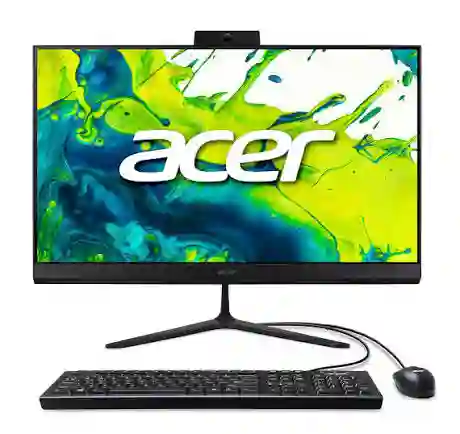
Some configurations are equipped with 16GB memory and 512GB SSD storage, while others have lower specifications. Check the exact model number before purchasing.
| Specification | Details | Why It Matters |
|---|---|---|
| Display | 23.8-inch Full HD | Comfortable desktop size |
| Operating system | Windows 11 Home | Familiar software |
| Storage | Up to 512GB SSD in listed models | Fast everyday use |
| Connectivity | Wi-Fi, Bluetooth, HDMI, USB | Flexible accessories |
Pros And Cons
The Aspire C24 is best viewed as a practical everyday computer rather than a premium machine.
| Feature | Pro | Con |
|---|---|---|
| Design | Compact all-in-one | Display is Full HD |
| Setup | Keyboard and mouse included | Configurations vary |
| Connectivity | Good selection of ports | Some models have only 8GB RAM |
| Storage | SSD options | Capacity depends on configuration |
| Price | Often positioned below premium models | Build and features are more basic |
Who Should Consider This Product
Choose the Acer if the main jobs are email, web browsing, video calls, streaming, documents, and light photo management.
It is not the best choice for demanding creative work or users who want premium display quality.
Best For: Seniors seeking a simple everyday Windows desktop
Not Ideal For: Demanding workloads or premium display needs
Comparison At A Glance
The five choices cover different budgets and priorities. The right pick depends more on how the computer will be used than on processor speed alone.
| Product | Best For | Key Trade-Off |
|---|---|---|
| Apple iMac M4 | Best overall | Higher price |
| HP All-in-One 24 | Best value | Only 8GB RAM |
| HP OmniStudio 24 | Performance | Costs more |
| Lenovo IdeaCentre AIO 24 | Balanced Windows use | Configuration varies |
| Acer Aspire C24 | Budget-friendly use | Basic Full HD display |
How We Chose These Products
We focused on features that can make everyday computer use easier for an older adult. The comparison considered manufacturer specifications, current models, display quality, memory, storage, connectivity, setup simplicity, and practical value.
We also looked for meaningful differences rather than selecting five computers that offer essentially the same experience.
| Evaluation Factor | Why It Matters |
|---|---|
| Ease Of Use | A simple setup reduces frustration |
| Display | Larger, clear screens can make reading easier |
| Performance | Helps apps open and run smoothly |
| Storage | Provides room for photos and documents |
| Connectivity | Makes accessories easier to add |
| Value | Avoids paying for features the user will not need |
What To Look For When Buying
The best desktop for seniors should match the person’s actual habits. A computer used mainly for email needs very different hardware from one used for photo editing.
Screen size and clarity: A 23.8- to 24-inch display is a useful starting point for many desktop users. Look for a sharp image and an anti-glare screen if reflections are distracting.
Memory: For basic tasks, 8GB can work. For heavier multitasking, 16GB is a more comfortable target.
Storage: An SSD is preferable to an old mechanical hard drive for everyday responsiveness. A 512GB SSD is a useful middle ground for many households.
Keyboard and mouse: Large, comfortable keys and a responsive mouse may matter more than having the fastest processor.
Operating system: Choose Windows if the user already knows Windows. Consider a Mac if the user prefers Apple’s interface or already uses Apple devices.
Camera and speakers: Built-in hardware can simplify video calls. This is one reason all-in-one desktops can be convenient.
Adjustability: A stand that allows comfortable positioning can help reduce awkward viewing angles.
Common Buying Mistakes
A powerful computer is not automatically the best computer for an older adult. These mistakes are easy to avoid.
| Mistake | Better Approach |
|---|---|
| Buying too much power | Match performance to real tasks |
| Choosing a tiny screen | Consider a comfortable 23.8-inch or larger display |
| Ignoring RAM | Prefer 16GB for heavier multitasking |
| Focusing only on price | Consider display, storage, support, and usability |
| Ignoring the operating system | Choose the platform the user understands |
Safety Considerations
Computer safety for seniors is mostly about comfortable use, account security, and avoiding online scams.
Keep the screen at a comfortable height and distance. Adjust text size and display scaling if reading small text is difficult. A good ergonomic setup can be more useful than buying a more powerful computer.
Online safety also matters. Use strong, unique passwords and enable two-factor authentication when available. Be cautious with unexpected pop-ups, phone calls, emails, and messages asking for remote computer access or payment.
If a caregiver helps manage the computer, make sure the user understands what information should never be shared, such as passwords, banking details, or security codes.
Frequently Asked Questions
These questions cover some of the most common concerns when choosing a desktop for an older adult.
What is the easiest desktop computer for seniors?
An all-in-one desktop is often one of the easiest designs because the computer and display are combined. The Apple iMac, HP All-in-One, and similar models also reduce cable clutter.
Is 8GB RAM enough for a senior?
Yes, 8GB can be enough for email, browsing, streaming, and basic documents. However, 16GB provides more breathing room for multitasking and can be a better long-term choice.
Is a 24-inch monitor good for seniors?
A 24-inch-class display can be a good balance between desk space and readability. The actual viewing experience also depends on resolution, brightness, text scaling, and viewing distance.
Is an iMac good for older adults?
It can be. The current 24-inch iMac has a 4.5K Retina display and M4 processor, giving it strong performance and a sharp screen. The main issue is its higher price and the need to learn macOS if the user is coming from Windows.
Should seniors buy a touchscreen desktop?
A touchscreen can be helpful for some users because it provides another way to interact with large on-screen controls. It is not essential, though, and a comfortable mouse and keyboard may be easier for others.
What computer specs matter most for seniors?
For most users, prioritize a clear display, SSD storage, enough RAM, comfortable input devices, reliable connectivity, and a simple operating system before paying extra for high-end processor performance.
Conclusion
For most seniors, the Apple iMac 24-inch M4 is the strongest overall choice if the budget allows and macOS is acceptable. Its sharp 4.5K display, modern M4 chip, built-in camera, and clean all-in-one design make it particularly attractive.
For Windows users, the HP All-in-One 24 offers a more affordable route, while the HP OmniStudio 24 is better for those who want extra performance. The Lenovo IdeaCentre AIO 24 offers a balanced option, and the Acer Aspire C24 makes sense for straightforward everyday computing.
The key is not to buy the most powerful desktop. Choose the one with the screen, controls, operating system, and features that the intended user will actually enjoy using.