
Best Cordless Phones for Seniors: 5 Easy Options

Audiobook Player

Compression Socks

Bed Exit Alarm Sensor
Choosing one of the best cordless phones for seniors is mostly about making everyday calls easier. A good senior-friendly phone should be simple to hold, easy to read, and clear enough to hear without a lot of setup.
Some older adults need large buttons and displays. Others may care more about loud ringers, hearing-aid support, call blocking, or extra handsets around the home. We compared current models with these needs in mind.
Best Overall: VTech SN5127
The VTech SN5127 is our best overall pick because it combines several senior-friendly features in one cordless system. It has large buttons, a large display, a 90dB ringer, and 50dB Audio Assist for louder, easier-to-understand calls.
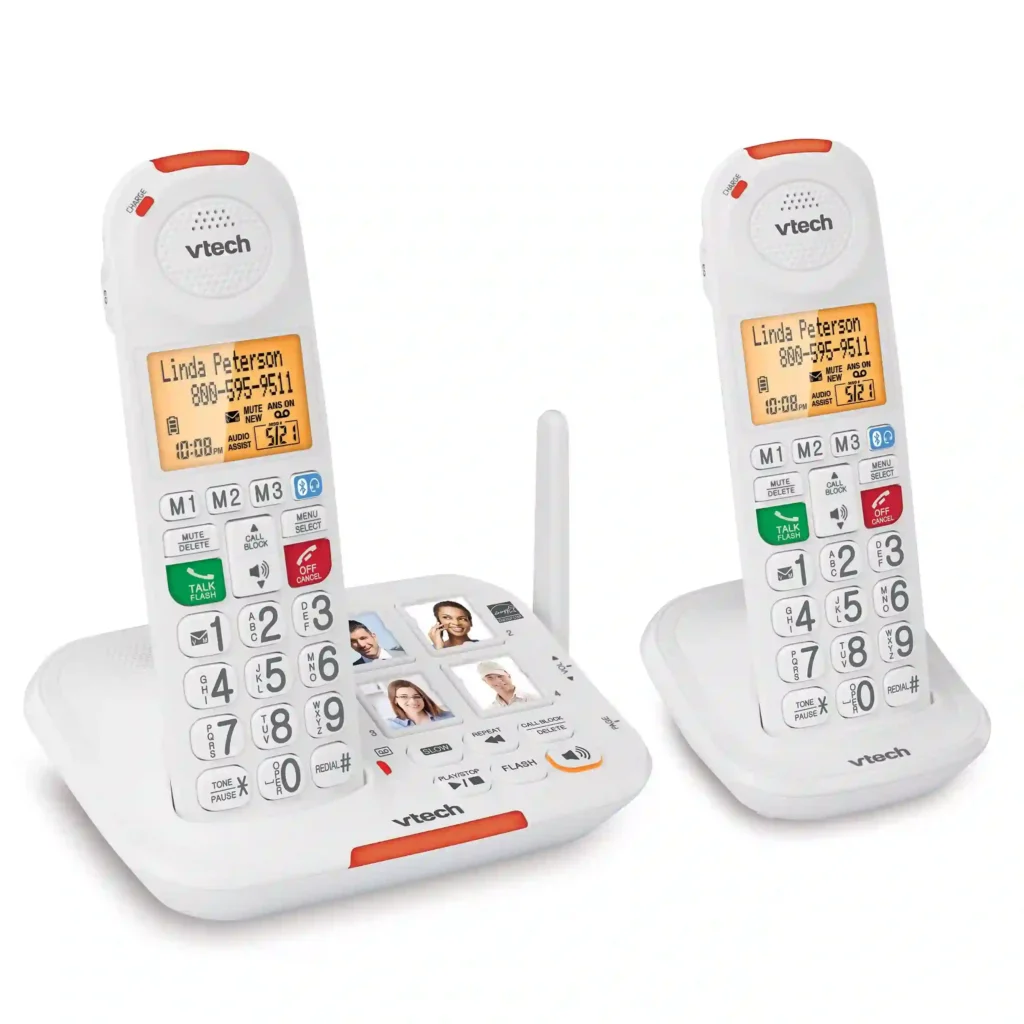
It also includes a photo dial for four frequently called contacts. That can be useful for someone who prefers pressing a familiar picture instead of remembering phone numbers.
The SN5127 also has Smart Call Blocker, caller ID announce, a digital answering system, speakerphone, and power backup. Its system can support up to four handsets.
Product Overview
This phone is a strong fit when both hearing and vision are concerns. The oversized buttons reduce the need for precise finger placement, while the large display makes caller information easier to see.
The 50dB Audio Assist feature is especially useful for users who struggle to understand normal phone volume. It temporarily boosts the overall volume and adjusts sound frequencies to make speech easier to understand.
Specifications
| Specification | Details | Why It Matters |
|---|---|---|
| Ringer | Up to 90dB | Easier to hear incoming calls |
| Audio Assist | Up to 50dB | Helps make speech easier to understand |
| Call blocking | Up to 1,000 numbers | Useful for unwanted calls |
| Handsets | Expandable to 4 | Good for larger homes |
Pros And Cons
| Feature | Pro | Con |
|---|---|---|
| Buttons | Oversized and easy to see | Larger design takes more space |
| Audio | Strong amplification | May be more than some users need |
| Calling | Photo dial and caller ID announce | Many features require setup |
| Security | Smart Call Blocker | Advanced settings can take time to learn |
Who Should Consider This Product
This is a good choice for seniors who want a traditional cordless phone but need stronger accessibility features.
It may be less suitable for someone who wants only a basic phone with very few buttons or settings.
Best For: Seniors who need easy-to-see controls and louder calls
Not Ideal For: Users who want the simplest possible basic phone
Best Value: AT&T EL51203
The AT&T EL51203 is a straightforward option for seniors who do not need advanced amplification. It offers an extra-large display, big buttons, caller ID, call waiting, and a handset speakerphone.
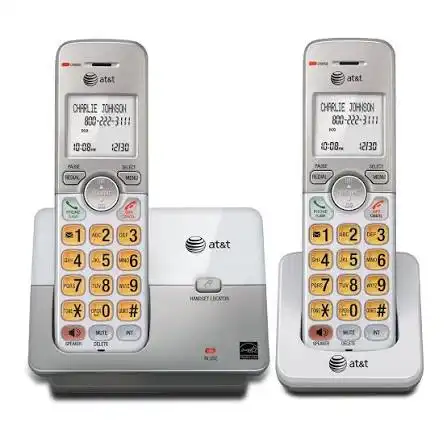
Its simple design makes it appealing for someone who mainly wants an easy cordless landline without paying for a large collection of specialized features.
Product Overview
The extra-large display is one of its biggest advantages. High-contrast text helps make caller information and call history easier to view.
The system also includes a simulated full-duplex speakerphone, which allows both people to speak and be heard during hands-free conversations.
Specifications
| Specification | Details | Why It Matters |
|---|---|---|
| Handsets | 2 | Useful for two areas |
| Display | Extra-large | Easier viewing |
| Caller ID | 50-name/number history | Helps identify callers |
| Speakerphone | Full-duplex | Allows hands-free calls |
Pros And Cons
| Feature | Pro | Con |
|---|---|---|
| Controls | Big buttons | Not as specialized as amplified models |
| Display | Extra-large screen | Still requires normal reading ability |
| Price | Relatively affordable | Fewer senior-specific features |
| Calling | Speakerphone included | No 50dB Audio Assist |
Who Should Consider This Product
The EL51203 makes sense for seniors who mainly need a readable display, large controls, and a simple cordless setup.
Someone with significant hearing difficulty may be better served by an amplified model such as the VTech SN5127.
Best For: Seniors who want simple controls at a lower cost
Not Ideal For: Users who need strong call amplification
Best For Range And Audio: AT&T CL82215
The AT&T CL82215 is a good choice for homes where cordless range and call quality matter. It includes two handsets, HD audio with an equalizer, caller ID announce, push-to-talk, and what AT&T describes as unsurpassed range.

The equalizer is useful because it gives the user more control over how calls sound. That can be helpful when normal voice settings do not feel comfortable.
Product Overview
This model is less focused on oversized senior controls and more focused on communication features. It can be a practical choice for an older adult who is comfortable using a conventional cordless handset.
The two-handset setup also lets you keep one phone in a bedroom and another in a living area without needing to walk back to a single base.
Specifications
| Specification | Details | Why It Matters |
|---|---|---|
| Handsets | 2 | Convenient around the home |
| Audio | HD audio with equalizer | Lets users customize sound |
| Caller ID | Caller ID announce | Identifies incoming callers |
| Push-to-talk | Included | Useful for quick handset-to-handset communication |
Pros And Cons
| Feature | Pro | Con |
|---|---|---|
| Audio | HD audio and equalizer | Not a dedicated amplified senior phone |
| Range | Designed for extended range | Actual range varies by home |
| Handsets | Two included | More advanced controls may take learning |
| Communication | Push-to-talk | Not needed by every user |
Who Should Consider This Product
Choose this model when the senior wants a conventional cordless system with stronger communication features and good flexibility around the home.
It is not the first choice for someone who needs very large buttons or powerful volume amplification.
Best For: Seniors who value range and customizable audio
Not Ideal For: Users with major vision or hearing limitations
Best For Easy Viewing: VTech CS6649
The VTech CS6649 is a corded/cordless answering system with a backlit keypad and display. The entire keypad illuminates along with the LCD screen, making it easier to view in dim conditions.
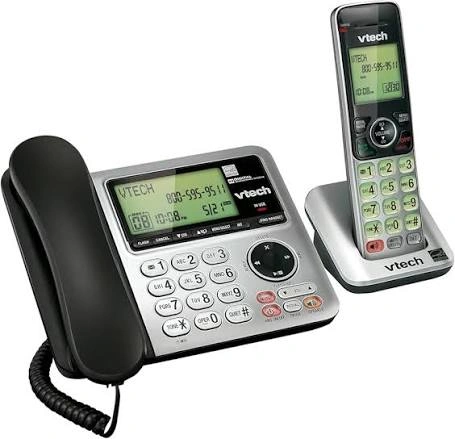
It also provides caller ID, call waiting, handset and base speakerphones, and ECO mode.
Product Overview
The backlit controls are the main reason to consider this model. A senior who often makes calls in the evening or in a room with lower lighting may find illuminated controls easier to use.
The handset and base both include speakerphones, giving users more flexibility during calls.
Specifications
| Specification | Details | Why It Matters |
|---|---|---|
| Keypad | Backlit | Easier to see in low light |
| Display | Backlit LCD | Better visibility |
| Caller ID | Stores 50 calls | Helps identify recent callers |
| Speakerphones | Handset and base | Flexible hands-free calling |
Pros And Cons
| Feature | Pro | Con |
|---|---|---|
| Visibility | Backlit keypad and display | Buttons are not oversized |
| Calling | Two speakerphone locations | Less senior-focused than SN5127 |
| Caller ID | Stores 50 calls | Requires caller ID service |
| Power | ECO mode | Fewer accessibility features |
Who Should Consider This Product
This model suits seniors who have normal hearing but find small, dark controls difficult to use.
For someone who needs strong amplification, the VTech CareLine range is a better fit.
Best For: Seniors who want easy-to-see controls
Not Ideal For: Users who need amplified calling
Best Premium Features: Panasonic KX-TGD89
The Panasonic KX-TGD89 series stands out for its advanced communication and call-management features. The compatible KX-TGDA99 handset supports Bluetooth headphones, and the system can be expanded with additional handsets.
It also offers automated call blocking, telemarketing call blocking, one-touch blocking for up to 1,000 additional numbers, and one-ring scam alerts.
Product Overview
This is a better match for a tech-comfortable senior or family household that wants more than basic calling.
Bluetooth headset support can make hands-free conversations easier. Panasonic also provides an easy-to-read backlit display on the compatible handset.
The main drawback is complexity. A user who wants only large buttons and simple dialing may find its broader feature set unnecessary.
Specifications
| Specification | Details | Why It Matters |
|---|---|---|
| Bluetooth | Supports compatible headphones | Allows hands-free calls |
| Call blocking | Automated and manual options | Helps reduce unwanted calls |
| Expansion | Up to 6 handsets | Useful in larger homes |
| Display | 1.6-inch backlit display on KX-TGDA99S | Easier to view |
Pros And Cons
| Feature | Pro | Con |
|---|---|---|
| Bluetooth | Wireless headset support | Requires compatible headset |
| Call blocking | Strong blocking features | More settings to learn |
| Expansion | Supports multiple handsets | Can increase overall cost |
| Display | Backlit display | Not as senior-focused as oversized-button models |
Who Should Consider This Product
This is a good choice for seniors who want advanced call management, Bluetooth connectivity, and room-to-room expansion.
It may be too complicated for someone who wants a basic phone with minimal controls.
Best For: Seniors who want premium connectivity and call blocking
Not Ideal For: Users who prefer very simple phones
Comparison At A Glance
Each model has a different strength. The best choice depends on whether the priority is amplification, simplicity, range, visibility, or advanced features.
| Product | Best For | Key Trade-Off |
|---|---|---|
| VTech SN5127 | Overall senior usability | More features to learn |
| AT&T EL51203 | Value and simplicity | Limited amplification |
| AT&T CL82215 | Range and audio | Fewer senior-specific controls |
| VTech CS6649 | Easy viewing | No strong amplification |
| Panasonic KX-TGD89 | Premium features | More complex setup |
How We Chose These Products
We focused on features that can make a cordless phone easier for an older adult to use. Manufacturer specifications were given priority, with attention to current product availability and senior-focused features.
We also looked at practical differences between models rather than choosing five phones with nearly identical designs.
| Evaluation Factor | Why It Matters |
|---|---|
| Ease Of Use | Reduces frustration during everyday calls |
| Visibility | Helps users read buttons and caller information |
| Audio | Supports clearer conversations |
| Safety | Call blocking can reduce unwanted calls |
| Flexibility | Extra handsets help cover larger homes |
| Value | Helps match features to the user’s actual needs |
What To Look For When Buying
The right cordless phone for a senior depends on the person’s abilities. A phone with every available feature is not automatically the best choice.
Look For Large Buttons
Large, well-spaced buttons can help users with reduced dexterity or vision. They can also make dialing less frustrating.
Check The Display
A large or backlit display can make caller ID easier to read. High-contrast text can be useful when small text is difficult to see.
Consider Volume And Audio
If hearing is a concern, look for amplified models rather than relying only on a louder ringer. The VTech SN5127, for example, combines a loud ringer with Audio Assist.
Think About Handset Placement
One handset may be enough for a small home. Multiple handsets can be more convenient if the senior spends time in several rooms.
Look For Hearing-Aid Compatibility
If the user wears hearing aids, check the phone’s compatibility information before buying. Some VTech models, including the CS6529 family, are identified as hearing-aid compatible.
Do Not Ignore Call Blocking
Spam and robocalls can make a landline frustrating. Some newer systems offer dedicated call-blocking tools, while others focus mainly on basic caller ID.
Common Buying Mistakes
A few simple mistakes can lead to a phone that looks good on paper but is difficult for the intended user.
| Mistake | Better Approach |
|---|---|
| Choosing only by price | Match features to the user’s needs |
| Ignoring hearing needs | Check amplification and audio options |
| Ignoring button size | Look for large, easy-to-press controls |
| Buying too many features | Choose features the user will actually use |
| Forgetting handset placement | Consider how many rooms need a phone |
Safety Considerations
Cordless phones are generally simple devices, but a few points are worth checking before installation.
Keep the base and chargers on stable surfaces where cords will not create a trip hazard. Make sure the handset is fully charged and that the user knows where to find the phone during an emergency.
If hearing, vision, dexterity, or memory problems significantly affect phone use, consider the person’s individual needs before choosing a model. A caregiver or appropriate professional can help determine which accessibility features are most useful.
Also remember that caller ID, call blocking, and other phone features may depend on the user’s telephone service.
Frequently Asked Questions
What is the easiest cordless phone for seniors?
The VTech SN5127 is one of the easiest options when accessibility is the priority. It combines oversized buttons, a large display, a loud ringer, and Audio Assist.
What cordless phone is best for seniors with hearing problems?
An amplified phone is usually a better starting point than a basic cordless model. The VTech SN5127 offers 50dB Audio Assist and a 90dB ringer, making it particularly suitable for users who need stronger audio support.
Are cordless phones good for older adults?
Yes. Cordless phones let users carry the handset between rooms instead of staying beside the base. Multiple-handset systems can make this even more convenient.
Conclusion
The VTech SN5127 is the strongest overall choice for most seniors because it combines large controls, a large display, strong ringer volume, audio assistance, photo dialing, and call blocking in one system.
For a simpler and more affordable setup, the AT&T EL51203 is a practical choice. The AT&T CL82215 is worth considering when range and audio customization matter, while the VTech CS6649 is a good fit for easier viewing.
For seniors who want advanced call management and Bluetooth connectivity, the Panasonic KX-TGD89 series offers more flexibility. The key is to choose based on the user’s actual hearing, vision, dexterity, and daily calling habits rather than simply buying the phone with the longest feature list.