
ASUS vs Google Nest WiFi for Seniors: Which?


Non-Slip Bathroom Mat

Arthritis Gloves

Digital Blood Pressure Monitor
ASUS vs Google Nest WiFi can be a useful comparison for seniors who want stable Wi-Fi without making home networking too hard. Both brands offer mesh systems that can help spread Wi-Fi across a home.
The main difference is how much control you want. ASUS ZenWiFi systems offer many network settings and support a wide range of AiMesh devices. Google Nest Wifi Pro keeps the experience more focused on the Google Home app and simple home management.
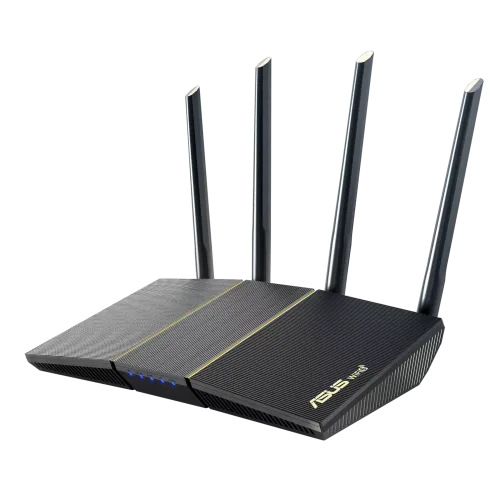
Quick Comparison
For seniors who want simple setup and a clean app experience, Google Nest Wifi Pro may be easier to manage.
ASUS ZenWiFi may suit seniors, families, or caregivers who want more network controls and expansion options. ASUS also supports AiMesh, which lets compatible ASUS routers and nodes work together.
The better choice depends less on age and more on how much control the user wants.

ASUS vs Google Nest WiFi At a Glance
Here is a quick look at the main differences that may matter in everyday use.
| Feature | ASUS ZenWiFi | Google Nest Wifi Pro |
|---|---|---|
| Setup | ASUS Router app | Google Home app |
| Mesh system | AiMesh | Google mesh |
| Wi-Fi generation | Varies by model | Wi-Fi 6E |
| App management | Extensive controls | Simple home-focused controls |
| Expansion | Many AiMesh-compatible options | Add Nest Wifi Pro routers |
| Smart home | Varies by model | Matter and Thread |
| Security | Varies by model | WPA3 and automatic updates |
| Wired ports | Varies by model | Two 1Gbps Ethernet ports |
ASUS features vary by ZenWiFi model. Nest Wifi Pro uses Wi-Fi 6E and supports 6 GHz, with two 1Gbps Ethernet ports on each router.
ASUS ZenWiFi Review for Seniors
ASUS ZenWiFi is a family of mesh Wi-Fi systems rather than one single router. That gives buyers more choice, but it also means the exact features depend on the model.
For example, current ZenWiFi models can offer Wi-Fi 7, AiMesh expansion, multiple network options, security tools, VPN features, and parental controls.
Ease of Use
ASUS has made setup much easier than the traditional router setup process.
The ASUS Router app provides guided setup. ASUS says ZenWiFi systems can be set up in three steps, with the mesh nodes automatically synchronizing their settings.
This can help a senior who wants to avoid a long setup process.
The trade-off is that ASUS gives users many settings. That is useful for advanced users, but it can feel like too much if the goal is simply to get Wi-Fi working.
Key Strengths
- Easy app-based setup
- Wide choice of ZenWiFi models
- AiMesh allows network expansion
- Strong control over network settings
- Some models include advanced security tools
- Useful for larger or more complex home networks
Potential Drawbacks
- Features differ between models
- Many settings can feel confusing
- Choosing the right ZenWiFi model takes some research
- Advanced features may be unnecessary for a simple home network
Google Nest Wifi Pro Review for Seniors
Google Nest Wifi Pro takes a more focused approach. It is designed as a whole-home mesh system and is managed through the Google Home app.
Nest Wifi Pro supports Wi-Fi 6E, including the 6 GHz band. Google lists support for up to 100 connected devices per router and multiple simultaneous 4K streams under its stated test conditions.
Ease of Use
Google’s approach may appeal to someone who wants fewer networking decisions.
Setup uses the Google Home app. The router connects to the modem, and additional Nest Wifi Pro routers can be used to extend the mesh network.
This can be useful for a senior who already uses Google Home products.
The downside is that Nest Wifi Pro is less flexible when mixing generations. Google states that Nest Wifi Pro cannot form a mesh with older Nest Wifi or Google Wifi devices.
Key Strengths
- Simple Google Home management
- Wi-Fi 6E support
- 6 GHz band
- Automatic security updates
- WPA3 security
- Matter and Thread support
- Good fit for a Google smart home
Potential Drawbacks
- Older Nest Wifi and Google Wifi devices cannot be mixed with Nest Wifi Pro
- Only two 1Gbps Ethernet ports per router
- Less flexible than ASUS for advanced networking
- A Google account and Google Home app are required for setup
Which Is Easier for Seniors to Use?
Both systems can be easier than traditional router setups.
The key difference is simplicity versus control.
ASUS gives users more choices. Its Router app can handle setup and network management, and ZenWiFi nodes can synchronize settings automatically.
Google keeps the experience more closely tied to the Google Home app. This can make sense for someone who already uses Google smart-home devices.
If a family member manages the network remotely, a simple app and clear device list may matter more than advanced router settings.
For a senior who wants the fewest decisions, Nest Wifi Pro may feel more straightforward. For a senior with a tech-savvy caregiver who wants deeper control, ASUS may offer more flexibility.
Performance Comparison
Performance depends heavily on the exact ASUS model, home layout, internet connection, and client devices.
This is important because ASUS ZenWiFi is a product family. A Wi-Fi 7 ZenWiFi model and an older ZenWiFi model will not offer the same wireless performance.
Nest Wifi Pro has a clearer hardware specification. It uses tri-band Wi-Fi 6E with 2.4 GHz, 5 GHz, and 6 GHz bands. Google lists a combined AXE5400 rating.
| Performance Area | ASUS ZenWiFi | Google Nest Wifi Pro |
|---|---|---|
| Wi-Fi standard | Depends on model | Wi-Fi 6E |
| 6 GHz | Depends on model | Yes |
| Mesh roaming | AiMesh | Automatic mesh roaming |
| Device capacity | Depends on model | Up to 100 devices per point under Google’s stated conditions |
| Ethernet | Depends on model | Two 1Gbps ports |
Neither system can overcome a weak internet connection or poor router placement. Walls, distance, and home layout can also affect coverage.
Comfort, Accessibility, and Senior-Friendly Design
A router does not require much physical effort after installation. The bigger issue is how easy it is to manage later.
ASUS may be helpful when a caregiver wants detailed network controls. The ASUS Router app provides network information and management from a phone.
Google Nest Wifi Pro may be easier for households already using Google Home.
Neither system should be chosen only because it is marketed as smart. Look at the actual home setup, internet speed, number of devices, and who will manage the network.
Features Comparison
The most useful differences are in network control, smart-home support, and expansion.
| Feature | ASUS ZenWiFi | Google Nest Wifi Pro |
|---|---|---|
| Mobile app | ASUS Router | Google Home |
| Mesh expansion | AiMesh-compatible devices | Additional Nest Wifi Pro routers |
| Smart-home focus | Depends on model | Matter and Thread |
| Security updates | Depends on model | Automatic |
| Advanced controls | Strong | More streamlined |
| VPN features | Available on some models | More limited router focus |
ASUS’s current ZenWiFi range includes models with features such as VPNs, parental controls, IoT networks, and network segmentation.
Nest Wifi Pro includes WPA3, automatic security updates, guest access, family protections, Matter, and a built-in Thread border router.
Price, Maintenance, and Long-Term Value
Exact pricing changes by model and market, so it is better not to judge either brand from one temporary sale price.
ASUS has an advantage in choice. A buyer can select from different ZenWiFi models and expand an AiMesh network with compatible ASUS equipment.
Google offers a simpler product family, but Nest Wifi Pro has an important compatibility limit. Older Nest Wifi and Google Wifi hardware cannot be combined with it in the same mesh.
For long-term value, check the cost of the full mesh system rather than only the first router.
Who Should Choose ASUS ZenWiFi?
Choose ASUS ZenWiFi if:
- You want more control over the home network.
- A caregiver or family member may manage the router.
- You want many AiMesh expansion choices.
- You have a larger or more complex home network.
- You want features such as VPN or IoT network controls on supported models.
- You want to choose from several generations and performance levels.
Who Should Choose Google Nest Wifi Pro?
Choose Google Nest Wifi Pro if:
- You want a simple Google Home-based system.
- You already use Google smart-home products.
- You want Wi-Fi 6E and the 6 GHz band.
- You prefer fewer networking settings.
- You want automatic security updates.
- You want Matter and Thread support.
ASUS vs Google Nest WiFi — Final Verdict
ASUS ZenWiFi and Google Nest Wifi Pro take different approaches.
For simpler home management: Google Nest Wifi Pro may be easier.
For network flexibility: ASUS ZenWiFi offers more options.
For Wi-Fi 6E: Nest Wifi Pro has a clear advantage over ZenWiFi models that do not support Wi-Fi 6E. Some newer ASUS models use newer Wi-Fi standards, so the exact ASUS model matters.
For advanced controls: ASUS is the more flexible choice across supported ZenWiFi models.
The most important point is to compare the exact ASUS model with Nest Wifi Pro before buying. “ASUS ZenWiFi” covers many different routers, so brand-level specifications can be misleading.
Scoring Summary
Scores are not used here because ASUS ZenWiFi is a broad product family with major differences between models. Giving one number to the entire ASUS range would create false precision.
| Category | ASUS ZenWiFi | Google Nest Wifi Pro |
|---|---|---|
| Ease of setup | Strong | Strong |
| Network control | Model-dependent, generally extensive | Streamlined |
| Smart-home features | Model-dependent | Strong |
| Wi-Fi 6E | Model-dependent | Yes |
| Expansion flexibility | Strong with AiMesh | More limited |
| Long-term flexibility | High across the range | More controlled ecosystem |
How We Evaluate Products
This comparison focuses on practical factors that can affect everyday use.
These include setup, app management, accessibility, network control, performance, security, expansion, maintenance, and long-term practicality.
No hands-on testing is claimed here. The comparison uses current manufacturer information and focuses on how the documented features may affect senior users.
Senior-Specific Buying Considerations
Before choosing a mesh router, think about who will manage the network.
Setup
Check whether the senior will install the system alone or whether a family member will help.
App Controls
A clear mobile app can make troubleshooting easier. This matters if someone needs to check connected devices or restart the network.
Coverage
Think about the home’s size and wall layout. A larger home may need more than one mesh unit.
Smart Home
If the home already uses Google Home, Nest Wifi Pro’s Matter and Thread support may be useful.
Future Expansion
ASUS AiMesh offers many compatible expansion choices. Nest Wifi Pro requires additional Nest Wifi Pro routers for its mesh network.
Common Buying Mistakes
Avoid these common mistakes:
- Choosing by brand name alone
- Ignoring the exact ASUS model
- Buying more speed than the internet connection can use
- Forgetting the cost of extra mesh units
- Assuming older Google Wi-Fi devices will work with Nest Wifi Pro
- Placing mesh units too far apart
Safety
Routers are generally low-risk household electronics, but normal electrical safety still matters.
Use the supplied power adapter where required. Keep the router and power equipment away from water and avoid blocking ventilation.
For installation, a family member or caregiver can help if reaching outlets, moving equipment, or managing cables is difficult.
Frequently Asked Questions
Is ASUS or Google Nest Wifi easier for seniors?
Google Nest Wifi Pro may feel simpler because its management is centered on the Google Home app. ASUS offers easy app setup too, but its wider range of settings can require more learning.
Does ASUS ZenWiFi work as a mesh system?
Yes. ASUS ZenWiFi uses AiMesh technology to connect compatible ASUS routers and mesh nodes into one network.
Does Nest Wifi Pro support Wi-Fi 6E?
Yes. Nest Wifi Pro is a Wi-Fi 6E system with 2.4 GHz, 5 GHz, and 6 GHz bands.
Can Nest Wifi Pro work with older Google Wifi devices?
No. Google states that Nest Wifi Pro cannot be combined with older Nest Wifi or Google Wifi devices in the same mesh network.
Which is better for a Google smart home?
Nest Wifi Pro has a strong Google smart-home focus and includes Matter and Thread support.
Which is better if a caregiver wants more control?
ASUS ZenWiFi may be more suitable when detailed network management matters, especially on models with advanced ASUS networking features.
Conclusion
ASUS ZenWiFi and Google Nest Wifi Pro can both provide whole-home mesh Wi-Fi, but they target different needs. Nest Wifi Pro focuses on a simple Google Home experience, while ASUS ZenWiFi offers more flexibility and network control.
For seniors, the best choice depends on the home, existing smart-home setup, internet plan, and who will manage the network. Most importantly, compare the exact ASUS ZenWiFi model with Nest Wifi Pro before making a decision.
