
ASUS vs Eero Wi-Fi Router for Seniors: Which?


Orthopedic Sandals

Anti-Glare Reading Glasses

Kitchen Timer with Large Display
ASUS vs Eero Wi-Fi router for seniors is a useful comparison when you want strong home Wi-Fi without making network setup harder than it needs to be. Both brands offer modern Wi-Fi 7 routers, but they take different approaches.
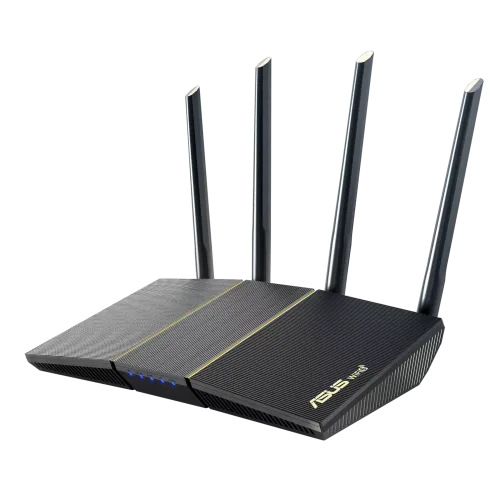
For this comparison, ASUS refers to the ASUS RT-BE58U, while Eero refers to the eero 7. Both support Wi-Fi 7, but ASUS offers more advanced network controls, while Eero puts more focus on simple app-based management and mesh networking.
Quick Comparison
For seniors who want simple setup and easy day-to-day control, eero 7 has the simpler approach. Its network is managed through the Eero app, and its TrueMesh system is designed to make whole-home coverage easier to manage.
ASUS RT-BE58U is more suitable for someone who wants greater control over the home network. It offers AiMesh, advanced security, VPN options, IoT networking, and more network settings.
The main difference is simple: Eero focuses on simplicity, while ASUS gives you more control.

ASUS vs Eero At a Glance
The two routers can both serve a modern home, but their strengths are different.
| Feature | ASUS RT-BE58U | eero 7 |
|---|---|---|
| Wi-Fi standard | Wi-Fi 7 | Wi-Fi 7 |
| Bands | Dual-band | Dual-band |
| Mesh system | ASUS AiMesh | eero TrueMesh |
| Setup | App and router settings | Eero mobile app |
| Ethernet | 2.5G + 1G options | Two 2.5G ports |
| Security | AiProtection | Standard security + optional eero Plus |
| Advanced controls | More extensive | Simpler |
| Smart home | IoT network features | Thread, Zigbee, Matter |
| Best fit | Users wanting control | Users wanting simplicity |
The exact features can vary by model, so this table is specifically about the RT-BE58U and eero 7.
ASUS RT-BE58U Review for Seniors
The ASUS RT-BE58U is a modern dual-band Wi-Fi 7 router with a strong feature set. ASUS lists speeds up to 3,600 Mbps, four external antennas, AiMesh support, and a 2.5G Ethernet port.
Ease of Use
ASUS gives you a lot of control. That is useful, but it can also make the router feel more complex.
The ASUS Router app can help manage network security and settings. AiProtection also includes a security scan and network protection features.
For a senior who enjoys adjusting settings, this can be a benefit. For someone who only wants Wi-Fi to work, the number of options may feel unnecessary.
Key Strengths
- Wi-Fi 7 support
- Strong network control
- AiMesh expansion
- Built-in AiProtection
- 2.5G Ethernet support
- IoT network options
- VPN features
- Four external antennas
Potential Drawbacks
- More settings can mean a steeper learning curve
- Advanced features may not be useful for every household
- Mesh expansion requires compatible ASUS hardware
Eero 7 Review for Seniors
The eero 7 takes a different approach. It is a dual-band Wi-Fi 7 router designed around simple app management and whole-home mesh networking.
Each eero 7 supports up to 2,000 square feet of coverage and more than 120 connected devices, according to Eero. It also has two auto-sensing 2.5GbE ports.
Ease of Use
This is where Eero stands out.
The Eero app puts network status, connected devices, activity, settings, and troubleshooting in one place.
That can be helpful for seniors who do not want to deal with complicated router menus.
Eero also uses TrueMesh technology. Compatible Eero units can work together to create a mesh network and automatically choose suitable paths for network traffic.
Key Strengths
- Simple app-based management
- Wi-Fi 7 support
- TrueMesh networking
- Two 2.5GbE ports
- Smart-home support
- Automatic channel selection
- Easy expansion with other Eero devices
Potential Drawbacks
- Fewer advanced controls than many ASUS routers
- Some advanced security features require Eero Plus
- The Eero system works best if you stay within the Eero ecosystem
Which Is Easier for Seniors to Use?
For many seniors, the biggest question is not maximum Wi-Fi speed. It is how easy the system is to set up and manage later.
Eero has a clear advantage in simplicity. Its app is built around basic network tasks such as checking the connection, viewing devices, and managing the network.
ASUS can also be managed through an app, but its larger feature set means there are more settings to understand.
| Senior Need | ASUS | Eero |
|---|---|---|
| Simple management | Good | Excellent |
| Advanced settings | Excellent | Good |
| App control | Yes | Yes |
| Easy mesh setup | Good | Excellent |
| Troubleshooting | Strong | Simple |
For a senior who wants fewer decisions, Eero may be easier.
Performance Comparison
Both options support Wi-Fi 7, so both are designed for newer devices.
The ASUS RT-BE58U supports dual-band Wi-Fi 7 with a rated total speed of up to 3,600 Mbps. ASUS also includes Multi-Link Operation and 160 MHz channels.
The eero 7 supports Wi-Fi 7 and offers wireless speeds up to 1.8 Gbps. It also supports wired speeds up to 2.3 Gbps and has two 2.5GbE ports.
| Performance Area | ASUS RT-BE58U | eero 7 |
|---|---|---|
| Wi-Fi generation | Wi-Fi 7 | Wi-Fi 7 |
| Rated wireless speed | Up to 3.6 Gbps | Up to 1.8 Gbps |
| 2.5G Ethernet | Yes | Yes |
| Mesh | AiMesh | TrueMesh |
| Best focus | Control and performance | Simple whole-home Wi-Fi |
Actual Wi-Fi speed will depend on the internet plan, client device, distance, walls, interference, and other network conditions.
Comfort, Accessibility, and Senior-Friendly Design
Routers do not have the same physical accessibility concerns as handheld products. Here, the important factors are mainly setup, app control, troubleshooting, and maintenance.
Eero’s simple app can reduce the number of technical decisions a user needs to make.
ASUS may be a better fit when a family member or caregiver wants more control over the network. Its security and network-management features provide more room for customization.
For a senior who receives technical help from a family member, ASUS’s extra controls may be useful. For a senior managing the router alone, Eero’s simpler interface may be more comfortable.
Features Comparison
The biggest difference is not Wi-Fi 7 itself. Both have it. The difference is how each company builds around it.
| Feature | ASUS RT-BE58U | eero 7 |
|---|---|---|
| Wi-Fi 7 | Yes | Yes |
| Mesh expansion | AiMesh | TrueMesh |
| Network security | AiProtection | Eero security |
| IoT networking | Yes | Smart-home support |
| VPN features | Yes | Available through supported services |
| Smart-home hub | Network-focused | Thread, Zigbee, Matter |
| App management | Yes | Yes |
ASUS AiProtection is built into supported ASUS routers without a subscription, while Eero offers optional Eero Plus features such as advanced security, ad blocking, content filters, and VPN services.
Price, Maintenance, and Long-Term Value
Price changes often, so it is better to compare the ownership model than rely on one temporary sale price.
Eero itself does not require a monthly fee for basic router use. However, Eero Plus is an optional subscription that adds advanced features. Eero currently lists Plus at $9.99 per month or $99.99 per year on its U.S. site.
ASUS’s AiProtection is described by ASUS as a subscription-free built-in security solution, although feature support varies by model.
| Cost Factor | ASUS | Eero |
|---|---|---|
| Basic router use | No subscription for AiProtection | No subscription required |
| Advanced security | Built-in features vary by model | Eero Plus available |
| Mesh expansion | Add compatible ASUS routers | Add Eero units |
| Long-term flexibility | High | High within Eero ecosystem |
Who Should Choose ASUS?
Choose ASUS RT-BE58U if:
- You want more network settings.
- You have a family member who can help with setup.
- You want built-in security tools.
- You want AiMesh expansion.
- You use IoT devices and want separate network options.
- You want more control over VPN and network settings.
- You have newer Wi-Fi 7 devices and want higher rated wireless capacity.
Who Should Choose Eero?
Choose eero 7 if:
- You want simple network management.
- You prefer using a phone app.
- You want easy mesh expansion.
- You do not want to manage many technical settings.
- You want a simple smart-home network.
- You want a system that family members can help manage remotely through the app.
ASUS vs Eero Wi-Fi Router — Final Verdict
Best for simple operation: Eero 7
Best for advanced control: ASUS RT-BE58U
Best for easy mesh expansion: Eero 7
Best for built-in network customization: ASUS RT-BE58U
Best fit for a senior who wants simplicity: Eero 7
The choice is less about which brand has the biggest feature list and more about how much control the household wants. ASUS offers a deeper set of networking tools, while Eero keeps the experience more focused on simple management and mesh Wi-Fi.
Scoring Summary
Scores below are editorial assessments based on the features discussed above, not laboratory test results.
| Category | ASUS | Eero |
|---|---|---|
| Ease of Use | 8/10 | 9/10 |
| Senior-Friendly Design | 8/10 | 9/10 |
| Performance | 9/10 | 8/10 |
| Maintenance | 8/10 | 9/10 |
| Value | 9/10 | 8/10 |
The scores should be viewed as a summary of the comparison, not as measured performance.
How We Evaluate Products
We focus on factors that can make a router easier or harder for older adults to manage.
These include:
- Setup
- App usability
- Network management
- Mesh expansion
- Security
- Maintenance
- Smart-home support
- Long-term flexibility
- Value
We do not treat manufacturer marketing claims as independent test results. The comparison above is based on current manufacturer information and documented product features.
Senior-Specific Buying Considerations
Setup
Check whether the person using the router can complete setup without help. If not, an app-focused system may be easier for a caregiver to manage.
Controls
Look for an interface that makes common tasks easy. Changing a Wi-Fi password or checking connected devices should not feel like a technical project.
Maintenance
Automatic updates and simple troubleshooting can reduce the amount of routine work.
Coverage
A larger home may need a mesh system rather than one router. Both ASUS AiMesh and Eero TrueMesh support network expansion.
Common Buying Mistakes
Avoid these mistakes when choosing between ASUS and Eero:
- Buying based only on maximum Wi-Fi speed
- Ignoring the size and layout of the home
- Choosing advanced features that will never be used
- Forgetting about mesh expansion
- Assuming every Wi-Fi 7 device will gain the same benefits
- Ignoring subscription features when comparing long-term cost
Safety
The main safety issue with either router is electrical setup. Place the router on a stable, open surface and keep its power equipment away from water and excessive heat.
For older adults, network security also matters. A router is connected to phones, computers, cameras, smart appliances, and other devices, so keeping firmware updated and using strong passwords is important.
Frequently Asked Questions
Is ASUS or Eero easier for seniors?
Eero is generally the simpler choice for users who want app-based network management with fewer advanced settings.
Does ASUS have better security than Eero?
The two brands use different security systems. ASUS includes AiProtection on supported models, while Eero offers standard security features plus optional Eero Plus services.
Does Eero require a monthly subscription?
No. Basic Eero use does not require a monthly subscription. Eero Plus is optional and adds extra features.
Can ASUS and Eero be used for mesh Wi-Fi?
Both brands support mesh networking, but they use their own ecosystems. ASUS uses AiMesh, while Eero uses TrueMesh.
Is Wi-Fi 7 necessary for seniors?
Not necessarily. Wi-Fi 7 can be useful for newer devices and faster internet plans, but a senior with basic browsing, video calls, and streaming may not need the newest Wi-Fi standard.
Conclusion
ASUS vs Eero Wi-Fi router for seniors comes down to control versus simplicity. ASUS RT-BE58U offers more advanced networking features and strong customization, while eero 7 focuses on simple app management and easy mesh networking.
For seniors who want a straightforward Wi-Fi system, Eero may be easier to live with. For households that want more control or have someone comfortable managing network settings, ASUS provides a deeper feature set.