
Razer vs AnkerWork Webcam for Seniors: Which?


Shower Chair for Elderly
Audiobook Player

Bathroom Grab Bar Set
If you are comparing Razer vs AnkerWork webcam for seniors, the key question is not just image quality. A good webcam should also be simple to set up, easy to adjust, and comfortable to use for video calls.
For a clear comparison, this guide looks at the Razer Kiyo V2 and AnkerWork C310. Both offer 4K video, autofocus, AI features, and privacy protection, but they take different approaches.
Quick Comparison
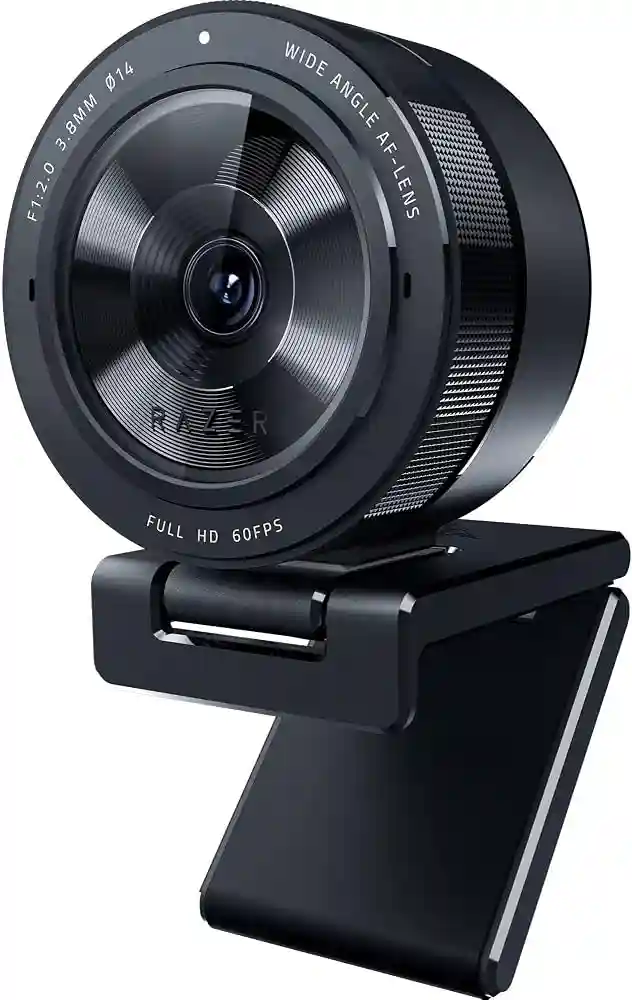
The Razer Kiyo V2 is a strong choice for seniors who want excellent 4K video and useful automatic image tools. It offers AI auto-framing, HDR, automatic image enhancement, and a built-in privacy shutter.
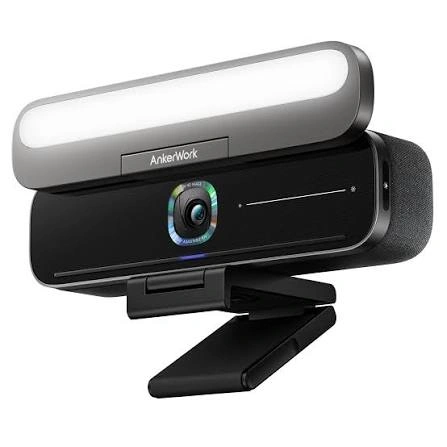
The AnkerWork C310 focuses on simple video calls with 4K resolution, AI autofocus, AI framing, noise cancellation, and a built-in privacy cover. Its listed UK price is £104.99, although prices can vary by country and time.
For a senior who wants simple everyday calls, AnkerWork has a practical feature set. For a senior who wants more advanced video controls, Razer offers more flexibility.
Razer vs AnkerWork At a Glance
Here is the basic difference between the two webcams.
| Feature | Razer Kiyo V2 | AnkerWork C310 |
|---|---|---|
| Video | 4K at 30 fps | 4K, up to 1080p at 60 fps |
| Autofocus | Auto and manual | AI autofocus |
| AI framing | Yes | Yes |
| HDR | Yes | Yes |
| Privacy | Built-in shutter | Built-in privacy cover |
| Microphones | Stereo | Dual microphones with AI noise cancellation |
| Software | Razer Synapse and Camo Studio | AnkerWork software |
| Connection | USB-C | USB 3.0 |
| Best suited to | Advanced calls and content | Everyday calls and meetings |
Razer lists 4K 30 fps, a 93-degree configurable field of view, autofocus/manual focus, HDR, a privacy shutter, stereo microphones, and USB-C connectivity for the Kiyo V2. AnkerWork lists 4K video, AI autofocus, AI framing, dual-mic noise cancellation, HDR, and a privacy cover for the C310.
Razer Kiyo V2 Review for Seniors
The Razer Kiyo V2 is built for users who want a high-quality webcam with automatic tools. It can be useful for video calls, online meetings, family chats, and other camera-based activities.
Its 4K resolution and automatic image tools can reduce the need for constant manual adjustment. Razer also includes a privacy shutter, which is useful when the camera is not being used.
Ease of Use
The Kiyo V2 offers several automatic features. Its AI auto-framing can keep the user centered in the picture. One-click image enhancement can also adjust exposure, white balance, and noise reduction.
For basic calls, these features may reduce the amount of camera adjustment needed.
The main drawback is that Razer also offers many advanced controls. Users can adjust settings such as ISO and shutter speed through Razer Synapse. That is useful for experienced users, but a senior who only wants simple video calls may never need these options.
Key Strengths
- 4K video at 30 fps
- AI-powered auto-framing
- HDR support
- Automatic image enhancement
- Built-in privacy shutter
- Adjustable field of view
- Stereo microphone
- Advanced image controls
Potential Drawbacks
- Advanced software may be more than some users need
- 4K video runs at 30 fps rather than 60 fps
- USB-C connection may require an adapter on some older computers
- Some advanced features depend on software
AnkerWork C310 Review for Seniors
The AnkerWork C310 takes a practical approach. It combines 4K video with AI autofocus, AI framing, HDR, and dual-microphone noise cancellation.
This makes it suitable for video calls, remote meetings, and casual conversations.
Ease of Use
The C310 is designed for monitor use and includes a built-in privacy cover. Its AI autofocus and AI framing can handle some camera adjustments automatically.
AnkerWork also provides software for changing settings and updating supported devices. The software is available for Windows and macOS.
For a senior who wants a webcam that can stay on the monitor and handle normal calls without much adjustment, the C310 has a straightforward feature set.
Key Strengths
- 4K video
- AI autofocus
- AI framing
- HDR support
- Dual microphones
- AI noise cancellation
- Built-in privacy cover
- USB 3.0 connection
Potential Drawbacks
- Some useful features require AnkerWork software
- The 4K feature may be unnecessary for basic video calls
- Availability can vary by region
- Advanced camera controls are less central than on the Razer
Which Is Easier for Seniors to Use?
Both webcams have automatic features that can make video calls easier.
The AnkerWork C310 may suit seniors who want a straightforward webcam for Zoom, Teams, family calls, and similar tasks. Its AI autofocus and AI framing can reduce the need to adjust the camera manually.
The Razer Kiyo V2 also offers automatic framing and image enhancement. It goes further with more manual controls for users who want to fine-tune the picture.
If simplicity matters most, look for the webcam that lets you leave most settings on automatic.
Neither webcam requires batteries. Both connect to a computer by USB, so there is no charging routine to manage.
Performance Comparison
For image quality, both are capable of 4K video. The Razer Kiyo V2 supports 4K at 30 fps and also offers HDR.
The AnkerWork C310 also provides 4K resolution. AnkerWork highlights its 12MP display and also supports 1080p at 60 fps through USB 3.0 and YUV encoding.
| Performance Area | Razer Kiyo V2 | AnkerWork C310 |
|---|---|---|
| 4K video | Yes | Yes |
| 1080p 60 fps | Yes | Yes |
| HDR | Yes | Yes |
| Autofocus | Auto/manual | AI autofocus |
| Auto framing | AI-powered | AI-powered |
| Low-light assistance | Automatic image enhancement | HDR and light adjustment |
For normal family calls, both offer more resolution than many users need. A good internet connection, room lighting, and computer performance can also affect the final call quality.
Comfort, Accessibility, and Senior-Friendly Design
A webcam does not require much physical effort. That makes both models fairly simple from a physical-use point of view.
The bigger difference is software.
The Razer Kiyo V2 gives users more control over image settings. That can be useful for someone who enjoys adjusting technology. But it may feel unnecessary for a user who wants to plug in the camera and start a call.
The C310 focuses more on automatic features. AI autofocus, AI framing, and noise cancellation can reduce the number of settings a user needs to manage.
Features Comparison
The two webcams overlap in many areas, but their software approach is different.
| Feature | Razer Kiyo V2 | AnkerWork C310 |
|---|---|---|
| Auto framing | Yes | Yes |
| Auto focus | Yes | AI-powered |
| HDR | Yes | Yes |
| Privacy cover | Built-in shutter | Built-in cover |
| Noise reduction | Yes | AI noise cancellation |
| Manual image controls | Extensive | Available through software |
| AI image tools | Yes | Yes |
Razer supports advanced controls through Synapse and also integrates Camo Studio features such as auto-framing and lighting correction. AnkerWork provides software for adjusting device settings and firmware updates.
Price, Maintenance, and Long-Term Value
Webcam prices change by country and retailer, so it is better to compare value rather than use one temporary price as a permanent figure.
At the time of checking, Razer listed the Kiyo V2 at US$149.99 on its US store. AnkerWork listed the C310 at £104.99 on its UK store. These currencies and markets are different, so the figures should not be treated as a direct price comparison.
Neither webcam needs batteries or regular consumables.
| Cost Factor | Razer Kiyo V2 | AnkerWork C310 |
|---|---|---|
| Batteries | No | No |
| Consumables | None | None |
| Software | Razer software | AnkerWork software |
| Privacy feature | Built-in | Built-in |
| Main maintenance | Keep lens clean | Keep lens clean |
For long-term use, software support and computer compatibility are worth checking before buying.
Who Should Choose Razer Kiyo V2?
Choose the Razer Kiyo V2 if:
- You want detailed 4K video.
- You like automatic image adjustments.
- You want more manual camera controls.
- You want AI-powered auto-framing.
- You value a built-in privacy shutter.
- You may use the webcam for more than simple family calls.
- You want HDR and a wide, configurable field of view.
Who Should Choose AnkerWork C310?
Choose the AnkerWork C310 if:
- You mainly need the webcam for calls and meetings.
- You want 4K video with automatic features.
- You prefer AI autofocus and framing.
- Built-in privacy protection matters.
- You want dual microphones with AI noise cancellation.
- You want a simpler feature set for everyday use.
Razer vs AnkerWork Webcam — Final Verdict
For most seniors who mainly make video calls, the AnkerWork C310 offers a practical balance of 4K video, automatic framing, autofocus, noise cancellation, and privacy protection.
The Razer Kiyo V2 is a better fit for seniors who want more control over their camera. Its 4K 30 fps video, HDR, AI framing, image enhancement, and advanced Synapse controls give it more flexibility.
Best for simple everyday calls: AnkerWork C310
Best for advanced camera controls: Razer Kiyo V2
Best for automatic framing: Both
Best for privacy: Both
Best for advanced customization: Razer Kiyo V2
Scoring Summary
The scores below are editorial estimates based on the documented features above. They are not laboratory test scores.
| Category | Razer Kiyo V2 | AnkerWork C310 |
|---|---|---|
| Ease of Use | 9/10 | 9/10 |
| Senior-Friendly Design | 9/10 | 9/10 |
| Performance | 10/10 | 9/10 |
| Maintenance | 9/10 | 9/10 |
| Value | 8/10 | 9/10 |
The small differences reflect feature depth rather than a major gap in everyday call quality.
How We Evaluate Products
We focus on features that can affect everyday senior use.
These include:
- Ease of setup
- Ease of operation
- Automatic features
- Video quality
- Microphone performance
- Privacy
- Software
- Maintenance
- Compatibility
- Long-term value
We do not claim hands-on testing. The comparison is based on current manufacturer information and product specifications.
Senior-Specific Buying Considerations
Before choosing either webcam, check these points.
Setup
Make sure the computer has the correct USB connection. The Razer Kiyo V2 uses USB-C, while the AnkerWork C310 uses USB 3.0.
Controls
If the webcam will be used by someone who does not enjoy changing settings, automatic features can be useful.
Lighting
A webcam can only do so much in a very dark room. A simple lamp facing the user may improve video quality.
Privacy
Both models include a physical privacy feature. This makes it easy to cover the camera when it is not being used.
Software
Check whether the computer supports the manufacturer’s software before relying on advanced features. AnkerWork provides software for Windows and macOS.
Common Buying Mistakes
Avoid these common mistakes when choosing a webcam.
- Buying 4K when the user only needs basic calls
- Ignoring the computer’s USB ports
- Forgetting to check software compatibility
- Choosing advanced features that will never be used
- Ignoring privacy protection
- Focusing only on camera resolution
Safety
Webcams have few physical safety concerns. The main practical issue is privacy.
Use the physical shutter or cover when the camera is not needed. Also keep the webcam and its cable positioned so the cable does not create a snagging hazard around the desk.
Conclusion
The Razer vs AnkerWork webcam comparison comes down to priorities. The AnkerWork C310 is a practical choice for seniors who want automatic features and straightforward video calls. The Razer Kiyo V2 is more appealing for users who want 4K video plus deeper image controls and customization.
For simple family calls, meetings, and everyday use, either can work well. The better choice depends less on age and more on how much control the user wants over the webcam.
