
Microsoft vs AnkerWork Webcam for Seniors: Which?


Weighted Blanket

Air Fryer for Easy Cooking

Slow Cooker Crock Pot
Microsoft vs AnkerWork webcam for seniors is mainly a choice between simple video calling and more advanced camera features. Microsoft’s Modern Webcam focuses on straightforward 1080p video, HDR, Teams integration, and a physical privacy shutter.
AnkerWork offers a wider webcam range. Its C310 adds 4K capture, AI autofocus, AI framing, AI noise cancellation, HDR, and a built-in privacy cover. Older PowerConf models such as the C200 also remain part of the AnkerWork lineup.
For seniors, the important question is not simply which camera has more features. It is whether those features make video calls easier, clearer, and less confusing.

Quick Comparison
Microsoft Modern Webcam is a practical choice for seniors who want a simple webcam for everyday video calls, especially when Microsoft Teams is important.
AnkerWork is more appealing for users who want more control over image quality, framing, lighting, and microphone performance. The current C310 offers considerably more camera technology than the Microsoft model.
More features are useful only when they make the webcam easier to use.
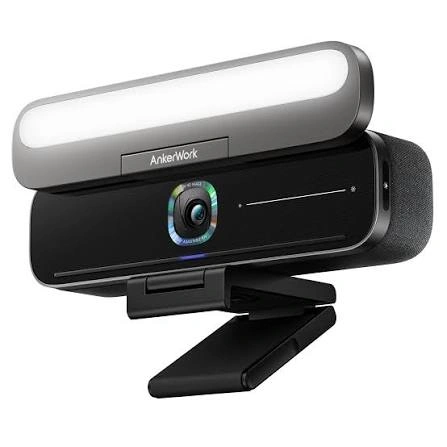
Microsoft vs AnkerWork At a Glance
The exact experience depends on the AnkerWork model. This comparison uses Microsoft’s Modern Webcam and AnkerWork’s current C310 as representative products.
| Feature | Microsoft Modern Webcam | AnkerWork C310 |
|---|---|---|
| Video | 1080p HDR | 4K, up to 1080p/60fps |
| Field of view | 78° | Not specified in the current product page |
| Autofocus | Automatic camera focus | AI autofocus |
| Framing | Basic meeting-focused design | AI framing |
| Low-light support | Auto light adjustment | HDR and low-light optimization |
| Privacy | Integrated shutter | Built-in privacy cover |
| Microphones | Built for video meetings | Dual-mic AI noise cancellation |
| Connection | USB | USB 3.0 |
| Teams focus | Microsoft Teams certified | Broad conferencing use |
| Software | Simple Windows/Teams ecosystem | AnkerWork software |
Microsoft lists 1080p video, HDR, a 78-degree field of view, True Look, and an integrated privacy shutter for its Modern Webcam. AnkerWork lists 4K, AI autofocus, AI framing, dual-microphone AI noise cancellation, and a privacy cover for the C310.
Microsoft Modern Webcam Review
Microsoft’s Modern Webcam is designed around video meetings rather than advanced camera controls. It connects to a monitor, laptop, or tripod and provides 1080p video with HDR.
Ease of Use
The simple approach can be useful for seniors who do not want to adjust many settings.
Its 78-degree field of view is suited to personal video calls, while True Look automatically handles white balance and light adjustment. The physical privacy shutter is also easy to understand because the user can see whether the camera is covered.
Key strengths
- Simple meeting-focused design
- 1080p video
- HDR support
- Automatic image adjustments
- Physical privacy shutter
- Microsoft Teams certification
- Can attach to a monitor, laptop, or tripod
Potential drawbacks
- Lower maximum resolution than the AnkerWork C310
- Fewer advanced camera features
- Less flexibility for users who want detailed image control
- It is an older webcam design, so current availability may vary
AnkerWork C310 Review
The AnkerWork C310 is aimed at users who want more camera capability. It has a 12MP sensor with 4K resolution and can transmit 1080p video at up to 60 frames per second through USB 3.0.
Ease of Use
The C310 includes AI autofocus, AI framing, and AI noise cancellation. These functions can reduce the amount of manual adjustment needed during calls.
However, AnkerWork also provides software for adjusting and customizing its devices. That can be helpful for users who enjoy control, but it adds another layer that a senior wanting a very basic setup may not need.
Key strengths
- 4K image capability
- AI autofocus
- AI framing
- AI noise cancellation
- HDR
- 1080p at up to 60fps
- Built-in privacy cover
- USB 3.0 connection
Potential drawbacks
- More features can mean more settings to understand
- 4K capability may be unnecessary for basic family calls
- The current C310 can cost more than a basic webcam
- Some features depend on the software and video-call platform
Which Is Easier for Seniors to Use?
For a senior who wants a basic webcam with minimal adjustment, Microsoft’s simpler design may be easier to understand.
The physical privacy shutter is particularly useful. It gives a clear visual signal that the camera lens is covered. Microsoft also designed the Modern Webcam around common meeting use rather than extensive manual controls.
AnkerWork’s AI features can reduce manual work once everything is configured. But its software gives users more options, which may be unnecessary for someone who only wants to call family members.
For simple video calls: Microsoft has the more straightforward approach.
For users comfortable with settings: AnkerWork offers more flexibility.
Performance Comparison
The biggest hardware difference is video capability.
Microsoft’s Modern Webcam provides 1080p video with HDR and automatic image adjustments.
The AnkerWork C310 goes further with 4K capture, a 12MP display, HDR, AI autofocus, AI framing, and 1080p/60fps transmission.
| Performance Area | Microsoft | AnkerWork C310 |
|---|---|---|
| Everyday video calls | Very suitable | Very suitable |
| Maximum resolution | 1080p | 4K |
| HDR | Yes | Yes |
| Autofocus | Automatic | AI-powered |
| Framing | Meeting-focused | AI framing |
| Low-light processing | Auto light adjustment | HDR/low-light optimization |
| Audio processing | Meeting-focused | AI noise cancellation |
For ordinary Zoom, Teams, or family calls, 1080p can already provide a clear image. AnkerWork’s higher resolution becomes more useful when image detail, cropping, recording, or advanced camera use matters.
There is also an important limitation: the video-call application can reduce the resolution delivered during a call. AnkerWork notes that third-party platforms can limit webcam output depending on their own resolution and bandwidth handling.
Comfort, Accessibility, and Senior-Friendly Design
Neither webcam requires batteries, so there is no charging routine to remember.
The more important accessibility factors are setup, physical controls, privacy, and the amount of software configuration required.
Microsoft’s integrated shutter is especially straightforward. AnkerWork’s C310 also has a built-in privacy cover, so both provide a physical way to block the camera.
For a senior with limited computer experience, fewer settings may be preferable. For a senior who enjoys technology, AnkerWork’s additional controls may be an advantage.
Features Comparison
The feature gap becomes clearer when looking beyond basic video.
| Feature | Microsoft Modern Webcam | AnkerWork C310 |
|---|---|---|
| HDR | Yes | Yes |
| Privacy control | Integrated shutter | Built-in cover |
| Auto image adjustment | Yes | Yes |
| AI autofocus | Not listed | Yes |
| AI framing | Not listed | Yes |
| AI noise cancellation | Not listed | Yes |
| 4K | No | Yes |
| 60fps at 1080p | Not specified | Yes |
AnkerWork’s C310 is clearly the more feature-heavy camera. Microsoft takes a simpler approach centered on reliable video meetings.
Price, Maintenance, and Long-Term Value
Webcam prices can change by country and retailer, so a temporary sale should not be treated as a permanent price.
Microsoft originally introduced the Modern Webcam at $69.99 in the United States. AnkerWork’s C310 is currently listed at £104.99 on its UK product page. These launch and current regional prices are not directly comparable, but they show the different positioning of the products.
For long-term value, consider:
- Whether 4K video is actually needed
- How often the webcam will be used
- Whether advanced software controls are useful
- Privacy-cover convenience
- Computer compatibility
- Availability in your region
- Warranty and support
AnkerWork provides dedicated software for customizing supported devices and checking firmware updates.
Who Should Choose Microsoft?
Choose the Microsoft Modern Webcam if:
- You mainly make family or work video calls.
- You want a simple webcam setup.
- Microsoft Teams is important to you.
- You prefer fewer camera settings.
- You want an easy-to-see physical privacy shutter.
- 1080p is enough for your calls.
Who Should Choose AnkerWork?
Choose AnkerWork if:
- You want more advanced camera features.
- Higher-resolution video matters to you.
- You want AI autofocus and framing.
- Background-noise reduction is useful.
- You want more control through webcam software.
- You may use the camera for recording as well as calls.
Microsoft vs AnkerWork Webcam for Seniors — Final Verdict
Best for simple everyday calls: Microsoft Modern Webcam
Best for advanced video features: AnkerWork C310
Best for straightforward operation: Microsoft Modern Webcam
Best for image flexibility: AnkerWork C310
The choice comes down to how much technology the user actually needs. Microsoft’s webcam keeps the experience focused on straightforward video meetings. AnkerWork’s C310 offers much more camera capability, but some seniors may never use its advanced features.
Scoring Summary
These scores are editorial assessments based on the documented features above, not laboratory test results.
| Category | Microsoft | AnkerWork C310 |
|---|---|---|
| Ease of Use | 9/10 | 8/10 |
| Senior-Friendly Design | 9/10 | 8/10 |
| Video Performance | 8/10 | 9/10 |
| Advanced Features | 7/10 | 10/10 |
| Privacy | 9/10 | 9/10 |
| Everyday Value | 9/10 | 8/10 |
How We Evaluate Products
This comparison focuses on the things that matter most for senior webcam use: setup, ease of operation, privacy, video quality, audio features, accessibility, software requirements, and long-term practicality.
The comparison is based on manufacturer documentation and current product information. It does not claim hands-on testing.
Senior-Specific Buying Considerations
A webcam does not need to be complicated to be useful.
Setup
Check whether the user can attach the webcam and connect its USB cable without assistance.
Controls
A physical privacy shutter or cover can be easier to understand than relying only on software controls.
Video Quality
For normal family calls, 1080p may be enough. Higher resolutions matter more for recording, cropping, or users who want extra image detail.
Software
Consider whether the senior is comfortable installing and adjusting webcam software. AnkerWork provides dedicated software for customization and firmware updates.
Common Buying Mistakes
Avoid these mistakes when choosing between the two:
- Paying for 4K when 1080p already meets the user’s needs
- Ignoring the simplicity of the software
- Forgetting to check computer compatibility
- Choosing features without considering actual use
- Ignoring the physical privacy cover
- Assuming every video-call platform will deliver the webcam’s maximum resolution
Safety and Privacy
Webcams create a privacy consideration because they can capture video from a private space.
Both products provide a physical way to cover the camera. Microsoft describes an integrated privacy shutter, while AnkerWork’s C310 includes a built-in privacy cover.
Windows also lets users manage which apps can access connected cameras through Camera settings.
Frequently Asked Questions
Is Microsoft or AnkerWork easier for seniors?
Microsoft’s Modern Webcam is generally simpler because it focuses on basic meeting functions. AnkerWork offers more features and settings.
Is 4K webcam video necessary for seniors?
Usually not for ordinary family video calls. A good 1080p webcam can be sufficient for everyday conversations.
Does the Microsoft Modern Webcam have a privacy shutter?
Yes. Microsoft lists an integrated physical privacy shutter with an LED indicator.
Does the AnkerWork C310 have a privacy cover?
Yes. AnkerWork lists a built-in privacy cover for the C310.
Which webcam has better video resolution?
The AnkerWork C310 supports 4K, while the Microsoft Modern Webcam provides 1080p video.
Is AnkerWork better for advanced users?
It may be a better fit for users who want features such as AI autofocus, AI framing, higher resolution, and software customization.
Conclusion
Microsoft vs AnkerWork webcam for seniors is less about choosing the camera with the longest feature list and more about matching the webcam to the user’s needs. Microsoft’s Modern Webcam offers a simple, meeting-focused experience with 1080p video, HDR, automatic adjustments, and a physical privacy shutter.