
Logitech vs Microsoft Webcam for Seniors: A Simple Guide


Digital Thermometer

Glucose Monitor Kit

Smart Digital Photo Frame
Logitech vs Microsoft webcam for seniors is a useful comparison for anyone who wants clearer video calls without a complex setup. Both brands offer simple USB webcams, but their features and software support differ.
For a clear comparison, this guide focuses on the Logitech C920s PRO HD Webcam and Microsoft Modern Webcam. Both offer Full HD video and a privacy shutter, making them close enough to compare for everyday calls. Logitech also currently lists the C920s as an active webcam product.
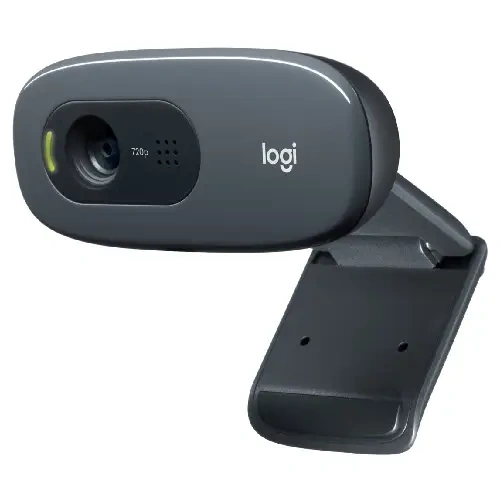
Quick Comparison
For most seniors who want a simple webcam for regular video calls, the Logitech C920s has a practical advantage. It offers 1080p video, autofocus, automatic light correction, dual microphones, and a physical privacy shutter.
The Microsoft Modern Webcam is also simple to mount and use. It has a privacy shutter, a 78-degree field of view, 1080p HDR video, and Microsoft Teams certification. Its built-in microphone needs to be enabled through Microsoft Accessory Center, which adds one extra step.

Logitech C920s vs Microsoft Modern Webcam At a Glance
These two webcams cover the basic needs of home video calls well.
| Feature | Logitech C920s | Microsoft Modern Webcam |
|---|---|---|
| Video | 1080p at 30fps | 1080p HDR |
| Field of view | 78° | 78° |
| Autofocus | Yes | Not highlighted by Microsoft support |
| Light correction | RightLight 2 | True Look features |
| Microphones | Dual stereo mics | Built-in mic |
| Privacy | Physical shutter | Physical shutter |
| Mounting | Display/laptop/tripod | Display/desk/tripod |
| Teams | Works with Teams | Teams certified |
| Software | Logi Tune | Microsoft Accessory Center |
The Logitech C920s has more clearly documented camera features, while Microsoft’s model is closely tied to the Teams experience.
Logitech C920s Is Easy for Daily Calls
The Logitech C920s is designed as a straightforward Full HD webcam.
Its 1080p video runs at 30fps. It also has autofocus, a 78-degree field of view, automatic light correction, and two microphones. These features can reduce the need for manual adjustment during normal calls.
Ease of Use
The C920s uses a USB-A connection and is designed for plug-and-play use. Logitech lists Windows, macOS, and ChromeOS compatibility for the model.
For a senior, that can matter more than advanced video features. A webcam that works with a simple USB connection can be easier to manage.
Key Strengths
- 1080p Full HD video
- Autofocus
- 78-degree field of view
- Automatic light correction
- Dual microphones
- Physical privacy shutter
- USB-A connection
- Support for Logi Tune settings
The privacy shutter is especially simple. It can be closed when the camera is not needed.
Potential Drawbacks
- No 4K video
- Fixed 78-degree field of view
- Uses USB-A
- Advanced settings may require Logitech software
For normal family calls, these limits may not matter much.
Microsoft Modern Webcam Keeps Things Simple
The Microsoft Modern Webcam is built around video meetings, with Microsoft Teams certification and simple mounting options.
Microsoft says it can be placed on a monitor, desk, or tripod. It also has a physical privacy shutter and an LED usage indicator.
Ease of Use
The webcam connects through USB and can be used with a Windows 10 or Windows 11 PC. Microsoft also provides the Accessory Center app for settings.
One detail matters for seniors. Microsoft says the built-in microphone is turned off by default for Teams certification. Turning it on requires Microsoft Accessory Center.
That is not a major problem, but it is one extra setup step.
Key Strengths
- 1080p video
- HDR support
- 78-degree field of view
- Physical privacy shutter
- LED usage indicator
- Monitor, desk, and tripod mounting
- Microsoft Teams certification
- Microsoft settings app
Microsoft also describes automatic white balance, light adjustment, and facial retouching through its True Look features.
Potential Drawbacks
- The built-in microphone needs to be enabled in software
- Microsoft Accessory Center is not available on macOS
- The model is more closely tied to Windows and Teams
- Current retail availability is less clear than the Logitech C920s
Which Is Easier for Seniors to Use?
Both are fairly simple, but the Logitech C920s has a more straightforward feature set for general use.
The C920s offers plug-and-play USB connectivity, autofocus, automatic light correction, and dual microphones. Logitech also lists it for Windows, macOS, and ChromeOS.
Microsoft Modern Webcam is also easy to mount. But users who want its built-in microphone must enable it through Microsoft Accessory Center. The app is not available on macOS.
For simple everyday calls, fewer setup steps can be a real advantage.
Performance Comparison
Both webcams are aimed at video calls rather than professional camera work.
| Performance Area | Logitech C920s | Microsoft Modern Webcam |
|---|---|---|
| Resolution | 1080p | 1080p HDR |
| Autofocus | Yes | Not specified in current support page |
| Field of view | 78° | 78° |
| Low-light support | RightLight 2 | Automatic light adjustment |
| Audio | Dual stereo mics | Built-in mic |
| Main use | Calls and meetings | Teams and video meetings |
The C920s has a clear advantage in documented autofocus support. Logitech says its five-element glass lens uses autofocus to keep the image clear.
Microsoft’s Modern Webcam offers HDR and automatic image adjustments, which can help produce a more polished video image in changing light.
Comfort, Accessibility, and Senior-Friendly Design
Neither webcam requires a battery or repeated charging.
Both can sit on a monitor or desk. Microsoft also supports tripod mounting, while Logitech’s webcam can be mounted on a display or laptop and used with compatible setups.
For seniors, the biggest practical factors are likely to be setup, camera position, microphone operation, and privacy.
The physical privacy shutters on both models are useful because they provide a simple way to cover the camera.
Features Comparison
The biggest differences are not the basic resolution. Both provide Full HD video.
| Feature | Logitech C920s | Microsoft Modern Webcam |
|---|---|---|
| Autofocus | Yes | Not clearly specified |
| Privacy shutter | Yes | Yes |
| Light correction | RightLight 2 | True Look |
| HDR | Not listed as a key feature | Yes |
| Dual microphones | Yes | Built-in microphone |
| Auto-framing | No | Not listed |
| Software | Logi Tune | Accessory Center |
Logitech’s C920s provides more clearly documented camera controls, while Microsoft places more emphasis on Teams and its True Look image features.
Price, Maintenance, and Long-Term Value
Webcam prices can change often, so a temporary sale should not be treated as a permanent price.
At the time of checking, Logitech lists the C920s at $59.99 on its U.S. site. Microsoft does not currently provide a comparable active retail price on the support page, so it is better not to assume a current Microsoft price.
The C920s also has a current Logitech product listing and is still included in Logitech’s webcam lineup.
For long-term value, check:
- Current local availability
- Warranty terms
- USB compatibility
- Operating system support
- Software needs
- Replacement or support options
Microsoft confirms that the Modern Webcam is covered by Microsoft’s PC accessory warranty system, although the exact warranty period depends on the device and purchase information.
Who Should Choose Logitech C920s?
Choose the Logitech C920s if:
- You want a simple webcam for general video calls.
- Autofocus is important.
- You use Windows, macOS, or ChromeOS.
- You want dual microphones.
- You prefer a physical privacy shutter.
- You want a webcam with clear current retail availability.
- You want useful features without moving to a more advanced 4K model.
Who Should Choose Microsoft Modern Webcam?
Choose the Microsoft Modern Webcam if:
- Microsoft Teams is your main video-call platform.
- You like Microsoft’s simple mounting design.
- HDR video is useful to you.
- You want a physical privacy shutter.
- You use a Windows PC.
- You are comfortable using Microsoft Accessory Center for settings.
Logitech vs Microsoft Webcam for Seniors — Final Verdict
For this comparison, the Logitech C920s is the more practical general-purpose choice for seniors who want easy setup, autofocus, broad operating-system support, and simple everyday video calls.
The Microsoft Modern Webcam makes more sense for a senior who mainly uses Microsoft Teams on Windows and likes Microsoft’s meeting-focused design.
Best for general everyday calls
Logitech C920s
Best for Microsoft Teams users
Microsoft Modern Webcam
Best for autofocus
Logitech C920s
Best for HDR
Microsoft Modern Webcam
Best for simple privacy control
Both
Scoring Summary
A numeric score can give a false sense of precision when the two webcams have different software ecosystems. A more useful summary is based on documented features.
| Category | Logitech C920s | Microsoft Modern Webcam |
|---|---|---|
| Ease of use | Strong | Strong |
| Senior-friendly design | Strong | Strong |
| Video features | Strong | Strong |
| Audio features | Strong | Good |
| Software flexibility | Strong | More Windows-focused |
| Privacy | Strong | Strong |
| Everyday value | Strong | Depends on availability |
These assessments are based on documented product features rather than hands-on testing. Logitech documents the C920s features directly, while Microsoft documents the Modern Webcam’s Teams, mounting, privacy, and software functions.
How We Evaluate Products
This comparison focuses on the things that can matter most during everyday senior use.
We consider:
- Ease of setup
- Ease of operation
- Video quality
- Audio
- Privacy
- Software requirements
- Compatibility
- Mounting
- Maintenance
- Long-term practicality
No hands-on testing is claimed here.
Senior-Specific Buying Considerations
A webcam does not need many advanced features to be useful.
Setup
Check whether the webcam uses a connection that matches the computer.
Controls
Simple physical controls can be easier than settings that require repeated software changes.
Privacy
A physical shutter gives a clear way to cover the camera when it is not being used.
Audio
Check whether the microphone works as expected with the chosen calling app.
Computer Compatibility
Check the operating system before buying. This is especially important with Microsoft Modern Webcam because Microsoft Accessory Center is not available on macOS.
Common Buying Mistakes
Avoid these common mistakes when choosing a webcam.
- Buying only because the brand is familiar
- Ignoring the computer’s USB ports
- Assuming 4K is necessary for normal calls
- Forgetting to check microphone settings
- Ignoring privacy features
- Paying more for features that will not be used
Safety
Webcams have a simple safety concern: privacy.
Use the physical privacy shutter when the camera is not needed. Microsoft specifically provides a shutter that can cover the lens, while Logitech also includes a privacy cover on the C920s.
Also keep the webcam and its cable positioned so the cable does not create a snag or trip hazard.
Conclusion
Logitech vs Microsoft webcam for seniors is less about choosing the brand with the most features and more about matching the webcam to the user’s computer and calling habits.
The Logitech C920s is a strong fit for general video calls because it combines 1080p video, autofocus, automatic light correction, dual microphones, and a privacy shutter. Microsoft Modern Webcam is a useful option for Windows users who mainly use Teams and want HDR video, simple mounting, and Microsoft’s meeting-focused features.